To set up SBCGlobal.net email in November 2026, use an app that signs in to AT&T through Yahoo (OAuth): Gmail on Android, or Apple Mail on iPhone, iPad or Mac. Choose Yahoo as the provider and sign in with your full @sbcglobal.net address. Apps that can’t do that, such as classic desktop Outlook, need manual IMAP settings: imap.mail.att.net (port 993, SSL) for incoming mail and smtp.mail.att.net (port 465 or 587, SSL) for outgoing. In those apps, type a 16-character AT&T secure mail key in the password box, not your normal password.
SBCGlobal.net addresses come from SBC Communications, which merged with AT&T in 2005. They are now part of AT&T Mail, which runs on Yahoo’s mail platform. AT&T no longer gives out new sbcglobal.net addresses. If you already have one, it works the same way as an att.net address, and it’s free to use.
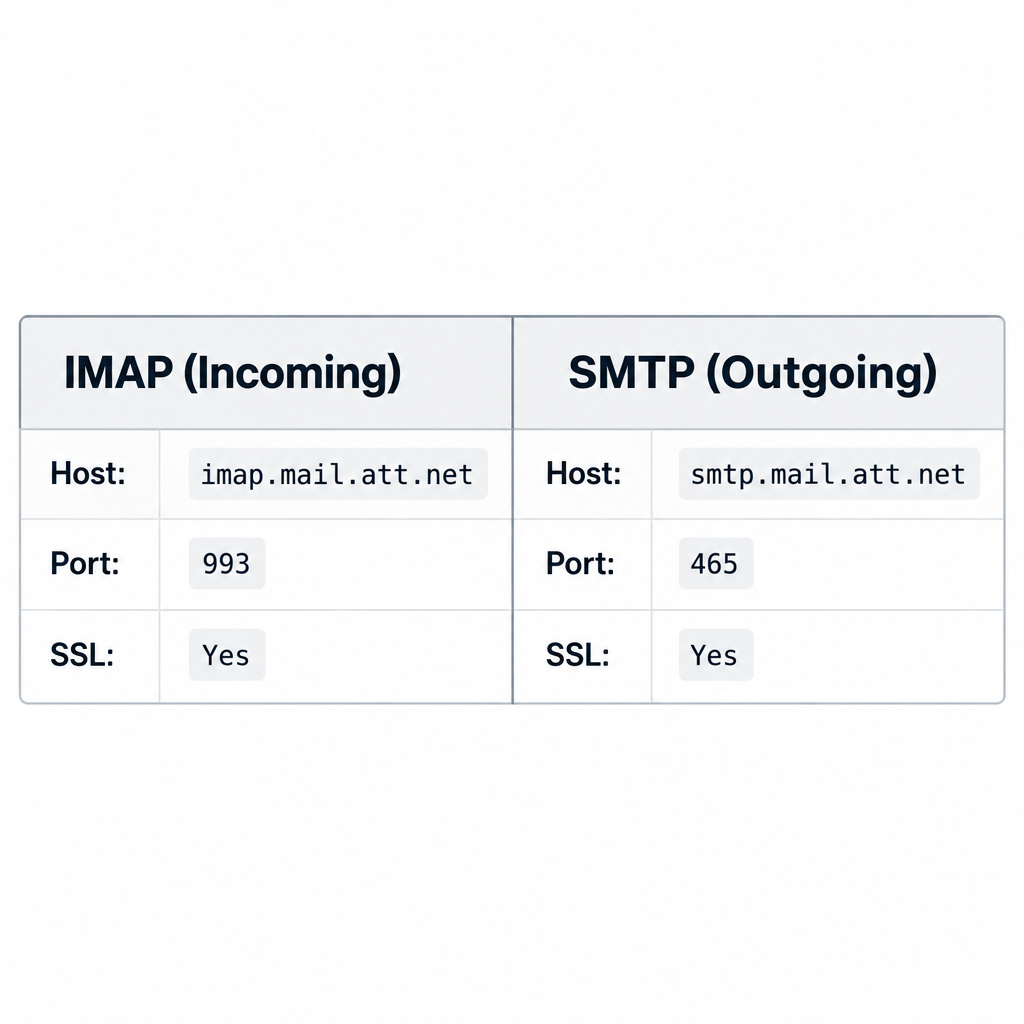
SBCGlobal.net email IMAP and SMTP settings
SBCGlobal.net uses the same servers as every other AT&T Mail address (att.net, bellsouth.net, pacbell.net and the rest). The old server names with “yahoo” in them, such as sbcglobal.imap.mail.yahoo.com or smtp.att.yahoo.com, are outdated. Use the att.net servers below.
SBCGlobal.net email IMAP settings
IMAP keeps your mail in sync across all your devices. If you read, delete or move a message on your phone, the same thing shows up on your computer.
Use these settings for the incoming mail (IMAP) server:
- Host name: imap.mail.att.net
- Port: 993
- SSL/TLS required: Yes
- Username: your full email address (for example, [email protected])
- Password: your secure mail key
POP3 is still available if you only want to download mail to one device. For incoming POP, use inbound.att.net on port 995 with SSL. For outgoing POP, use outbound.att.net on port 465 with SSL.
SBCGlobal.net email SMTP settings
SMTP (Simple Mail Transfer Protocol) is the standard way email apps send messages. When you press Send, your app connects to AT&T’s outgoing server using these details:
- Host name: smtp.mail.att.net
- Port: 465 (try 587 if 465 fails)
- SSL/TLS required: Yes
- Authentication required: Yes, using the same username and password as incoming mail
- Username: your full email address
- Password: your secure mail key
How to create a secure mail key
You only need a secure mail key for apps that don’t offer a Yahoo sign-in option. To make one:
- Sign in to your account at att.com.
- Go to Manage profile, then Sign-in info.
- Select your sbcglobal.net address and choose Manage secure mail key.
- Select Add secure mail key, give it a nickname (for example, “Office PC Outlook”) and select Create secure mail key.
- Copy the 16-character key right away. AT&T only shows it once.
Keys don’t expire, and you don’t need a new one when you change your AT&T password. Make a separate key for each device and app. If AT&T ever locks or blocks your account for security reasons, it deletes all your keys, and you’ll have to create new ones.
SBCGlobal.net email settings for Android devices
The simplest way to use SBCGlobal.net on Android is the Gmail app, which AT&T lists as OAuth compatible on Android 5.0 (Lollipop) and later. Outlook Mobile and the Yahoo Mail app also work.
To add your account in Gmail:
- Open the Gmail app and tap your profile picture in the top right.
- Tap Add another account.
- Choose Yahoo from the list of providers.
- Enter your full @sbcglobal.net address and your normal AT&T password on the sign-in page.
- Allow the permissions it asks for, then tap Next to finish.
If you use a different mail app with no Yahoo option, choose Other or manual setup and select IMAP. Enter imap.mail.att.net as the incoming server and smtp.mail.att.net as the outgoing server. Turn on SSL/TLS for both, and enter your secure mail key as the password.
SBCGlobal.net email settings for iPhone
Setting up SBCGlobal.net on an iPhone or iPad is easy once you know one trick: choose Yahoo, not “Other.” According to AT&T, Apple Mail on iOS 9 or later supports OAuth, so you sign in with your regular AT&T password and don’t need a key.
How to add SBCGlobal.net email to your iPhone
- On iOS 18 or iOS 26, go to Settings > Apps > Mail > Mail Accounts > Add Account. On iOS 17 or earlier, go to Settings > Mail > Accounts > Add Account.
- Tap Yahoo.
- Enter your full @sbcglobal.net address and tap Next. You’ll then see an AT&T sign-in page.
- Enter your AT&T password and approve access.
- Make sure Mail is switched on, then tap Save.
If you previously set the account up under Other with IMAP, remove it and add it again under Yahoo. Delete it in Mail Accounts first.
SBCGlobal.net email settings for Mac
AT&T supports Apple Mail through OAuth on macOS 10.11 El Capitan and later. That covers every Mac still getting updates.
- Open the Mail app and choose Mail > Add Account from the menu bar.
- Select Yahoo and click Continue.
- Sign in with your full @sbcglobal.net address and your AT&T password, then approve access.
- Tick Mail (and Notes if you want it), then click Done.
Very old Macs running macOS 10.10 Yosemite or earlier can’t use OAuth. On those, choose Other Mail Account, enter the IMAP and SMTP settings above, and use a secure mail key as the password.
SBCGlobal.net email settings for Windows
The Windows 10 Mail app this section used to describe no longer works. Microsoft ended support for the Mail, Calendar and People apps on December 31, 2024, and replaced them with the new Outlook for Windows. That’s the app to use on Windows 10 and Windows 11 now.
To set up SBCGlobal.net email in the new Outlook for Windows:
- Open Outlook, which is free in the Microsoft Store and preinstalled on recent Windows 11 PCs.
- Go to Settings (gear icon) > Accounts > Email accounts > Add account.
- Enter your full @sbcglobal.net address and select Continue.
- If Outlook offers a Yahoo sign-in, use your AT&T password. If it asks for IMAP details instead, choose IMAP and enter imap.mail.att.net (port 993, SSL/TLS) and smtp.mail.att.net (port 465, SSL/TLS).
- Enter your secure mail key in both password fields and select Continue.
You can also use the browser instead of a mail app. Your mail is always available at currently.com or through att.net sign in, with nothing to configure.
IMAP settings for Outlook 2016 and later
Classic desktop Outlook (Outlook 2016, 2019, 2021, 2024 and Microsoft 365) doesn’t use OAuth for AT&T, so it always needs a secure mail key. Microsoft ended support for Outlook 2016 and 2019 on October 14, 2025. These versions still connect, but they no longer get security updates.
To add the account:
- Open Outlook and go to File > Add Account.
- Enter your @sbcglobal.net address, click Advanced options, tick Let me set up my account manually and click Connect.
- Choose IMAP.
- Incoming mail: server imap.mail.att.net, port 993, encryption method SSL/TLS.
- Outgoing mail: server smtp.mail.att.net, port 465, encryption method SSL/TLS.
- Click Next, enter your secure mail key as the password and click Connect.
If sending fails with an authentication error, open File > Account Settings. Make sure the outgoing server is set to use the same settings as incoming mail, and that the key was pasted without extra spaces.
FAQ
Is SBCGlobal.net email still active in 2026?
Yes. Existing sbcglobal.net addresses still work as part of AT&T Mail, and you sign in with your AT&T account. AT&T doesn’t create new sbcglobal.net addresses, so if you lose access to an old one, you’ll need to go through AT&T’s account recovery.
Why does my email app reject my SBCGlobal password?
The most common reason is that the app doesn’t support OAuth, so AT&T won’t accept your normal password. Create a secure mail key at att.com and enter it in the password field instead. If your app offers Yahoo as a provider, remove the account and add it again using that option.
Do I use Yahoo or AT&T servers for SBCGlobal.net email?
Use the AT&T servers: imap.mail.att.net for incoming mail and smtp.mail.att.net for outgoing mail. AT&T Mail runs on Yahoo’s platform, which is why apps ask you to pick “Yahoo” for OAuth sign-in. But the manual server names with “yahoo” in them are outdated.
What port should I use for SBCGlobal.net SMTP?
Use port 465 with SSL/TLS first. If your app or network blocks it, switch to port 587 with SSL/TLS or STARTTLS. Incoming IMAP always uses port 993.
Do I need a different secure mail key for each device?
Yes. AT&T recommends a separate key for each device and app, and a separate one for each AT&T email address or sub-account. Keys never expire, but AT&T deletes them all if your account gets locked for security reasons.
Can I still use the Windows 10 Mail app for SBCGlobal.net?
No. Microsoft ended support for Windows Mail and Calendar on December 31, 2024, and those apps no longer send or receive mail. Use the new Outlook for Windows, classic Outlook with a secure mail key, or webmail in your browser.
Sources
- AT&T: Use OAuth or a secure mail key for email apps
- AT&T: Create a secure mail key
- AT&T: Get AT&T email on a wireless device
- AT&T: Email security upgrade and server settings
- Apple Support: Add an email account to your iPhone or iPad
- Microsoft Support: Windows Mail, Calendar and People are becoming new Outlook