
How to cancel Amazon Prime on the website
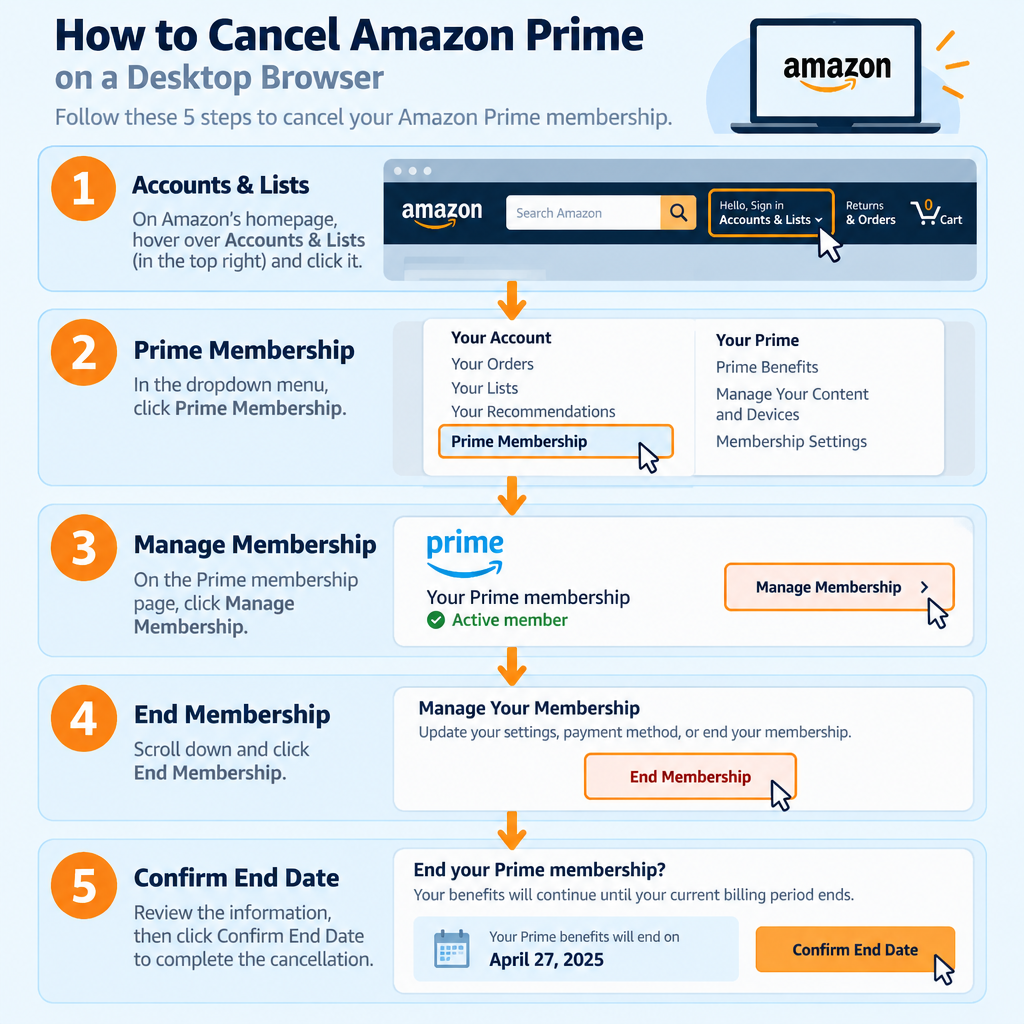
On the Amazon website, click Accounts & Lists in the top right corner and open your Prime membership page. Then follow these steps:
- Click the Prime tile on the Your Account page. On the Amazon homepage you can also hover over Accounts & Lists and choose Prime Membership.
- Amazon will show you the benefits you’re about to lose. Skip past them and find the membership banner at the top of the page. Click Manage membership there.
- Click End membership at the bottom of the menu that opens.
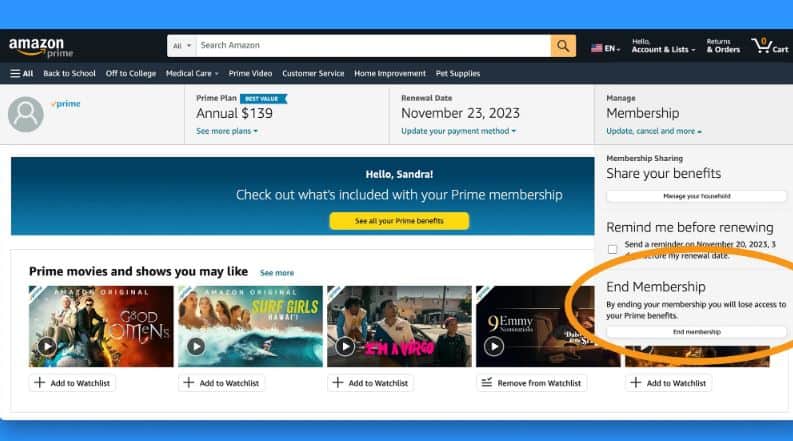
- Amazon will list what you lose by leaving one more time. Scroll down and click the button to continue cancelling. Its wording changes from time to time, but it’s the button that keeps the cancellation going.
Note: if you’re not sure about cancelling, this page also lets you switch plans (for example, from monthly to yearly) or ask Amazon to remind you later.
- The next screen sums up your membership: what you pay, how often, and when your next payment is due. Confirm the cancellation with the button that shows your end date, such as End on [your next billing date]. Stop when you see the final confirmation message. If you leave earlier, Prime will keep renewing.
Pause instead of cancelling
If you’re still unsure, Amazon may offer to pause your membership before you confirm. Amazon’s help page explains how pausing works:
- Monthly plan: the pause lasts one month. After that, Prime restarts on its own.
- Annual plan: you can pause for up to one year. If you don’t restart it yourself before then, the membership cancels automatically.
You don’t pay while Prime is paused. The big difference from cancelling is what happens when you come back. With a pause, your settings and content are where you left them. Cancelling ends everything at once. For example, Amazon Photos drops from unlimited full-resolution photo storage to the free 5 GB plan, and your Amazon Household sharing stops. If you store a lot of photos in Amazon Photos, download them before you cancel.
Cancel Prime in the Amazon app
The app works the same way. Tap the person icon in the bottom menu, go to Your Account, find your Prime membership, then tap Manage membership and End membership. Follow the screens until you see the confirmation.
Refunds, and if you don’t see an End membership button
Amazon’s Prime terms say paid members who haven’t used any benefits since their last charge can get a full refund. That means no Prime shipping, no Prime Video and no other Prime perks since the charge. Amazon says refunds take three to five business days to arrive. If you cancel within three business days of joining, or of a free trial turning into a paid plan, you also get the fee back. In that case Amazon may subtract the value of any benefits you already used. Memberships paid for with a gift card or promotional code can’t be refunded.
If there’s no End membership button, someone else bills you for Prime. Common examples are Apple, Google Play and some phone carriers. Cancel through whoever charges you.
If you see an Amazon charge on your bank statement that you can’t place, the guide What Is Amazon Digital Charge explains what those lines usually are. Sellers should know that Prime is a shopping membership. Cancelling it doesn’t affect a seller account, ad campaigns or Amazon PPC Tools linked to Seller Central.
Why cancelling is easier now
Cancelling Prime used to be a lot harder. In 2023 the US Federal Trade Commission (FTC) sued Amazon. It said Amazon pushed people into Prime and made leaving hard on purpose, and it described a cancellation process with four pages, six clicks and fifteen options. In September 2025 Amazon agreed to a $2.5 billion settlement: a $1 billion civil penalty and $1.5 billion in refunds to customers. Amazon did not admit wrongdoing. Under the settlement, cancelling Prime must not be “difficult, costly, confusing or time consuming,” and Amazon has to show the cost, renewal terms and how to cancel when people sign up.
Refunds from that settlement are still being paid by check, PayPal or Venmo. The FTC says it is not contacting people about refunds. Treat any call, text or email asking you for payment or account details to “claim” one as a scam.
New members should try a monthly plan first
A 30-day free trial may not tell you how much you’ll really use Prime. Everything is new during the trial, so you’ll probably use the free shipping, deals and Prime Video more than you will a few months later.
If you’ve never had Prime, start with the monthly plan so you can see whether you really get much out of it. Paying monthly costs more over time: 12 payments of $14.99 add up to $179.88, compared with $139 for a year paid upfront. That’s about $41 more. If you know you’ll keep Prime for roughly 10 months or longer, the yearly plan saves money. Until you know that, use the monthly plan to decide whether Prime is just nice to have or something you’d really miss. Amazon also offers cheaper monthly plans for some people. Prime Access is for people on qualifying government assistance, and there’s a discounted plan for students and for young adults aged 18 to 24.
FAQ
Do I get a refund if I cancel Amazon Prime?
Only in certain cases. If you haven’t used any Prime benefits since your last charge, Amazon refunds that payment in full. If you cancel within three business days of joining or of your trial turning into a paid plan, you also get the fee back, minus the value of any benefits you used. Otherwise you keep Prime until the paid period ends and get no money back.
Does Prime end as soon as I cancel?
No. In most cases your benefits last until the end of the billing period you’ve already paid for, and that date appears on the button you click to confirm. If Amazon gives you a full refund because you didn’t use any benefits, Prime ends straight away instead.
How do I cancel a Prime free trial?
Follow the same steps as a paid membership: Accounts & Lists, your Prime membership page, Manage membership, then End membership. If you cancel before the trial ends, you won’t be charged. You can keep using Prime until the trial ends.
Can I cancel Prime Video but keep Prime shipping?
No. Prime Video comes with Prime, so you can’t remove it on its own. If you only want streaming, Amazon sells a separate Prime Video membership, and you cancel that one through Prime Video settings, not through Prime.
What happens to my Amazon Photos if I cancel Prime?
Your account switches to the free 5 GB plan, which replaces the unlimited full-resolution photo storage that comes with Prime. If you’re over 5 GB, download or delete files before you cancel. If you pause instead, Amazon says your photos will be where you left them when Prime restarts.
Why can’t I find the End membership button?
You’re most likely billed by someone else, such as Apple, Google Play or your phone carrier. Cancel through that service’s subscription settings. If Amazon does bill you and the button still doesn’t appear, contact Amazon Customer Service.
Sources
- How to Cancel Amazon Prime, Amazon Customer Service
- Amazon Prime Terms & Conditions, Amazon Customer Service
- Pause Your Amazon Prime Membership, Amazon Help
- How to cancel your Prime membership, About Amazon
- Amazon Refunds, Federal Trade Commission













