

Amazon Inspector is AWS’s built-in vulnerability scanner. It automatically and continuously checks your EC2 instances, Amazon ECR container images, Lambda functions and, since June 2025, your code repositories for known software flaws and risky code. To use it in November 2026, turn on the new Amazon Inspector in the AWS console. Amazon Inspector Classic, the old version, reached end of support on May 20, 2026. New accounts get hybrid EC2 scanning by default, so even instances without the Systems Manager agent get scanned.
What Amazon Inspector does
Amazon Inspector finds known vulnerabilities and unintended network exposure in your AWS workloads, then ranks them so you know what to fix first. It works without you having to remember to run a scan.
Here is why that matters. Your servers, network setup and applications can have security holes you don’t know about, in production and in staging. Say you have a misconfigured Redis server in a staging environment, and its port was accidentally left open to traffic from outside the VPC. Depending on how quickly it gets compromised (minutes or hours), that cache server could end up attacking other servers. At that point the safe assumption is that the server can no longer be trusted, and that machines connected to it may be compromised as well. Vulnerability scanning tools exist to catch weaknesses like this before an attacker does.
If you already run EC2 instances and keep container images in ECR, Amazon Inspector is one of the easiest ways to add automatic security checks. The current version replaced the scheduled, manually started assessments of Inspector Classic with continuous scanning. Inspector finds the EC2 instances, container images and Lambda functions in your account on its own and scans them when something changes, such as a new image push, a new package install or a newly published CVE. New resources are picked up as they appear, which makes this approach far easier to scale than the old one.
Each finding gets an Amazon Inspector risk score. The score combines the published CVE data with your own environment, including network reachability and whether an exploit is known to exist. Findings appear in the Inspector console and are also sent to AWS Security Hub and Amazon EventBridge, so you can route them into tickets or alerts.
Detecting and scanning container images for vulnerabilities
Once ECR scanning is turned on, Inspector scans container images automatically when you push them to Amazon ECR. To see this in action, create a new ECR repository and push a deliberately vulnerable sample image, such as one containing DVWA, a web app built to be insecure for security training.
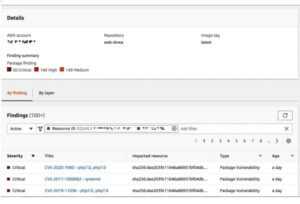
After a short wait, the findings appear. In the example shown, Amazon Inspector flagged 50 critical findings in the image.
Click the title of any finding to open its details.
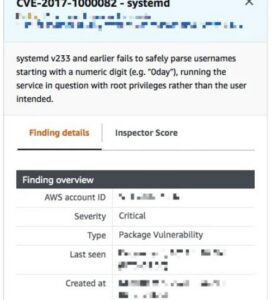
Scroll down a little and you will find a link to a reference page with more detail about the vulnerability.
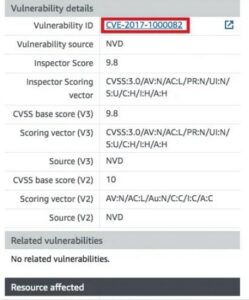
Clicking the Vulnerability ID link opens a page like this one:
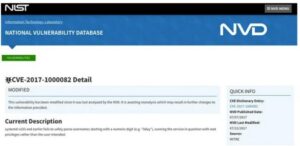
Inspector also rescans images in ECR when new CVEs are published that affect their packages. You don’t need to push the image again to get updated results.
Detecting and scanning EC2 instances for vulnerabilities
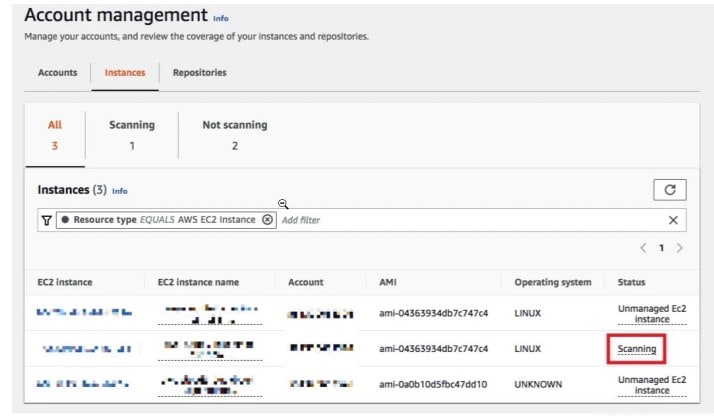
To check that Inspector finds and scans EC2 instances, launch any instance in an existing VPC. A few minutes after launch, the new instance should appear on the Account management page of the Amazon Inspector console, and on the other coverage pages.
The original walkthrough used an AWS Cloud9 environment running Amazon Linux 2. Both have since changed. AWS closed Cloud9 to new customers on July 25, 2024, and Amazon Linux 2 reached end of support on June 30, 2026. For a new test, launch a regular EC2 instance from an Amazon Linux 2023 AMI instead.
Agent-based and agentless scanning
Inspector has two scan modes for EC2. Hybrid mode, the default for new accounts, uses the AWS Systems Manager (SSM) agent wherever it is available and falls back to agentless scanning for instances without it. Agentless scanning works by taking snapshots of the instance’s EBS volumes to build a software inventory. Agent-based mode scans only instances that SSM manages in the same AWS account.
Agent-based scanning is still worth setting up. It scans continuously, and it is required for CIS Benchmark assessments. The steps below show how to fix an instance that Inspector reports as unmanaged.
Fixing an “Unmanaged EC2 instance” status
If Inspector can’t identify the instance (the status shows Unmanaged EC2 instance), click that status, then click the these instructions link.
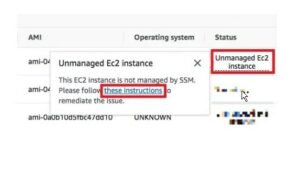
This opens a Systems Manager Automation document that checks whether the instance meets the requirements to become an SSM managed instance.
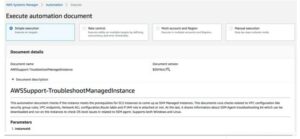
Enter the instance ID and choose Execute. In a few minutes, the automation returns the troubleshooting details you need to fix the setup.

First, make sure the IAM role attached to the instance includes the AmazonSSMManagedInstanceCore managed policy. You can create a new role with this policy or add the policy to a role you already use. If the instance is in a private subnet with no internet access, you also need VPC endpoints for Systems Manager (ssm, ssmmessages and ec2messages) in the VPC that contains the instance.
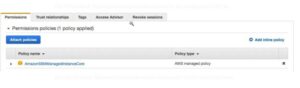
Run the Systems Manager troubleshooting automation again. Confirm that the issues you already fixed now pass, then fix any remaining configuration problems it reports. Once everything is set up correctly, Amazon Inspector should start scanning the instance.
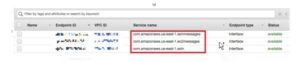
If the instance still doesn’t show up, check these common causes:
- The instance has the InspectorEc2Exclusion tag, which removes it from EC2 scanning.
- The instance is stopped. Scanning pauses until it starts again, and existing findings stay until the instance is terminated.
- The operating system isn’t supported. The status will say so.
- The SSM agent isn’t running. On Linux, check the logs in /var/log/amazon/ssm and /var/log/amazon/inspector.
After a short while, the findings from the scan should appear on the instance.
Open a finding the same way as in the container image section above, and you should see a page like the one below.

Why you should use Amazon Inspector
Inspector is easy to turn on in an AWS account, and once it is running it keeps scanning on its own. Getting EC2 instances fully managed by SSM can take a few minutes of IAM and network setup. That effort pays for itself, because Inspector notices changes to the instance and rescans automatically, so you never have to remember to start a scan. That is the main improvement over Amazon Inspector Classic, which ran assessments on a schedule you configured.
Advantages
Inspector’s biggest strengths are that it needs no setup to start scanning, it covers several AWS resource types in one place, and its findings feed straight into other AWS security tools.
Automatic scanning
Amazon Inspector finds security vulnerabilities and exposure problems automatically. Work that used to mean someone starting scans and reading through results by hand now happens continuously, so you see problems sooner. Coverage now includes EC2, ECR, Lambda functions (package vulnerabilities, plus code scanning for flaws such as injection and weak cryptography) and, through Inspector code security, GitHub and GitLab repositories.
Compliance checks
Many organizations have to show that their systems meet specific security standards. For EC2, Inspector can run assessments against the Center for Internet Security (CIS) Benchmarks for supported operating systems. This helps with hardening and audit evidence, but Inspector alone does not make your workloads compliant with a framework such as PCI DSS or HIPAA.
Detailed reporting
Each finding explains the vulnerability, which resource is affected, the risk score and the recommended fix, often as an updated package version. You can export findings in bulk. You can also export a software bill of materials (SBOM) in CycloneDX 1.4 or SPDX 2.3 format to an Amazon S3 bucket. SBOM export does not support Windows EC2 instances.
Easy integration
Inspector is part of AWS, so turning it on takes a few clicks, and it works with your existing AWS setup. Findings go to AWS Security Hub and Amazon EventBridge, and you can manage it across many accounts from a delegated administrator account in AWS Organizations.
Disadvantages
Inspector’s limits are its narrow scope, the delay in some scan types, and costs that grow with every resource it covers.
Limited customization
Inspector scans AWS resources: EC2, ECR, Lambda and connected code repositories. You can’t write your own checks, it doesn’t test running web applications the way a dynamic application scanner does, and it doesn’t cover servers outside AWS. Teams with mixed environments often run another tool alongside it.
Processing time
Most scans finish within minutes, but not every scan type is continuous. Agentless EC2 scans run periodically instead of in real time, and very large environments produce a flood of findings that takes time to sort. Using the risk score and filters to focus on reachable, exploitable issues makes a big difference here.
Additional cost
Inspector is billed by usage with no upfront fee. EC2 is charged per instance scanned each month, ECR per image scanned and rescanned, Lambda per function each month, and code security per repository scan. Agentless EC2 scans create EBS snapshots, and those snapshots are billed separately at EBS rates. New accounts get a 15-day free trial, and the console shows an estimated monthly cost based on usage during the trial. Check the AWS pricing page for your region before you leave every scan type turned on.
Overall, Amazon Inspector is a strong default for checking AWS workloads for known vulnerabilities and exposure. You get automatic scanning, useful reporting, CIS checks and simple integration. Weigh that against its limited customization, the delay on some scan types and the cost of scanning everything.
Other tools are worth considering as well, especially if you have systems outside AWS.
Popular alternatives to Amazon Inspector
The main alternatives are general-purpose vulnerability scanners that cover on-premises networks and other clouds, not just AWS.
| Tool | Made by | Type | Best fit |
|---|---|---|---|
| Nessus | Tenable | Commercial scanner | Detailed network and host scanning |
| Qualys VMDR | Qualys | Cloud-based platform | Large, multi-cloud estates with compliance reporting |
| OpenVAS | Greenbone | Open source | Teams on a budget that can manage it themselves |
| Rapid7 InsightVM | Rapid7 | Commercial platform | Risk ranking and fix-tracking workflows |
Nessus
Nessus is a vulnerability scanner from Tenable. It finds security holes in systems and applications across whole networks, and its large plugin library covers a wide range of common vulnerabilities. It also offers plenty of customization and integration options.
Qualys
Qualys is a cloud-based security and compliance platform. It finds vulnerabilities at the network and application layers, and it can check systems against industry standards such as PCI DSS and HIPAA. It also offers several integration options and strong reporting.
OpenVAS
OpenVAS (Open Vulnerability Assessment System) is an open-source vulnerability scanner maintained by Greenbone. It finds security holes in systems and applications across networks, uses a large feed of vulnerability tests, and can be adjusted to your needs. Reporting and integration features are included.
Rapid7 InsightVM
InsightVM is Rapid7’s vulnerability risk management service. It finds vulnerabilities, checks systems for compliance and ranks risk, with detailed reporting. Its workflow tools help teams assign fixes and track them through to completion.
Choosing the right tool
If everything you run is on AWS, start with Amazon Inspector. It costs nothing to try for 15 days and needs no software to deploy. Some alternatives cost less at scale or customize more easily, and others cover on-premises and multi-cloud systems that Inspector can’t reach. Decide based on where your workloads live, your budget and the compliance reports you have to produce. Many teams run Inspector for AWS and add one of the tools above for everything else.
FAQ
Is Amazon Inspector Classic still available?
No. AWS stopped accepting new Inspector Classic customers on May 20, 2025, and ended support entirely on May 20, 2026. Its assessments and findings can no longer be accessed through the Classic console. The current Amazon Inspector is the replacement and doesn’t use the old Inspector agent.
Does Amazon Inspector need an agent on EC2 instances?
Not always. In hybrid scan mode, the default for new accounts, Inspector uses the SSM agent where it is installed and scans other instances agentlessly through EBS snapshots. Agent-based scanning is still needed for continuous scans and for CIS Benchmark assessments.
How much does Amazon Inspector cost?
Pricing depends on usage: per EC2 instance per month, per ECR image scanned and rescanned, per Lambda function per month, and per code repository scan. Agentless scans also add EBS snapshot charges. New accounts get a 15-day free trial with a cost estimate in the console, and current rates for each region are listed on the AWS pricing page.
Why is Amazon Inspector not scanning my EC2 instance?
The most common causes are a missing AmazonSSMManagedInstanceCore policy on the instance role, no route to Systems Manager endpoints from a private subnet, an unsupported operating system, a stopped instance, or the InspectorEc2Exclusion tag. The coverage status in the Inspector console usually tells you which one applies.
Is Amazon Inspector related to my Amazon shopping account?
No. Amazon Inspector is an AWS cloud security service for businesses and developers, and it has nothing to do with retail orders or subscriptions. If you came here about a charge on your bank statement or a membership, guides such as How To Cancel Amazon Prime and What Is Amazon Digital Charge cover those Amazon.com account topics.
Does Amazon Inspector scan source code?
Yes. Inspector code security became generally available on June 17, 2025. It adds static code analysis, dependency scanning and infrastructure-as-code checks for repositories connected from GitHub or GitLab. Inspector can also scan Lambda function code for issues such as injection flaws and weak cryptography.
Sources
- Amazon Inspector pricing
- Amazon Inspector features
- Scanning Amazon EC2 instances with Amazon Inspector
- Exporting SBOMs with Amazon Inspector
- Amazon Inspector Classic end of support
- Why is Amazon Inspector not scanning my Amazon EC2 instances?
- Amazon Inspector launches code security
- Amazon Linux 2 FAQs
- AWS Cloud9 User Guide













