To get TNT on a Firestick in November 2026, open the Amazon Appstore on your Fire TV, search for “TNT” (some app stores list it as “Watch TNT”) and install the free app. Then open the app, choose Sign In, enter the code shown on your TV at tntdrama.com/activate and log in with your cable, satellite or live TV streaming provider. Without a TV provider, the app shows very little. That makes a live TV service such as Sling TV or YouTube TV the realistic option for cord cutters. You don’t need to sideload an APK, and doing so carries real risks.
The Watch TNT app is free to download from the Amazon Appstore on any Fire TV Stick or Fire TV. Once it is installed, you activate it at the TNT activation page with the code your Fire TV Stick shows you. The sections below walk through installing, activating and fixing the app, plus how to watch TNT without cable.
What TNT is and what you need to watch it
TNT (Turner Network Television) is an American cable channel that airs movies, TV shows, TNT originals and live sports. On your Fire TV Stick you can download the TNT app from the Amazon Appstore. To watch most of what’s in the app, you need an active TV subscription from a provider that carries TNT.
Ownership has changed since earlier versions of this guide. TNT belonged to Warner Bros. Discovery, and Paramount completed its acquisition of Warner Bros. Discovery on October 6, 2026. That change hasn’t altered how you install or sign in to the app on a Fire TV.
The sports lineup has changed too. The NBA moved its games to NBC, Peacock and Amazon Prime Video starting with the 2025-26 season. If you’re installing TNT to watch NBA games, you won’t find them there anymore.
How to install Watch TNT on Firestick
The Amazon Appstore is the only route you need. Installing takes a couple of minutes.
- Turn on your Fire TV and connect it to your Wi-Fi network.
- On the home screen, select the Find (magnifying glass) icon.
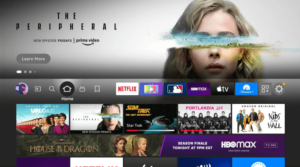
- Select the search bar.
- Type “TNT” and look for the app. You can also press the Alexa button on the remote and say “TNT”.
- Pick the TNT app from the search results. Check that Turner or Warner Bros. Discovery is listed as the publisher, not a lookalike app.
- Select Get (or Download) to install the app on your Firestick.
Once the TNT app is installed on your Fire TV Stick, move on to the activation steps below.
Why you should skip sideloading TNT with Downloader
Older guides told you to install the Downloader app, enable “Install unknown apps” in Developer Options and download a TNT APK from a shortened link. Don’t do that. The app is free in the Amazon Appstore. An APK from an unofficial link might be out of date, changed, or carrying malware. And it won’t get you around the TV provider sign-in or the US-only restriction anyway.
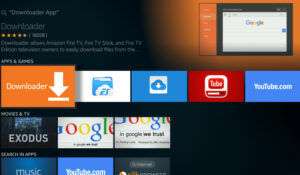
Sideloading doesn’t even work on Amazon’s newest hardware. The Fire TV Stick 4K Select runs Amazon’s Linux-based Vega OS in place of the Android-based Fire OS, so it can’t install Android APKs or run Downloader at all. Amazon has said future Fire TV Sticks will run Vega OS as well.
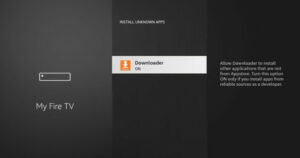
If you turned on “Install unknown apps” for Downloader on an older Fire OS device for this, switch it back off. The setting is under Settings > My Fire TV > Developer Options > Install unknown apps. Then get TNT from the Appstore instead.
How to activate and stream TNT on Firestick
Activation links the app on your Fire TV to your TV provider account, so live channels and locked episodes unlock. Keep a phone or computer nearby.
- Open the TNT app on your Firestick or Fire TV.
- Select the Sign In option in the app.
- Write down the activation code shown on the Firestick screen. Leave the app open, because the code expires after a while.
- On a computer or phone browser, go to the TNT activation page at tntdrama.com/activate. Type the address yourself so you don’t land on a lookalike site that asks for your login.
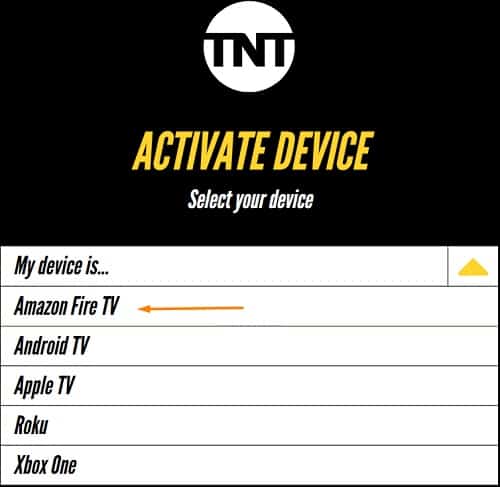
- If you’re asked which device you’re using, choose Amazon Fire TV.
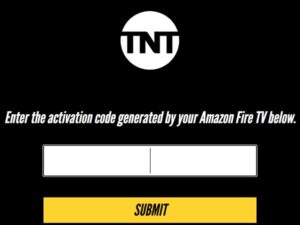
- Enter the TNT activation code and select Submit (or Continue).
- Choose your TV provider from the list and sign in with the username and password from that provider. These are the same details you use on your provider’s own website, not your Amazon account.
The official TNT website has the full list of supported providers.
- Go back to the TNT app on your Firestick. It should refresh within a few seconds and show that you’re signed in. If it doesn’t, close and reopen the app, choose Sign In again and start over with a new code.
Some providers support Fire TV single sign-on. If yours does and you’ve already signed in to it in your Fire TV settings, the TNT app may sign you in without a code.
How to watch TNT without cable on Firestick or Fire TV
Without cable, you can still watch TNT on a Fire TV Stick by subscribing to a live TV streaming service that carries the channel. You then sign in to the TNT app with that service’s login, or just watch TNT inside the service’s own Fire TV app.
| Service | Carries the TNT channel | Notes |
|---|---|---|
| Sling TV (Orange or Blue) | Yes | Usually the cheapest option; Sling Orange has been listed at $45.99 a month |
| YouTube TV | Yes | Base plan around $82.99 a month, includes TNT, TBS and truTV |
| Hulu + Live TV | Yes | Priced around $90 a month or more depending on the plan |
| DirecTV | Yes | TNT is part of the MySports package |
| Fubo | No | Doesn’t carry TNT |
| HBO Max (Standard or Premium) | Live TNT Sports events only | Standard is $18.49 and Premium $22.99 a month; Basic with Ads has no live sports |
Prices change often, so check the current price on each provider’s own site before you sign up. HBO Max isn’t a replacement for the TNT channel. It streams selected live sports events from TNT Sports, not TNT’s full 24/7 lineup of shows and movies.
How to fix TNT not working on Firestick
The TNT app on your Fire TV sometimes stops working properly. Most problems, like buffering, a black screen, the app freezing or sign-in errors, clear up with the steps below. Start at the top and work down.
- Check your Firestick’s internet connection under Settings > Network. If the signal is weak, move the router closer or connect to a stronger Wi-Fi network.
- Close the TNT app completely, then open it again.
- Restart your Firestick from Settings > My Fire TV > Restart, or hold the Select and Play/Pause buttons on the remote for about five seconds.
- Update the TNT app. Open the Appstore, find TNT and select Update if it’s offered.
- Update your Fire TV software under Settings > My Fire TV > About > Check for Updates. Older software can stop activation from working.
- Clear the TNT app’s cache under Settings > Applications > Manage Installed Applications > TNT > Clear cache. If problems continue, choose Clear data. That signs you out, so you’ll need to activate again.
- Last of all, uninstall the TNT app from the same menu and reinstall it from the Appstore.
If sign-in still fails after a fresh install, the problem is usually with your provider account, such as a package that doesn’t include TNT or a password that needs resetting. At that point, contact your TV provider. The same steps fix most streaming apps on Fire TV. For one example, see How To Fix Disney Plus Stuck On Loading Screen.
FAQ
Is TNT available on Firestick?
Yes. The TNT app is a free download from the Amazon Appstore on Fire TV Sticks and Fire TV devices. Downloading it is free, but you need a TV provider login that includes TNT to stream most of its content.
Does TNT have a free trial?
No, TNT doesn’t offer its own free trial. If your cable, satellite or live TV streaming plan includes TNT, the app costs nothing extra. Some live TV services that carry TNT run trials for new customers from time to time, so check their sign-up pages.
Why is my TNT activation code not working?
Codes expire after a short time, so a code you wrote down earlier may no longer be valid. Choose Sign In again in the app to get a fresh code and enter it right away at tntdrama.com/activate. Make sure you’re on the real TNT site and that you picked the right TV provider.
Can you still watch NBA games on TNT?
No. The NBA’s current media deal moved games to NBC, Peacock and Amazon Prime Video starting with the 2025-26 season. TNT Sports still shows other live sports, and some of those events also stream on HBO Max’s Standard and Premium plans.
Can I sideload the TNT app with Downloader?
You don’t need to, and it isn’t a good idea. The official app is in the Amazon Appstore, and APKs from unofficial links can carry malware. Newer Vega OS devices such as the Fire TV Stick 4K Select don’t support sideloading or Downloader at all.
Sources
- Amazon Fire TV help and Amazon Appstore listing for the TNT app
- TNT activation page (tntdrama.com/activate)
- HBO Max Help Center: plans and live sports
- Paramount investor relations: Paramount to acquire Warner Bros. Discovery
- CNBC: Paramount’s takeover of Warner Bros. Discovery closed (October 2026)
- AFTVnews: Fire TV models that don’t support sideloading or Downloader due to Vega OS