
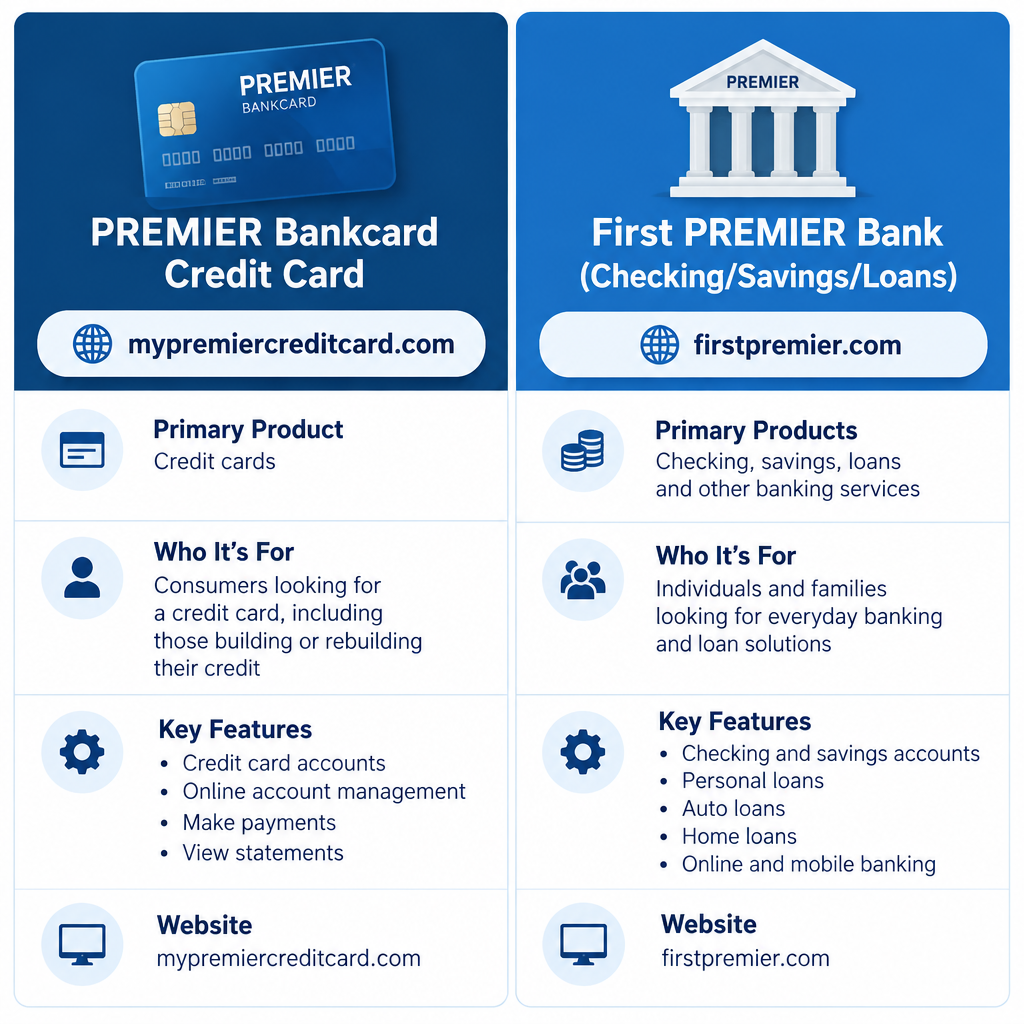
First PREMIER has two separate logins. If you have a PREMIER Bankcard credit card, sign in at www.mypremiercreditcard.com or in the PREMIER Credit Card app, both of which use the same username and password. If you bank with First PREMIER Bank in South Dakota (checking, savings or loans), use the Sign In option on firstpremier.com instead. Always type these addresses yourself, because many lookalike “login guide” sites rank in search results.
Searching “First PREMIER login” returns a mix of official pages, copycat guide sites and a few unrelated banks. The sections below sort them out, so you know which page signs you in, which pages to skip and what to do when a login fails.
Which First PREMIER login you need
It depends on what you have with First PREMIER. Credit card holders and bank customers use different websites and different usernames, so a login from one will not work on the other.
| You have | Where to sign in | App |
|---|---|---|
| PREMIER Bankcard Mastercard (credit card) | www.mypremiercreditcard.com | PREMIER Credit Card |
| First PREMIER Bank checking, savings or loans | firstpremier.com, then Sign In | First PREMIER mobile banking |
| Card issued by First Bankcard (FNBO) | firstbankcard.com | Not a First PREMIER product |
Sign in at mypremiercreditcard.com
www.Mypremiercreditcard.com Login, Sign In to Your First PREMIER Bank Account
The credit card portal is where you see your statement, check your balance, make payments and manage alerts. When you choose Log In on the homepage, you go to the PREMIER Bankcard customer portal at connect.mypremiercreditcard.com, where you enter your username and password.
- Type www.mypremiercreditcard.com into your browser’s address bar. Don’t click a search ad.
- Select Log In.
- Check that the address bar shows mypremiercreditcard.com before you type anything.
- Enter your username and password.
- Complete any verification step the site asks for, such as a one-time code.
If this is your first time, use the registration option on the login page. You’ll need your card details and some personal information to prove who you are. Forgot your details? Use the “Forgot Your Username?” or “Forgot Your Password?” links under the login form.
Copycat guide sites are not the login page
Pages such as mypremiercreditcard.live and mypremiercreditcard.me are not run by PREMIER Bankcard. They are guide sites with titles like “MyPremierCreditCard, MyFirstPremierCreditCard Login …”, “MyPremierCreditCard Login Account Balance Authorities.” and “MyPremiercreditcard, My First PremierCreditCard Login.” They can’t sign you in, and you should never enter your card number or password on them.
These pages also get facts wrong. One of them said the company was “founded by T. Denny Stanford.” The name is T. Denny Sanford. He bought the Sioux Falls bank in 1986, renamed it First PREMIER Bank and launched the PREMIER Bankcard credit card business.
The same pattern shows up for almost every popular portal. Searches for mycsulb or jcp com associate kiosk also return pages of directory sites that copy the real login name. Only the company’s own domain can sign you in.
Sign in to First PREMIER Bank online banking
The First PREMIER Bank online banking link from older guides appears in search results with the plain title First Premier Bank. It belongs to the bank, not the credit card. It’s for customers with deposit accounts or loans at First PREMIER Bank.
- Go to www.firstpremier.com.
- Select Sign In at the top of the page.
- Pick the right account type (personal or business online banking).
- Enter your Login ID and password.
Older guides linked straight to a deep online banking address. It’s safer to start from the homepage each time, because those deep links change when the bank updates its systems. If you enter the wrong password three times, online and mobile banking are locked. First PREMIER says to call Customer Care at 800-501-6535 to unlock it.
First Bankcard is a different company
A search listing titled “First Bankcard Premier credit cards for your choice …” points to firstbankcard.com. Despite the similar name, First Bankcard is the credit card division of First National Bank of Omaha (FNBO). It issues partner cards for retailers such as Runnings. It is not part of First PREMIER Bank or its affiliate PREMIER Bankcard.
Sign in at firstbankcard.com only if your card says First Bankcard or FNBO. Your PREMIER Bankcard username will not work there.
About First PREMIER Bank
The official site’s title is “First PREMIER Bank, Personal and Business Banking, Credit …”. It describes a community bank based in Sioux Falls, South Dakota, offering personal, business and agricultural banking. Its sister company, PREMIER Bankcard, runs the PREMIER Mastercard credit cards, which are mostly marketed to people who are building or rebuilding credit.
T. Denny Sanford, who built both companies after buying the bank in 1986, died on July 18, 2026, at age 90, according to the obituary First PREMIER published. The bank and the card business are still operating, and the login addresses on this page are unchanged.
The firstpremier.com sign-in menu
The page titled Sign In Menu, firstpremier.com. is the bank’s list of every sign-in option in one place. It covers personal online banking, business and commercial services (such as business online banking, receivables management and reporting), plus links for eStatements, bill pay and mobile banking. The menu also includes a credit card sign-in link that sends cardholders to the PREMIER Bankcard site.
Use it when you’re not sure which service your account belongs to. For example, an agricultural loan customer and a commercial treasury customer may use different portals.
Card alerts and the PREMIER Credit Card app
The credit card homepage, listed in old guides as Premier Bank Card Online, House., promotes free real-time card alerts. These cover things like purchases over a limit you set, PIN changes and international transactions. You can set them up from your online account or the app.
The PREMIER Credit Card app is on the Apple App Store and Google Play. Its App Store listing says to sign in with your existing MyPremierCreditCard.com username and password, so you don’t need a separate app account. If you haven’t registered online yet, do that first on the website.
Account summary and third-party notices
The page listed in old guides as Premier Bank Card Online, Login. is the account summary you see after signing in. From there you can check your balance, see recent transactions, make a payment and view statements.
Sometimes you’ll see a notice saying you are leaving the site for a third-party website. That’s normal. PREMIER Bankcard shows it whenever a link goes outside its own domain, because it doesn’t control those sites. If you see a login form after that notice, close it. Your real card login is on mypremiercreditcard.com or in the official PREMIER Credit Card app.
If you still can’t log in
Work through these in order:
- Check the address bar for the exact domain: mypremiercreditcard.com for cards, firstpremier.com for banking.
- Use the Forgot Username or Forgot Password links instead of guessing, so you don’t lock the account.
- Try a private browser window, or clear the site’s cookies, then sign in again.
- Update the app, or sign in on the website to see whether the problem is only in the app.
- Call the customer service number on the back of your card (cardholders) or First PREMIER Customer Care at 800-501-6535 (bank customers).
Stop and call right away if you entered your details on a lookalike site. Ask the company to lock the account and issue new credentials, then change any other passwords that were the same.
FAQ
Is First PREMIER the same as PREMIER Bankcard?
They’re sister companies, but each has its own website. First PREMIER Bank handles banking at firstpremier.com. PREMIER Bankcard runs the credit cards at mypremiercreditcard.com. Your card login won’t work for online banking, and your banking login won’t work for the card.
Can I use the PREMIER Credit Card app without registering online?
Not really. The app uses your MyPremierCreditCard.com username and password, so set up your online account first. After that, the same details work in the app.
Why does my First PREMIER Bank login say my account is locked?
Three wrong password attempts lock online and mobile banking. Call First PREMIER Customer Care at 800-501-6535 to unlock it, and use the password reset next time instead of guessing.
Are mypremiercreditcard.live and mypremiercreditcard.me safe?
They’re not official PREMIER Bankcard sites and can’t sign you in. Never enter card numbers or passwords on them. Sign in to your card account only at mypremiercreditcard.com or in the official PREMIER Credit Card app.
Can I pay my PREMIER credit card bill online?
Yes. Sign in at mypremiercreditcard.com or in the PREMIER Credit Card app and choose the payment option from your account summary. Payment options and timing are set out in your account, so check them there before the due date.
Sources
- First PREMIER Bank homepage
- First PREMIER Bank: Online & Mobile Banking
- First PREMIER Bank: Where can I enroll in online banking
- PREMIER Bankcard
- PREMIER Credit Card app on the App Store
- First Bankcard: About us
- First PREMIER Bank: Denny Sanford obituary













