
As of November 2026, Roku still has no official Twitch app, and the old workarounds no longer work. Amazon removed the official Twitch channel in November 2017, and the unofficial Twitched channels went soon after. Roku also began removing “private” add-with-code channels on March 1, 2022. To watch Twitch on a Roku TV or player today, mirror your screen from an Android phone or Windows PC, or use AirPlay from an iPhone, iPad or Mac on a compatible Roku.
Twitch is a live streaming platform where you can watch gameplay, chat with streamers and other viewers, and broadcast your own games. It started as a site for gamers, but it now also carries music, talk shows and “Just Chatting” streams.
What Twitch is and who uses it
Pro streamers and casual players both use Twitch. Beginners mostly watch games they enjoy. More experienced players stream their own gameplay to an audience. Twitch runs in web browsers and has official apps for iPhone, Android, Windows and Mac browsers, Apple TV, Amazon Fire TV, Android TV and Google TV, and Xbox. Roku is the big streaming platform it skips.
Is there a Twitch app on Roku?
No. Twitch is a cross-platform service, but you won’t find an official Twitch channel in the Roku Channel Store. Amazon owns Twitch and has never publicly explained why it left. It pulled the official Roku channel in November 2017.
You can still get Twitch onto a Roku screen. You just have to send it from another device. The working methods are further down this page.
Features of Twitch
- You can broadcast your own gaming content live.
- Live chat runs alongside every stream, so you can talk to the streamer and other viewers during a session.
- You can watch other players in games such as PUBG: Battlegrounds and EA Sports FC (the series formerly called FIFA).
- Twitch looks at what you watch and recommends similar channels and streams.
- Beyond games, you’ll find special events, music, talk shows and interactive live streams.
The old “add channel with a code” method (no longer works)
For several years after the official app was removed, guides told Roku owners to add Twitch with a private channel code. This method is now history. In October 2021, Roku announced that it would remove uncertified (“private”) channels from its platform, and the removal began on March 1, 2022.
For reference, this was the old process:
- Open a web browser and go to the Roku website (my.roku.com).
- Sign in to your Roku account.
- Open the account menu and choose “Add channel with a code.”
- Type TwitchTV in the channel access code box, select Add channel, and confirm. A warning that the channel was not certified usually appeared, and people were told to ignore it.
- In the last window, select Yes to add the channel. A confirmation message appeared once it was added.
“Add channel with a code” still exists on my.roku.com, but now it only works for beta channels. Developers use these for testing, and they expire 120 days after creation. Twitch has never published a beta channel, so any “Twitch code” you see online today comes from a third party, not from Twitch or Roku.
Third-party Twitch channels (Twitched, Twitched Zero and Twoku)
Third-party channels used to fill the gap, but none of them is a reliable option now. Twitched Zero was a free, ad-supported channel. Twitched cost about $0.99 and had no ads. The developer shut down Twitched Zero first, and Twitched was later removed from Roku too. Twoku, another unofficial channel added by code, stopped working for most users after Roku’s March 2022 cleanup of uncertified channels.
The old steps had you add one of these channels, sign in on Roku, and enter an activation code on the Twitch website. Don’t spend time on them now. Any channel that relies on Twitch’s systems without Amazon’s approval can break overnight. Don’t type your Twitch password into an unofficial channel either.
How to watch Twitch on Roku with screen mirroring (Android and Windows)
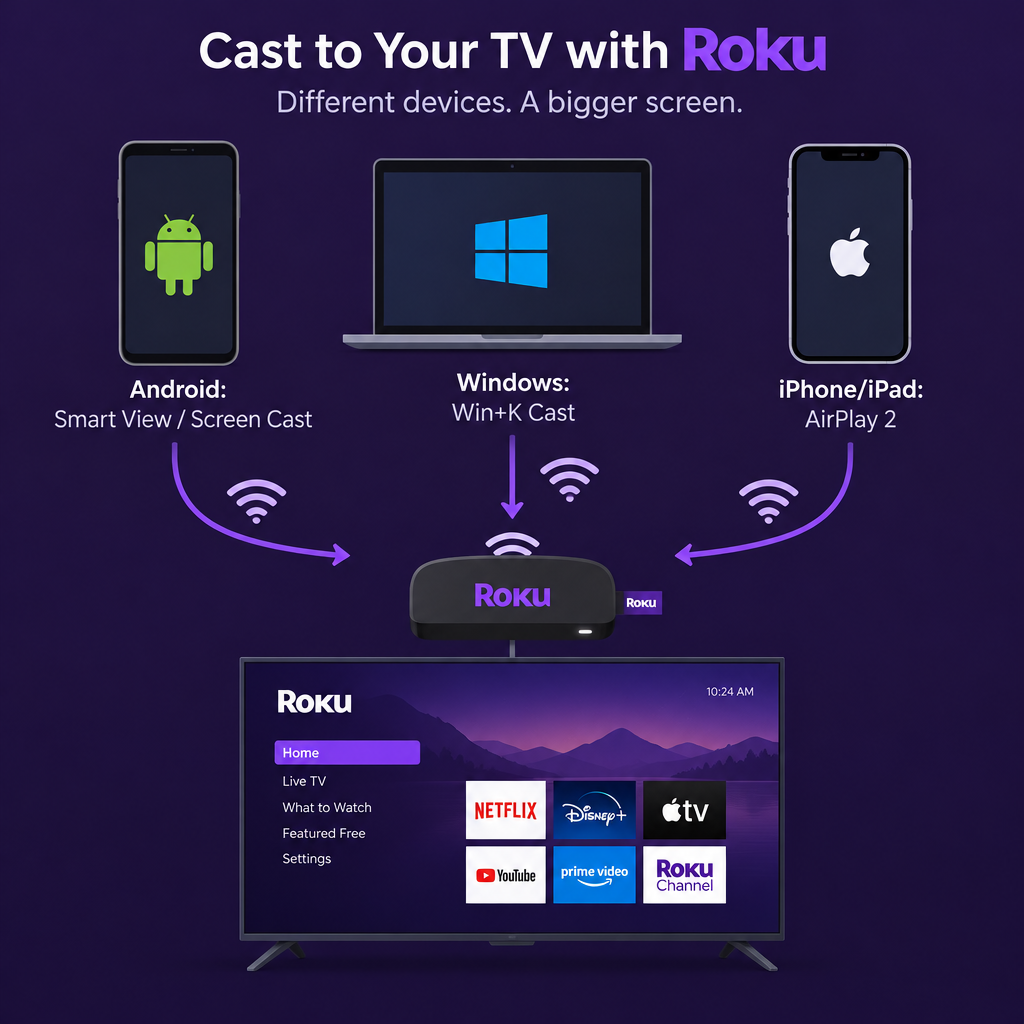
Screen mirroring is the most dependable way to get Twitch onto a Roku today. Your phone or PC plays the stream, and the Roku shows a copy of that screen on your TV.
First, turn mirroring on in the Roku:
- On your Roku, go to Home > Settings > System > Screen mirroring.
- Set Screen mirroring mode to Prompt (Roku asks each time) or Always allow.
- Make sure your Roku and your phone or PC are on the same Wi-Fi network.
From an Android phone or tablet
- Swipe down from the top of the screen to open Quick Settings.
- Tap the mirroring tile. Its name depends on the brand: Smart View on Samsung, Screen Cast or Cast on others.
- Pick your Roku from the list, then accept the request on the TV if it asks.
- Open the Twitch app, start a stream, and turn the phone sideways for full screen.
Google Pixel phones don’t support Miracast, the standard Roku uses for mirroring, so a Pixel won’t find the Roku this way. If you have a Pixel, a Google TV or Chromecast device is the easier route, because the Twitch app can cast to those directly.
From a Windows PC
- Press Windows key + K to open the Cast panel. On Windows 11 you can also open Quick Settings > Cast.
- Select your Roku and accept the prompt on the TV.
- Open twitch.tv in your browser and make the video full screen.
Your PC needs Miracast-capable graphics and Wi-Fi hardware, and most laptops from the last several years have them. Mirroring works best on an up-to-date machine, so if Windows Update keeps failing, follow a guide to fix error code 0x800f0988 first. Clearing space before a long session is sensible, but if you delete the wrong file, check how to recover deleted files in windows 10 8 7. For duplicate photos, the best visipics alternatives for windows list covers safer cleanup tools.
How to watch Twitch on Roku with AirPlay (iPhone, iPad and Mac)
Apple devices can’t use Miracast, but many Roku models support AirPlay 2, which does the same job. Your Roku needs Roku OS 9.4 or later. Your iPhone or iPad needs iOS 12.3 or later, and a Mac needs macOS Mojave 10.14.5 or later. Most 4K Roku players and many Roku TVs are supported. Roku’s AirPlay support page has the exact model list for your region.
- On the Roku, go to Settings > Apple AirPlay and HomeKit and make sure AirPlay is turned on.
- On your iPhone or iPad, open Control Center and tap Screen Mirroring. Choose your Roku.
- Type the code shown on the TV into your phone.
- Open the Twitch app and play a stream.
On a Mac, click Control Center > Screen Mirroring in the menu bar, choose the Roku, then open twitch.tv in Safari or another browser.
Which method should you use
The device in your hand decides the method.
| Your device | Method | What you need | Main drawback |
|---|---|---|---|
| Android phone (Samsung, Motorola, OnePlus and others) | Screen mirroring | Miracast support, same Wi-Fi | Phone screen must stay on |
| Google Pixel | Not supported | Use a Chromecast or Google TV device instead | No Miracast |
| Windows 10 or 11 PC | Screen mirroring (Windows + K) | Miracast-capable hardware | Some lag over busy Wi-Fi |
| iPhone, iPad or Mac | AirPlay 2 | Compatible Roku on Roku OS 9.4 or later | Not every Roku model supports it |
| Any device | Separate streaming stick | Fire TV, Apple TV or Google TV device | Extra cost |
Mirroring has real trade-offs. Notifications from your phone can show up on the TV. Your phone’s battery drains during a long stream. Picture quality depends on your Wi-Fi. If you watch Twitch for hours every week, a cheap streaming device with the official app is more comfortable, and you can plug it into a spare HDMI port next to your Roku.
FAQ
Will Twitch ever come back to Roku?
Neither Amazon nor Roku has announced any plan to bring Twitch back, and the official app has now been gone since November 2017. Amazon sells its own Fire TV devices, which run the official Twitch app. Don’t expect a return any time soon.
Does the TwitchTV channel code still work on Roku?
No, not for new installs. Roku began removing private, non-certified channels on March 1, 2022. Codes now only add beta channels that developers publish, and those expire after 120 days.
Is it safe to use unofficial Twitch channels on Roku?
The ones that existed, such as Twitched, Twitched Zero and Twoku, have been removed or stopped working. Anything new that claims to be a Twitch channel and comes from outside the Roku Channel Store hasn’t been checked by Roku. Don’t sign in to your Twitch account through it.
Can I cast Twitch to Roku from the Twitch app’s cast button?
No. The cast button in the Twitch mobile app uses Google Cast, and Roku doesn’t support that. Use Quick Settings mirroring on Android or Screen Mirroring (AirPlay) on Apple devices instead.
Why does my Roku not show up when I try to mirror?
Check that both devices are on the same Wi-Fi network. Then make sure Screen mirroring mode on the Roku isn’t set to Never allow, and that the Roku software is up to date (Settings > System > System update). If you’re using an iPhone, also check that your Roku model is on Roku’s AirPlay list.
Can I stream my own gameplay to Twitch from a Roku?
No. Roku devices can’t broadcast to Twitch. To stream your own gameplay, use a PC with streaming software, or a console with built-in Twitch broadcasting such as an Xbox.
Sources
- Roku Support: How to use AirPlay and HomeKit with your Roku streaming device
- Roku Support: Screen mirroring from Android and Windows devices
- Roku Community: Independent channels no longer supported
- Cord Cutters News: Amazon pulls their Twitch channel from Roku













