
To send Bits on Twitch, open the channel, click the Bits (diamond) icon next to the chat box, pick an amount and send it as a Cheer. You can also type “Cheer” plus a number in chat, for example “Cheer100”. You need Bits in your account first. You can buy them at twitch.tv/bits (the website is cheaper than the mobile apps), and in some regions you can earn a few free ones by watching an ad. The streamer gets $0.01 for every Bit you cheer.
Twitch is a live streaming platform used mainly by gamers. Streamers broadcast games, music, art and talk shows, and viewers watch and chat with them. Bits are Twitch’s own way for viewers to support the streamers they watch.
How sending Bits works
Sending Bits is called cheering. You post a chat message that uses some of your Bits. The Bits come out of your balance, an animated emote appears in chat, and the streamer is paid for them.
The Twitch community has grown fast and has become a big source of gaming news and entertainment. Cheering is one of the most visible ways viewers take part in it. Your support shows up right in the chat.
What are Twitch Bits
Bits are a virtual currency you spend on Twitch to support streamers. You buy them with real money, and you spend them by cheering in a channel’s chat. Each cheer shows an animated emote called a Cheermote, and the streamer earns money from it.
A few key facts:
- Value to the streamer: Twitch pays the streamer $0.01 per Bit. 100 Bits = $1.00, whatever pack you bought them in.
- Cost to you: You pay a bit more than that. 100 Bits cost $1.40 on the web, so Twitch keeps the difference.
- Where you can spend them: Only in channels that accept Cheering. If you see the Bits icon next to the chat box, the channel accepts them. In 2026, Twitch let many more streamers switch on Bits, so it is no longer only Affiliates and Partners. Payouts still depend on Twitch’s own eligibility rules.
- Badges: When you cheer in a channel, you earn a Bits badge next to your name in that chat. It moves up a tier as your total grows, so other viewers and the streamer can see how much you have supported the channel.
You can get Bits in two ways. You can buy them, or in some regions you can earn a small number by watching ads. Both are covered below.
How to watch ads on Twitch for Bits
Watching ads for Bits is free, but it pays very little. Most guides report about 5 to 10 Bits per ad. The option isn’t available everywhere, either. It depends on your region and on how many ads are available at the time.
- Go to the channel of the streamer you want to support.
- Click the Bits icon (the small diamond) next to the chat box.
- In the window that opens, click Get Bits.
- If your account and region qualify, you’ll see a Watch Ad option. Click it.
- Watch the ad to the end. You’ll then see how many Bits you earned.
- You can watch another ad if one is available, or go back and cheer.
If the Watch Ad button is greyed out and says “Try again later”, there are no ads available for you right now. That is normal. If the option doesn’t appear at all, it isn’t offered in your region, and buying Bits is the only route.
Stay away from “free Bits” generators, giveaways that ask for your login, and sellers offering cheap Bits outside Twitch. Twitch only sells Bits through its own store and the official app stores. Bits from anywhere else are scams or can get your account in trouble.
How to buy Bits on Twitch
Watching ads takes a long time and earns very few Bits. Most people buy them instead, and the cheapest way is the website at twitch.tv/bits. You can also buy from the chat window of any channel that accepts Cheering.
- Click the Bits icon (the small diamond) next to the chat box. You can also go to twitch.tv/bits.
- Click Get Bits to see the packs.
- Pick the pack you want and finish checking out with your saved payment method.
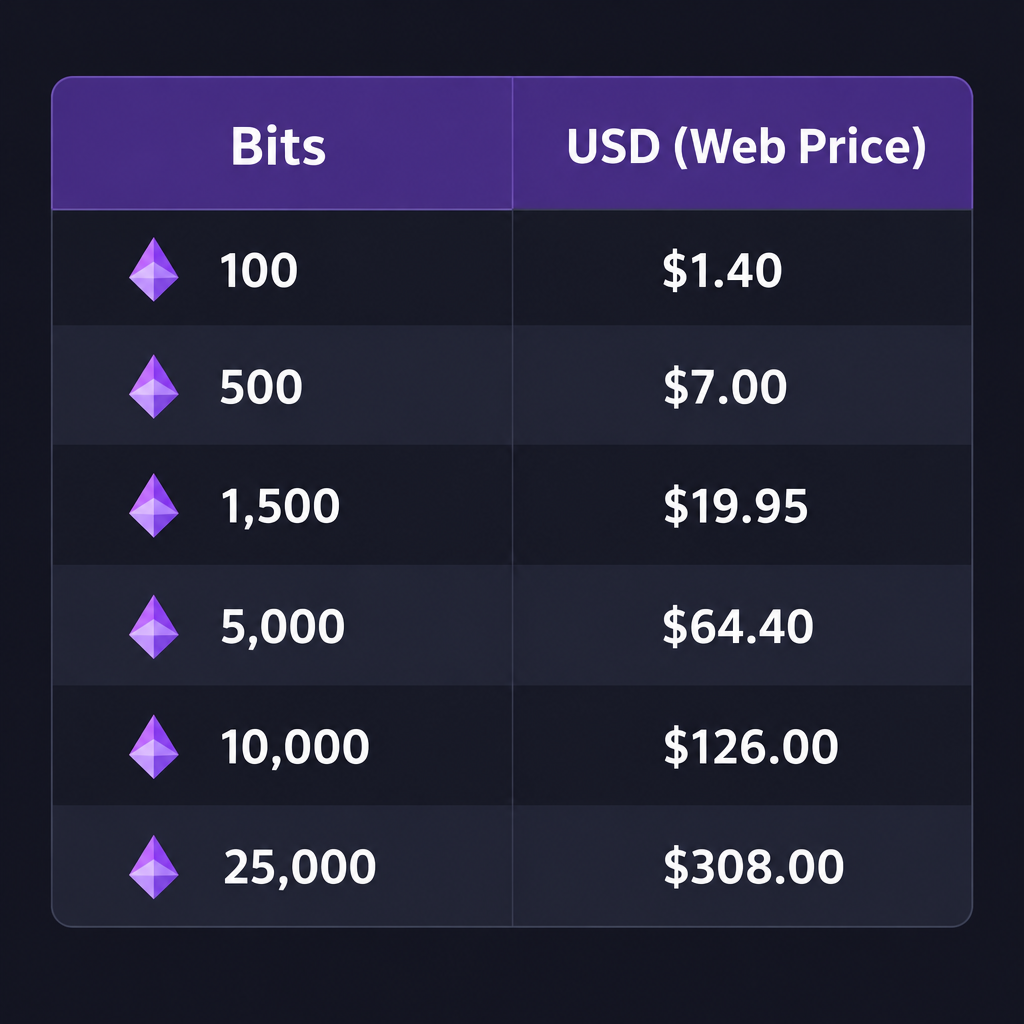
These are the usual US web prices:
- $1.40 USD for 100 Bits
- $7.00 USD for 500 Bits
- $19.95 USD for 1,500 Bits
- $64.40 USD for 5,000 Bits
- $126.00 USD for 10,000 Bits
- $308.00 USD for 25,000 Bits
Bigger packs give a slightly better price per Bit. For example, 100 Bits cost $0.014 each, while 25,000 Bits cost $0.0123 each. Prices change by country and currency, and Twitch sometimes runs promotions, so check the price shown at checkout before you pay.
Bits cost more in the Twitch app for iPhone and Android, because Apple and Google take a cut of in-app purchases. On your phone, you can get the web price by opening twitch.tv/bits in Safari or Chrome instead of the app. The streamer still gets $0.01 per Bit no matter where you bought them.
How to give Bits on Twitch
Bits are a way to show a streamer you appreciate them. The streamer earns $0.01 for every Bit you send, and your cheer shows up in chat for everyone, the streamer included. To send them, use the Bits menu or type a cheer in chat.
Cheer from the Bits menu
- Open the channel and click the Bits icon next to the chat box.
- Pick a Cheermote and an amount. Bigger amounts show bigger, more colourful animations.
- Type a message if you want, then send it.
Cheer by typing in chat
Type the word Cheer followed by the number of Bits, with no space. “Cheer300” sends 300 Bits, for example. You can add a normal message in the same line. The Bits come out of your balance right away. If you type more than you have, Twitch asks you to buy more first.
Some streamers set a minimum cheer, such as 100 Bits. Smaller cheers won’t go through in their channel. Without a minimum, you can cheer as little as 1 Bit.
Power-ups and other ways to spend Bits
Bits can also pay for Power-ups. These include Message Effects, an On-screen Celebration and Gigantify an Emote, which makes an emote huge in chat. In 2026 Twitch added Custom Power-ups. The streamer designs these and sets their price in Bits. Some channels also have extensions, such as games or polls, that accept Bits.
Twitch tested a feature called Combos in beta from 2025. Several viewers could tap to chip in Bits together and trigger bigger and bigger on-screen animations. It was switched off on March 31, 2026. Cheering and Power-ups were not affected.
Bits compared with PayPal tips
Some streamers also take direct tips through PayPal or a tipping service such as Streamlabs. Tips skip Twitch’s markup, so more of your money reaches the streamer. The downside is that the payer can file a chargeback and take the money back. That is a real risk for streamers.
Bits work the other way round. The money is already paid to Twitch when you buy the Bits, so there are no chargebacks on a cheer. Your cheer also appears in chat with an animation and counts toward your badge. If the streamer has a tip link, ask them which they prefer. Many are happy with either.
Conclusion
Bits are the official, built-in way to support a streamer on Twitch. Every Bit you cheer pays them a cent, and they see your message on stream. Buy your Bits on twitch.tv/bits in a browser to get the lowest price, check that the channel shows the Bits icon, then type “Cheer” plus an amount in chat.
FAQ
How much is 1 Bit worth on Twitch?
A Bit is worth $0.01 to the streamer who gets it. You pay a little more when you buy Bits, for example $1.40 for 100 on the web. Twitch keeps the difference.
Can I send Bits on the Twitch mobile app?
Yes. Tap the chat box, then the Bits icon, then pick an amount, or type “Cheer” plus a number. Buying Bits in the app costs more because of Apple and Google fees, so buy them on twitch.tv/bits in your phone’s browser, then cheer from the app.
Why can’t I see the Bits icon in a channel?
The channel hasn’t turned on Cheering. Only the streamer can switch it on. You can’t send Bits there, but you can still follow, subscribe if subscriptions are on, or support them in other ways they list on their channel.
Do Bits expire?
Bits you buy stay in your account until you use them. You can see your balance by clicking the Bits icon in any chat that accepts Cheering.
Can I get a refund for Bits?
Bits you have already cheered go to the streamer and can’t be taken back. For a purchase problem, such as a double charge, contact Twitch Support through the Twitch Help Center, or Apple or Google if you bought the Bits in the app.
Is cheering better than subscribing?
They do different jobs. A subscription is a monthly payment that gives you perks like emotes. Bits are one-off amounts you send whenever you like, as little or as much as you want. Many viewers subscribe to their favourite streamers and cheer now and then for big moments.
Sources
- Twitch, Purchase Bits page (twitch.tv/bits)
- Twitch Help Center, Guide to Cheering with Bits
- Twitch blog, A New Way to Cheer (ads for Bits announcement, October 2016)
- Twitch Developers, EventSub changelog (Combos removal and Custom Power-ups)













