
As of November 2026, Plex can’t play Netflix inside its own app, and there is no Netflix plug-in to install. The closest option is Plex’s free Discover feature. You tell Plex you subscribe to Netflix, and Netflix titles then show up in Plex search and your Plex Watchlist. When you choose one, Plex sends you to the Netflix app to watch it. The old Mac plug-in described below stopped working years ago, so the steps for it are kept only as history.
What the Netflix plug-in for Plex was
Plex is a media library app, and its Mac version once had a Netflix plug-in. The plug-in added Netflix as a choice in the video section of your media library. Once it was installed, you could browse Netflix, search for films and TV shows, and watch them without leaving Plex.
The plug-in only worked with the Mac OS X version of Plex. It never ran on Windows. It also depended on Microsoft Silverlight, the browser plug-in Netflix used for playback at the time.
Two changes ended it for good:
- Plex dropped plug-ins. In September 2018, Plex announced that it was retiring plug-ins, along with Watch Later, Recommended and Cloud Sync. According to TechCrunch’s report, Plex said fewer than 2 percent of users used plug-ins and that they ran on an outdated protocol that was hard to support. New plug-ins can no longer be installed, and plug-ins for streaming channels stopped working.
- Microsoft retired Silverlight. Microsoft’s support page set October 12, 2021 as Silverlight’s end of support. After that date there were no security updates, and Microsoft pulled the installer.
How the old Mac plug-in was installed
These steps are kept for reference only. None of them work today, so skip this section if you just want to watch Netflix.
Step 1
You installed Microsoft Silverlight on your Mac. If Netflix already played in your web browser, Silverlight was already there. If not, you downloaded the installer from Microsoft, double-clicked the file named “Silverlight.pkg” and followed the on-screen instructions.
Don’t do this today. Silverlight has been unsupported since October 2021, and copies of the installer offered on other websites are a security risk.
Step 2
You opened the Netflix page on the Plex Online site in your web browser. You could also choose “Plex Online” inside Plex to get to the same page. Plex Online no longer exists.
Step 3
You clicked the “Install Netflix Into Plex” link to add the plug-in. Then you opened the video library in Plex and chose “Netflix” to start using it.
How to add Netflix to Plex today with Discover
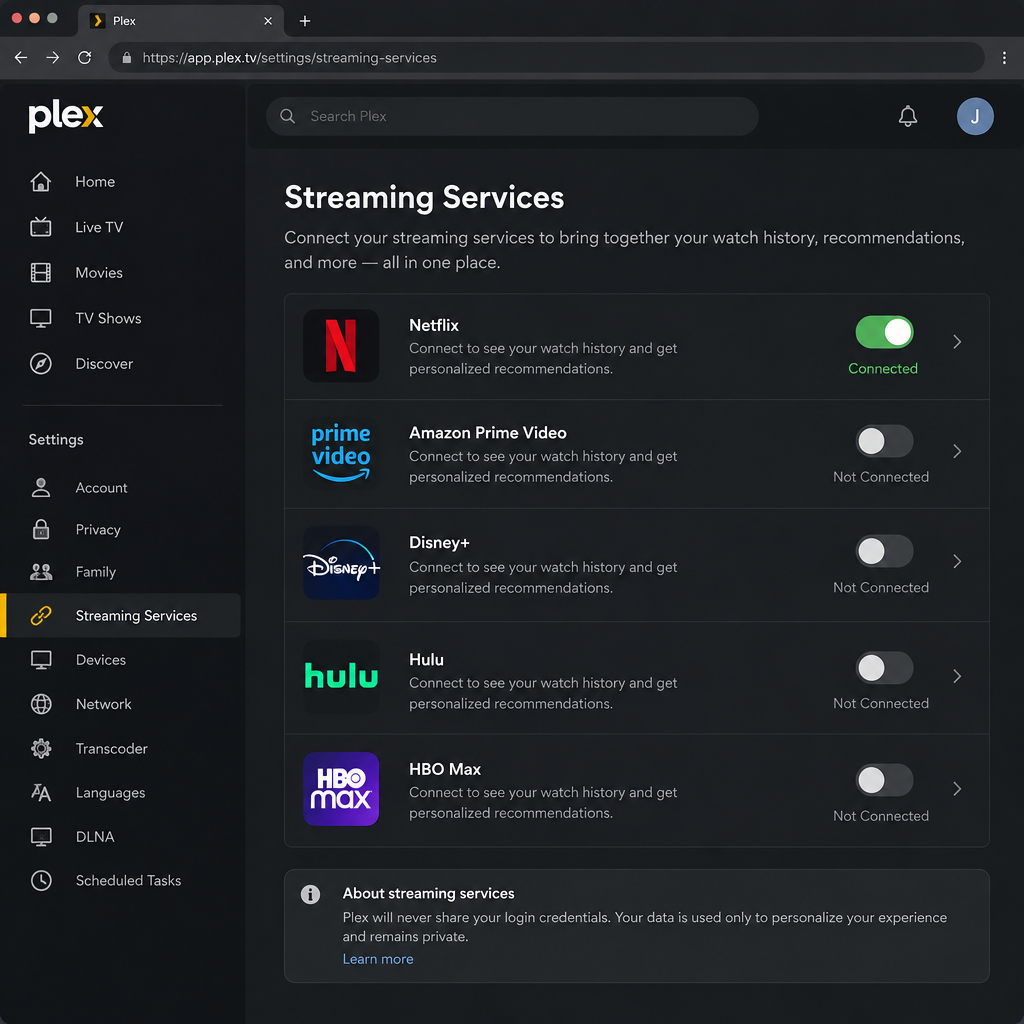
Discover connects Plex and Netflix. It can’t play Netflix content itself. Plex launched it in April 2022 to deliver on a plan it had announced earlier: one interface for the services you pay for, including Netflix, Amazon Prime Video, Disney+, Hulu and HBO Max. You can see all of your library in one place, and a single Watchlist covers every service.
Discover is free, and you don’t need a Plex Pass for it. You do still need your own Netflix subscription.
Turn on Netflix in Plex
- Sign in to Plex in a web browser, or open the Plex app on your phone, tablet or TV.
- On Plex Web, open Settings and choose Streaming Services in the left-hand list. You can also select Discover (the compass icon) in the sidebar and choose your streaming services from there.
- In the mobile apps, open the menu or your profile, go to Settings, then Streaming Services. Menu names have moved between app versions, so look for “Streaming Services” if your screen looks different.
- Switch on Netflix, plus any other services you pay for.
- Save your changes and go back to the home screen.
Watch a Netflix title from Plex
- Search for a film or show in Plex, or browse the Discover tab.
- Open the title’s page. It shows which of your services carry it, for example “Watch on Netflix”.
- Select Netflix. On supported devices, Plex opens the Netflix app straight to that title.
- To save a title for later, add it to your Watchlist. The Watchlist syncs across every device where you’re signed in to Plex.
What to expect
- Playback happens in the Netflix app. You need the Netflix app installed and signed in on the same device.
- Deep links don’t work everywhere. Some reviewers found that certain devices, including some Apple TV and Samsung TV apps, showed a message saying links into other apps weren’t available. On those devices, use Plex to find the title, then open it yourself in Netflix.
- Results depend on your region. Netflix’s catalog varies by country, so Plex only lists what’s available where you are. A missing title usually means Netflix doesn’t carry it in your country.
Why you can’t put Netflix videos in your Plex library
Some websites sell “Netflix downloader” programs that save Netflix shows as files you can add to a Plex library. Avoid them. Netflix content is protected by DRM (copy protection), and ripping it breaks Netflix’s terms of use. These tools also often come from unknown developers, which brings a malware risk.
The official way to watch offline is the Download feature inside the Netflix app on supported phones, tablets and Windows devices. Those downloads stay inside the Netflix app, can’t be moved into Plex, and expire after a set time.
FAQ
Is there a Netflix plug-in for Plex in 2026?
No. Plex stopped supporting plug-ins in 2018, and the old Netflix plug-in also needed Microsoft Silverlight, which lost support on October 12, 2021. Today the only official link between the two is Plex’s Discover feature, which lists Netflix titles and hands playback over to the Netflix app.
Can Plex play Netflix shows inside the Plex app?
No. Plex shows Netflix titles in search and in your Watchlist, but playback always happens in the Netflix app. On supported devices, Plex opens Netflix straight to the right title. On others, you open Netflix yourself.
Do I need Plex Pass to see Netflix in Plex?
No. Discover, the Universal Watchlist and cross-service search are free with a Plex account. Plex Pass is a paid subscription for features like remote access to your own media server and hardware transcoding. It doesn’t add Netflix playback.
Why doesn’t a Netflix title show up in Plex?
The usual reason is that Netflix doesn’t offer that title in your country. Plex only lists what’s available in your region. Also check that Netflix is switched on under Settings > Streaming Services. If Plex’s availability data is out of date for a title, search for it directly in the Netflix app.
Can I download Netflix episodes and add them to my Plex server?
No. Netflix downloads are protected and only play inside the Netflix app, and they expire after a set time. Third-party tools that rip Netflix videos break Netflix’s terms and can carry malware. Keep your own legally owned media in Plex and watch Netflix in its own app.
Does Plex work with Netflix on Windows?
Discover works the same way on Windows as on any other platform. Turn on Netflix in Plex Web or the Plex Windows app, then open titles in the Netflix app or in a browser. The old Mac-only limit disappeared along with the plug-in.
Sources
- Silverlight end of support on October 12, 2021 (Microsoft Support)
- Plex kills off support for Cloud Sync, Plugins and bookmarking features (TechCrunch)
- Huge Plex update adds a universal watchlist, cross-service search and new discovery features (TechCrunch)
- Find where to watch something with “Discover” and your “Watchlist” (Plex Forum)
- A beginner’s guide to Plex (Plex Blog)













