
File transfer software lets you send files that are too big for email, such as video, design files, backups and datasets, quickly and securely to coworkers, clients and your own devices. As of November 2026, Gmail still caps attachments at 25 MB per email and Outlook defaults to 20 MB for internet email accounts, so anything bigger needs a cloud link or a dedicated transfer tool. The main benefits are time saved, easier work with clients in other countries, practical remote work and less paper. Most small teams already have enough with Google Drive or OneDrive. Accelerated tools such as Raysync are worth paying for only when you move very large files over long distances on a regular basis.
Moving data at work gets interrupted all the time. A file is too large to attach, the connection is too slow, or the person who needs it never receives it. High-speed file transfer software fixes this. Files go out quickly and reliably, and size or a sluggish connection stops being a reason a transfer fails.
The Main Benefits of File Transfer Software
Businesses get four practical benefits from file transfer software:
- It saves time, money and staff effort compared with email workarounds or physical delivery.
- It makes working with clients in other countries easier, because files arrive in minutes whatever the time zone.
- It supports remote and hybrid teams who need to swap large files from home.
- It helps companies use less paper.
Each one is covered below, after a quick look at what this kind of software is and where everyday tools reach their limits.
What Is File Transfer Software?
File transfer software is a program or service that sends and receives files between two or more users or devices. Some tools work over the internet. Others, such as AirDrop and Quick Share, work between nearby devices without one. These tools are most useful when a file is too large for standard sharing methods like email, or when the format (audio, video, large archives and so on) is awkward to send any other way.
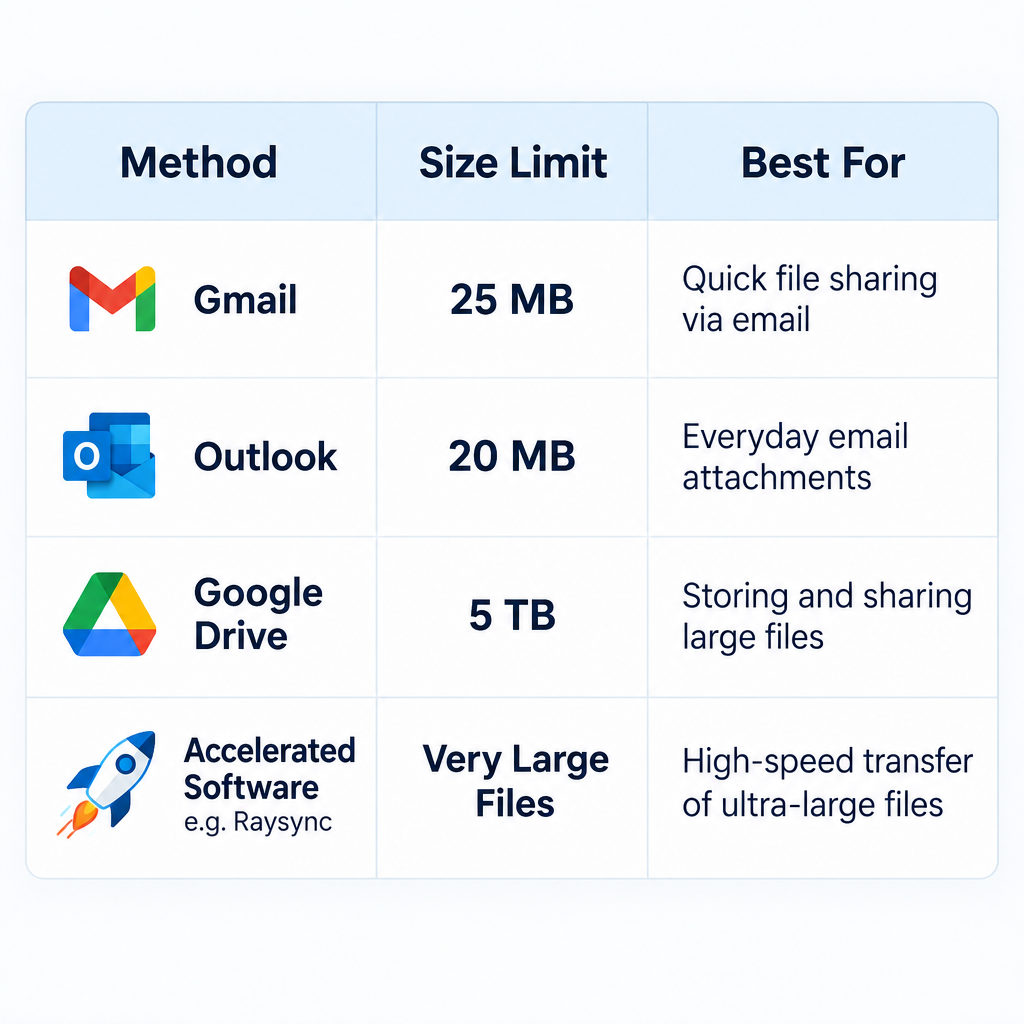
The usual options fall into a few groups. Each has different limits:
| Method | Typical size limit | Best for |
|---|---|---|
| Gmail attachment | 25 MB total per email (larger files become a Google Drive link) | Small documents and photos |
| Outlook attachment (Outlook 2013 and later, POP/IMAP accounts) | 20 MB by default (Exchange accounts follow the server’s limit) | Small office files |
| Google Drive link | Files up to 5 TB, with 750 GB of uploads per user every 24 hours | Sharing large files with anyone who has a link |
| AirDrop and Quick Share | Nearby devices only, no internet needed | Phone to laptop, or phone to phone, in the same room |
| Accelerated transfer software (for example Raysync or IBM Aspera) | Built for very large files and folders | Media, engineering and data teams sending terabytes over long distances |
Nearby sharing between phone brands has also improved. Google made Quick Share work with Apple’s AirDrop on the Pixel 10 in November 2025 and added the Pixel 9 series (except the Pixel 9a) in February 2026. Google also said support would reach more Android phones during 2026. An Android phone can now send files straight to an iPhone, iPad or Mac.
Why Does Your Business Need High-Speed File Transfer Software?
Your business needs it as soon as email limits and slow uploads start costing staff time. People shared data before the internet too, but the methods have changed a lot since then. Today, PC-to-PC transfer software and PC-to-mobile transfer over Wi-Fi save real time, and that time adds up across a team.
Not every business needs a paid tool. If your largest files are a few gigabytes, a cloud storage link from Google Drive or OneDrive usually does the job. Dedicated high-speed software pays off when you send very large files often, over long distances, or under strict security rules.
1. Save Useful Resources
Good file transfer software sends data faster and with fewer errors. Staff spend less time splitting files, compressing them or re-sending failed uploads. Compare it with older methods such as mailing a hard drive by parcel or express courier, and the faster, cheaper option is obvious for most companies.
It also helps you reach many different kinds of users. Large companies serve customers, partners and suppliers with very different setups. With file transfer software they can send the right file to each person quickly, and the file arrives exactly as it was sent.
Marketing teams are a common example. Campaign videos and photo sets for social channels are often far too big for email. The same teams that compare Social media management tools free of charge also need a dependable way to hand raw files to agencies and clients.
2. Make It Easier to Work With International Customers
Companies that use file sharing software can send international clients the data they need at any hour, so time zone differences matter much less. The recipient downloads the file when their working day starts. Nobody has to stay up late to hand it over.
The cost of shipping drives or paper to overseas clients by courier is mostly gone, too. PC-to-PC and PC-to-mobile transfer tools make sending and receiving files simple. Distance does slow down ordinary internet transfers, and this is the problem accelerated tools are built to solve. Raysync, for example, uses its own UDP-based protocol instead of standard TCP to keep speeds up on long international routes.
3. Support Remote and Hybrid Work
File transfer software became essential during the COVID-19 pandemic, when offices emptied almost overnight. It is still essential now that remote and hybrid work are normal. Staff working from home on the same project can send and receive files without being on the office network.
At home, the real limit is usually upload speed. Many home plans upload at a small fraction of their download speed, so a large file can crawl even when the transfer tool is working fine. Before you blame the software, run a speed test or check your plan’s details. If you get service through DIRECTV, for example, look up your directv internet speed tier.
4. A Big Step Toward a Paperless Office
Offices waste a lot of paper, and that has an environmental cost. File transfer software has helped companies cut that waste and work more efficiently. Transfer apps for Windows PCs, Macs, Android phones and iPhones connect everyone in a company, so documents can be shared, reviewed and stored without being printed.
Paperless workflows also help customers. The Benefits of social media marketing for consumers, such as quick answers, product videos and early offers, depend on content moving fast from the people who make it to the people who publish it. Digital file handoffs make that speed possible.
Raysync File Transfer Software
Raysync is a commercial transfer product for businesses that move large and small files between their own staff and outside partners. It is sold mainly as an alternative to IBM Aspera. Its main features are:
- Accelerated transfer: a self-developed UDP-based protocol designed to keep transfers fast over long-distance and unstable international connections.
- Deployment options: on-premises, cloud (SaaS) or a hybrid of the two.
- Security: the vendor’s pricing page lists AES-256 encryption and TLS 1.3 support.
- Management: file management, user and permission controls for organisations, an admin dashboard, and API/SDK integration with other systems.
On Raysync’s official pricing page, the SMB on-premises plan is listed at $1,599 per year. Enterprise pricing is available only on request. Some third-party listings still show older starting prices, so check the vendor’s page before you budget. Raysync offers a 7-day free trial of its Enterprise edition, which is enough time to test transfers on your own connection before you buy.
Raysync is overkill for most small offices. If your team mostly shares files under a few gigabytes inside one country, cloud storage you already pay for will usually do the job. Raysync makes sense for media production, engineering, research and other teams that move very large datasets across continents on a regular basis.
FAQ
What is the main benefit of file transfer software?
The main benefit is speed with reliability. Large files that email rejects reach the right person quickly and arrive intact. That saves staff time and avoids couriers or repeated failed uploads.
What is the largest file you can send by email?
Gmail allows up to 25 MB of attachments per email, and anything larger is sent as a Google Drive link. Outlook 2013 and later default to 20 MB for internet email accounts, while Exchange and Microsoft 365 accounts follow whatever limit the server administrator sets. For anything bigger, use a cloud link or a transfer service.
Is free file transfer software good enough?
For most people and small teams, yes. Google Drive, OneDrive and the free tiers of services like WeTransfer cover everyday sharing. Free tiers do cap transfer size and how long links stay active, so check the limit shown when you upload before sending anything important.
Is file transfer software secure?
Business tools encrypt files in transit, and many also encrypt stored files. Raysync, for example, lists AES-256 and TLS 1.3. Use links that expire, add passwords where the tool allows it, and never send sensitive files through a service your company has not approved.
Can you send files from Android to iPhone without an app?
On supported phones, yes. Since November 2025, Quick Share on the Pixel 10 can send files to iPhones, iPads and Macs via AirDrop. Google added the Pixel 9 series (except the Pixel 9a) in February 2026 and is bringing the feature to more Android phones during 2026.
When should a business pay for accelerated transfer software?
Pay for it when you regularly move very large files, often hundreds of gigabytes or more, across long distances, or when compliance rules require detailed control over who accessed what. Use a free trial to compare speeds on your own network before you commit.
Sources
- Google Gmail Help: Attachment size limits
- Microsoft Support: Attachment size exceeds the allowable limit error in Outlook
- Google Workspace Admin Help: Storage and upload limits for Google Workspace
- Google for Developers: Google Drive API usage limits
- Raysync: Pricing and plans
- Raysync: Free trial













