
To get into Publix Passport, go to Publix’s own associate site at Publix.org, click the Passport login, and enter your Publix user ID and password. If you can’t sign in, click “I need help logging in” under the Log in box and follow the on-screen steps. If that doesn’t fix it, ask your store manager or Publix’s support team. Use only the official Publix.org address, because many lookalike “Publix Passport” sites copy the login page.
How to Log In at Publix Oasis Passport or Publix.org
Publix Passport (Publix writes it “PASSport”) is the online portal for Publix associates. This guide covers what you need before you sign in, the login steps, and what to do if you forget your password.
To log in, you need a valid Publix user ID and password, a working internet connection, and an up-to-date web browser on a phone, tablet or computer. First-time users usually get stuck on one of three things: they don’t have their login details yet, they type the wrong ID, or they end up on a fake site.
What Is Publix Passport
Publix Passport is the private website Publix runs for its associates. Publix is one of the biggest supermarket and pharmacy chains in the US, with more than 1,400 stores across eight Southeastern states. Many associates still call the portal “Publix Oasis,” an older name for the associate site, so both names lead to the same place.
Through Passport, associates can see their work schedules, view pay stubs, check health insurance and other benefits, and find tax documents such as the W-2. Publix also uses the site to share company news and resources with associates.
Benefits of a Publix Passport Account
A Passport account lets you handle the most common work tasks yourself, without calling the office:
- Check your work schedule
- View your pay stubs
- Check your health insurance and other benefits
Login Requirements
Have these ready before you start:
- The official login address: www.publix.org
- A valid Publix Passport user ID and password (new associates get these during onboarding)
- An up-to-date web browser, such as Chrome, Edge, Safari or Firefox
- A PC, laptop, phone or tablet with a reliable internet connection
Publix Passport Login Step by Step
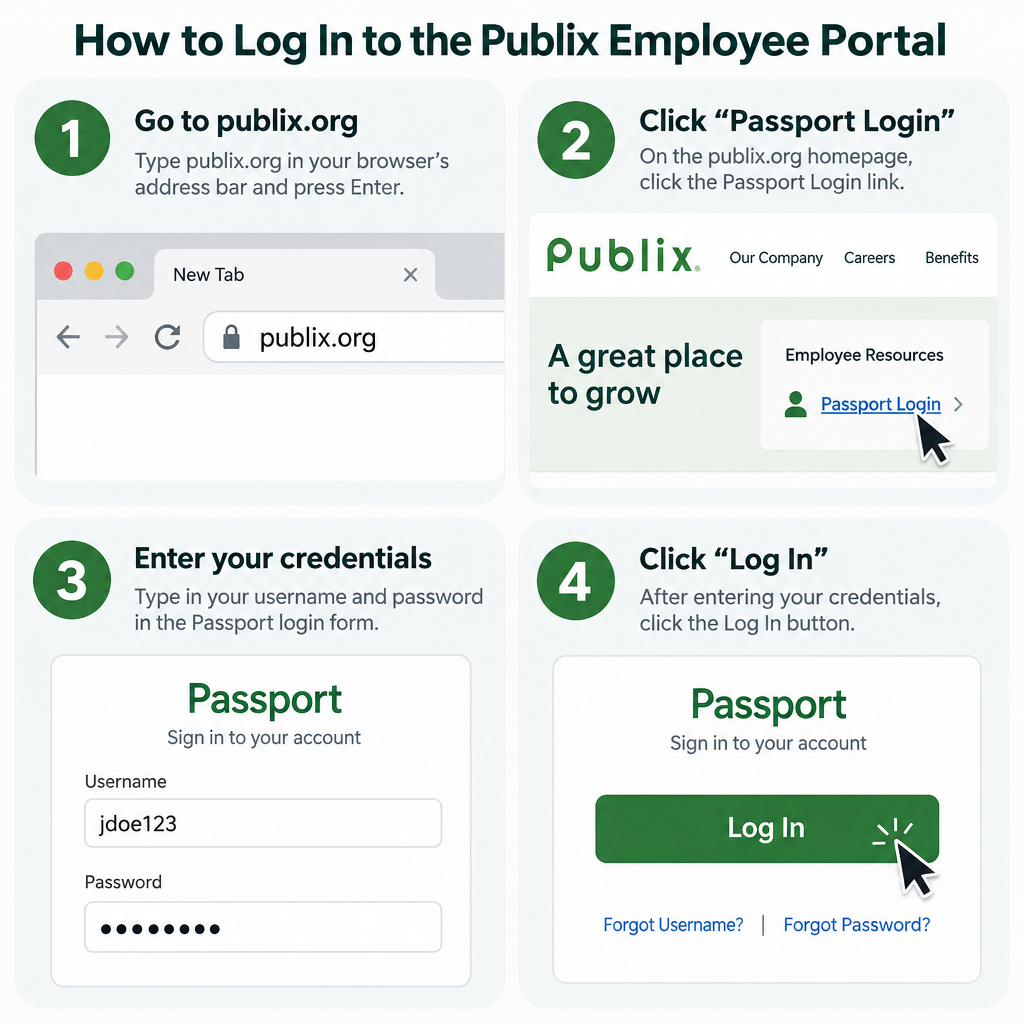
Follow these steps to sign in to your Publix Passport account:
- Open your browser and type Publix.org into the address bar yourself. Don’t click a search ad.
- Choose the Passport login on the associate site.
- Enter your user ID and password in the Log in box.
- Click the Log in button to open your account.
If the page won’t load, first check that the address really ends in publix.org. Then try a private browsing window or clear your browser’s cache, and sign in again.
How to Reset a Forgotten Publix Passport Password
Publix’s own instructions say to use the help link on the Passport homepage:
- Go to the Publix Passport homepage on Publix.org.
- Under the Log in box, click “I need help logging in.”
- Enter your Publix user ID when asked.
- Follow the on-screen steps to confirm who you are.
- Once you’re verified, set a new password and sign in with it.
If you can’t finish the reset, or your account stays locked after a few minutes, stop trying. Repeated failed attempts can keep the account locked. Ask your store manager or Publix’s support team to verify your identity and reset the account.
How to Avoid Fake Publix Passport Sites
The safest rule is simple: type your Publix password only on a page whose address ends in publix.org. If you search for “Publix Passport,” most of the results are not run by Publix. Many of them post their own phone numbers and “reset” pages.
Every popular login gets copied this way. Bank logins are a common target (people search terms like wellsfargobanklogin), and so are email portals such as www.optonline.net and third-party tools like smihub. A real employer or bank will never ask for your password on a different domain. If you think you typed your Publix password on a fake page, change it right away through the official help link and tell your manager.
About Publix
Publix Super Markets, Inc., usually called Publix, is an American supermarket chain owned by its employees. Its headquarters are in Lakeland, Florida. George W. Jenkins founded it in 1930. It is a private company, owned mostly by current and former associates and by members of the Jenkins family.
Publix calls itself the largest employee-owned company in the United States, with more than 260,000 associates. It has stores in Florida, Georgia, Alabama, Tennessee, South Carolina, North Carolina, Virginia and Kentucky. Its stock isn’t publicly traded. Only current associates and board members can buy it, and the price was set at $18.70 per share on November 1, 2026.
Publix Passport Contact Info
Your fastest help for Passport problems is the “I need help logging in” link. If that doesn’t work, talk to your store manager, who can pass the problem to the right Publix support team.
The main phone number for Publix’s corporate office in Lakeland is (863) 688-1188. The office is at 3300 Publix Corporate Pkwy, Lakeland, FL. Be careful with Passport “help desk” numbers posted on third-party sites, because many of them don’t match each other and aren’t published by Publix.
Final Tip
Bookmark the real Publix.org login page in your browser the first time you sign in successfully. After that, open Passport from the bookmark instead of a search engine. That protects you from fake sites and saves you a step every time you check your schedule or pay stub.
FAQ
What is the official Publix Passport website?
Publix Passport lives on Publix’s associate site at Publix.org. Type the address yourself and check that the page address ends in publix.org before you enter your user ID and password. Pages on other domains that use the Passport name are not run by Publix.
Is Publix Oasis the same as Publix Passport?
Yes, for most associates. Oasis is an older name many associates still use for the Publix associate site, and today Passport is the login they mean. Both names point to the same sign-in at Publix.org.
What should I do if I forgot my Publix Passport password?
Click “I need help logging in” under the Log in box on the Passport homepage and follow the on-screen steps to confirm your identity and set a new password. If the reset fails or your account is locked, ask your store manager or Publix’s support team to reset it.
Can I check my Publix schedule and pay stubs on my phone?
Yes. Passport works in a mobile browser such as Safari on iPhone or Chrome on Android. Use the same Publix.org address and login details you use on a computer.
How do new Publix associates get their login details?
New associates get their Publix user ID and first sign-in instructions during onboarding. If you haven’t received them, ask your manager before you try other sites or numbers you find online.
Who do I call for Publix Passport problems?
Start with the “I need help logging in” link, then your store manager. The main number for Publix’s corporate office is (863) 688-1188. Avoid “help desk” numbers listed on unofficial Passport websites.
Sources
- Publix company news: January 2022 profile (PASSport login help)
- Publix corporate office location and phone number
- Publix Reports Third Quarter 2026 Results and Stock Price
- Publix Reports First Quarter 2026 Results and Stock Price













