
You can get a blue verified badge on Instagram in one of two ways as of November 2026. The free way is to tap Request verification under Account type and tools, but Instagram only approves accounts it considers notable. The paid way is a Meta Verified subscription, or a Meta One creator or business plan, which gives the badge to eligible accounts after an ID check. In the US, paid plans start at about $14.99 a month in the app. Buying followers will not get you verified, and it breaks Instagram’s rules.
You may have wondered about the small blue checks next to some of your favourite accounts. They show that Instagram has confirmed the account really belongs to the person, brand or organisation it claims to be.
Until 2023 the only way to get the badge was to pass Instagram’s notability review. That free review still exists. Since Meta Verified arrived in February 2023, ordinary creators can also pay to get a confirmed identity and the badge.
What the verified badge means
The badge tells people the account is authentic. They can follow it, message it or buy from it knowing it is not a fake or an impersonator.
The free badge used to be reserved almost entirely for celebrities, public figures, journalists and large organisations, and it still mostly is. A large follower count helps only when it reflects real public interest. Some people buy followers hoping to look “notable”, but buying followers breaks Instagram’s Terms of Use and Community Guidelines. Instagram removes fake followers and can restrict the account, and inflated numbers can count against you in a verification review.
Anyone can now submit the free request, including personal accounts, and anyone who meets the basic requirements can buy Meta Verified. Approval through the free route still depends on notability.
How to become a verified Instagram user
Choose your route first. The two routes judge your account in very different ways.
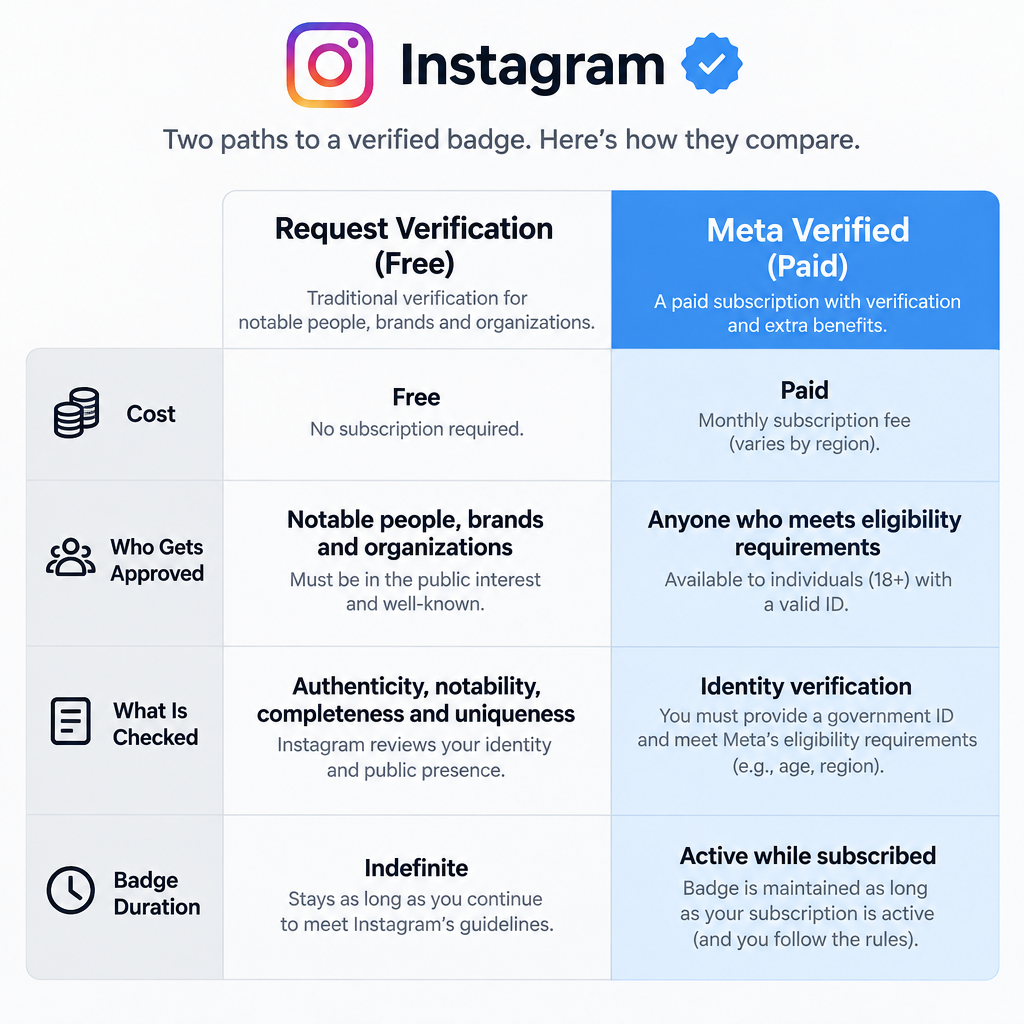
| Request verification (free) | Meta Verified or Meta One (paid) | |
|---|---|---|
| Cost | Free | From about $14.99/month in the US app; varies by country and platform |
| Who gets approved | Notable people, brands and organisations | Eligible accounts that pass an ID check |
| What is checked | Authenticity, uniqueness, completeness, notability | Government ID, account history, security |
| Other benefits | Badge only | Badge plus impersonation protection and account support |
| If you stop | Badge stays unless rules are broken | Badge goes when the subscription ends |
A verified account becomes the trusted source for everything about you or your brand. Customers know they are dealing with the real business, which can help with sales and makes copycat accounts easier to spot.
If Instagram keeps signing you out while you fill in the form, work through Fix Instagram Keeps Logging Out before you try again.
Whichever route you take, follow the Instagram Community Guidelines and Terms of Use at all times. An account that breaks them can be refused or lose its badge.
For the free route, your account must also meet the requirements below.
Your account should be unique
Instagram verifies only one account per person or business. The only exception is accounts in different languages.
Fan pages, meme accounts and general-interest pages that repost other people’s content are not eligible. Instagram wants the one official presence of a real person or organisation.
Your account must be genuine and authentic
You have to prove who you are. During the request, you upload a government-issued photo ID, such as a driver’s license or passport, for a person. For a business, you upload official documents such as articles of incorporation, a recent utility bill or a tax filing.
Make sure the full name on your ID matches the name on your Instagram profile before you apply. A mismatch is one of the simplest reasons a request fails.
Your account must be public
Your profile must be public when you apply. Private accounts are not eligible for the free badge, so switch to public in Settings and activity > Account privacy before you request it.
Make sure your account is complete
Instagram looks for a full profile. That means a bio, a profile photo and at least one post, and the account needs to be active when you apply.
Keep your content original, and post regularly so the account shows real, ongoing activity. Profiles that only contain “add me” links to other social networks are not considered complete.
Make sure your account is notable
For the free badge, the account must belong to a well-known, highly searched person, brand or entity. Instagram reviews whether that person or brand appears in several news sources.
Paid or promotional content does not count as a news source. Coverage you bought, sponsored posts or press releases will not help. Coverage that helps is real reporting about you in recognised outlets, plus a following that has grown naturally. If you are not there yet, the paid route is the realistic option.
How to request verification on Instagram, step by step
The free request takes about five minutes in the Instagram app. Instagram’s current menu path is different from older guides that list “Settings > Account”.
- Open Instagram and go to your profile.
- Tap the menu (three lines) in the top right corner.
- Scroll to For professionals and tap Account type and tools.
- Tap Request verification.
- Enter your full name and choose your category, such as News/Media, Sports, Music, Entertainment, Blogger/Influencer or Business/Brand/Organization.
- Upload a clear photo of your government ID or your official business documents.
- Add your notability details: your country or region, your audience, any other names you are known by, and links to articles about you. Do not use paid or promotional links.
- Tap Submit.
Instagram sends the decision as a notification. It can take up to 30 days, and some reviews take longer. Filing a second request while one is pending cancels the first. If you are turned down, you can apply again after 30 days.
If the Request verification option will not load or the app keeps crashing, the basic troubleshooting in why is instagram not working 2021 (updating the app, clearing the cache, checking Instagram’s status) still applies.
How to subscribe to Meta Verified instead
Meta Verified is the paid route for accounts that will not pass the notability test. In the US, the basic plan costs about $14.99 a month in the app. Subscribing on the web has usually been cheaper. Business plans go higher.
Since 15 September 2026, Meta also sells Meta One plans. The creator and business tiers run from Essential at $14.99 a month to Max at $499 a month, and they include the option to get a badge after an identity check. Meta Verified is still on sale alongside them. Prices and plan names vary by country, so check the price in your own app before you pay.
- Open your profile and tap the menu (three lines).
- Under For professionals, tap Meta Verified. You can also start from Accounts Center.
- Pick the profile you want to verify and choose a plan.
- Confirm your payment details.
- Upload your government ID. In some regions you may also be asked for a short selfie video.
To qualify, you need to be at least 18, have a history of posting on the account and have two-factor authentication turned on. Your profile name and photo must also match your ID. Billing is per profile, so verifying Instagram and Facebook can mean two subscriptions. Once you are verified, you cannot change your profile name, username, date of birth or profile photo without verifying again.
Final thoughts
Verification tells people they are dealing with the real you or the real brand, and it makes impersonators much easier to spot.
If your name already appears in real news coverage, start with the free request. If it does not, Meta Verified or a Meta One plan is the honest shortcut: you pay for an identity check, not for fake popularity. In both cases, complete your profile and turn on two-factor authentication before you apply.
FAQ
How much does it cost to get verified on Instagram?
The free request costs nothing. Meta Verified starts at about $14.99 a month in the US Instagram app, and the Meta One Essential plan is also $14.99 a month. Prices vary by country and by whether you pay in the app or on the web.
How many followers do you need to get verified on Instagram?
Instagram does not set a minimum follower count for either route. The free badge depends on notability, meaning real news coverage and public interest. Meta Verified depends on your ID, age and account history, not your follower count.
How long does Instagram verification take?
Instagram says you will get a notification about a free request within about 30 days, though some reviews take longer. Meta Verified ID checks are usually much quicker, but timing depends on your region and on how clear your documents are.
What happens if Instagram denies my verification request?
You can submit a new request after 30 days. Use that time to make the profile complete and to build real press coverage. Paid placements do not count. If notability is the problem, Meta Verified is the alternative.
Can I lose my blue check?
Yes. Instagram can remove any badge if the account breaks its Terms of Use or Community Guidelines, or if it finds the request contained false information. A paid badge also disappears when you cancel Meta Verified or your Meta One plan.
Is it safe to pay someone who promises to get me verified?
No. Instagram says it never charges for the free badge and never contacts people to offer verification. Third-party “verification services” and direct messages offering a blue check are common scams. The only paid route is Meta Verified or Meta One, bought inside the app or Accounts Center.
Sources
- Instagram Help Center: Request a verified badge on Instagram
- Meta: Meta Verified
- Engadget: Meta adds new subscription tiers for businesses, creators and AI power users
- TechCrunch: Meta expands subscription push with new AI-focused plans













