
To get more real likes on Facebook posts in November 2026, post original content made for the people who already follow your Page. Ask genuine questions, reply to comments and messages quickly, and use Meta Business Suite Insights to see what works and when your audience is online. Paid boosts can bring in new followers, but buying likes or using engagement pods breaks Meta’s rules and can cut the reach of every post you publish. Also keep in mind that Pages now count followers rather than Page likes, so what you are really chasing is likes, reactions and comments on individual posts.
How many likes does your company Page get each time you post? If you run social media marketing, you probably know that number offhand. Every business needs something different, and some channels will work better for you than others. Facebook is still too big to ignore.
Why real likes on Facebook posts still matter
Real likes come from people who are actually interested, and they keep paying off over time. Building that audience is hard work, but Facebook is still one of the largest audiences any business can reach. In January 2026, Meta CEO Mark Zuckerberg said Facebook has more than 2 billion daily active users.
There is also plenty of competition. Back in 2016, Facebook said 60 million businesses had a Page, and that number has only grown since. Breaking through takes a clear strategy, not luck.
Getting more real likes on Facebook posts is a key part of your Facebook marketing. Don’t get so focused on likes that you forget what Facebook is for, though. It is a place where people talk to each other. Every business struggles to be heard over the noise, so you are not alone.
This guide has no tricks or shortcuts. Meta is actively punishing those. In April 2025, Meta said it had removed more than 100 million fake Pages involved in scripted activity to inflate reach. Then in July 2025, it announced that accounts which repeatedly repost other people’s videos, photos or text would get reduced distribution on everything they share.
Reposting other people’s clips is exactly what that crackdown targets. Before you look up how to download videos from Facebook for your own Page, make sure the footage belongs to you or that you have permission to use it.
What works is being a good Facebook user and posting things your audience genuinely values. You can do that by:
- Making quality images and videos of your own
- Showing the real people behind your business
- Keeping a recognisable visual style
- Linking your Facebook Page to your website and other profiles
- Running giveaways that follow Meta’s promotion rules
- Using Facebook ads carefully to bring in new followers
1. Start with engagement
All social media marketing comes down to one idea: engagement. Businesses that got by on word of mouth before Instagram existed now also need influence online, and influence has to be earned and spent wisely. If you are just starting out, it is easy to feel lost about where to begin.
Engagement looks different for every business. The core idea stays the same whether you want real likes on Facebook posts or followers on Instagram: people can’t talk about your business, or buy from it, until they see your content.
It doesn’t matter much whether they find you through paid ads, influencers or your own customers sharing your posts. The effect is the same. Build your social media strategy on that idea.
2. Build brand awareness
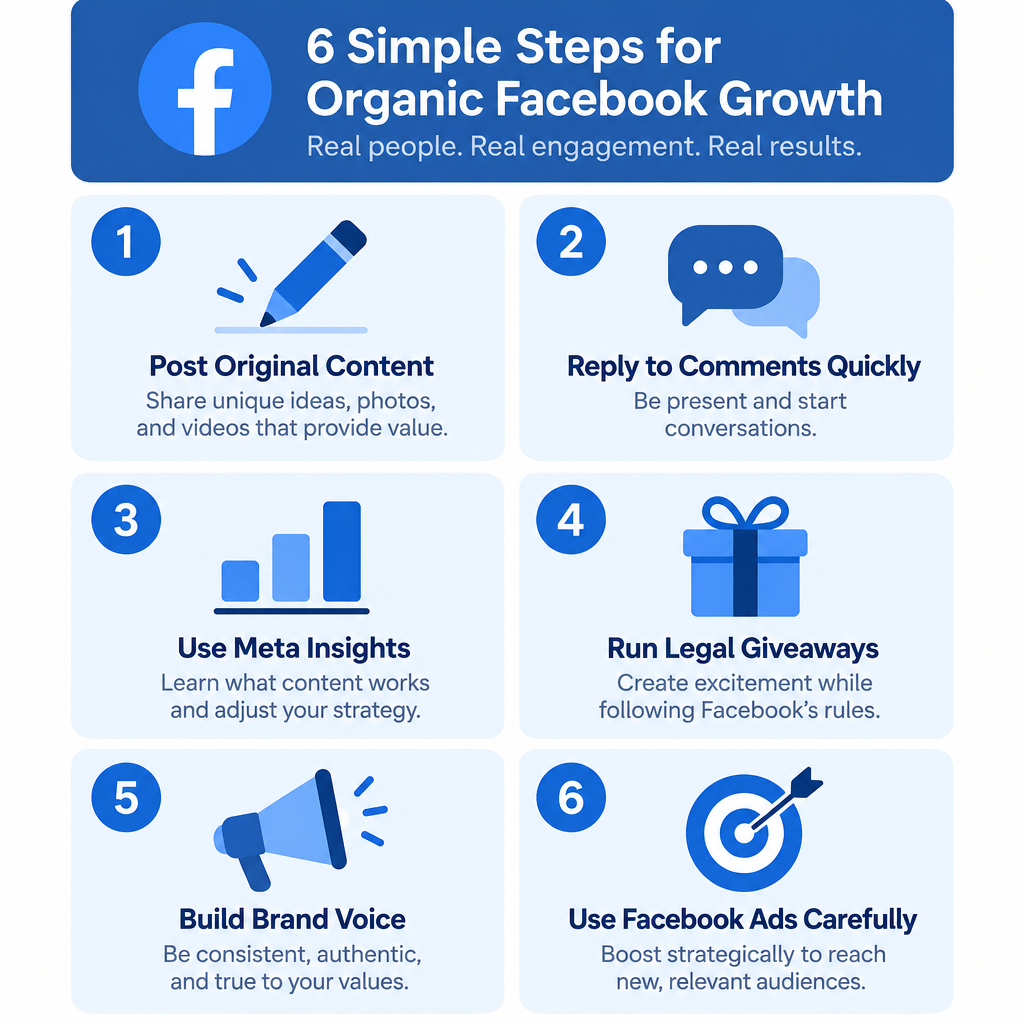
To get real likes on Facebook posts, you first need people who follow you. Almost every business has some kind of online presence, but many don’t reach as many people as they could. Posting good content often isn’t enough on its own. You need a way to get your brand in front of new people.
Use Facebook ads to find new followers
Facebook ads, run through Meta Ads Manager or the Boost post button on your Page, are the quickest way to put your Page in front of people who don’t know you yet. You can target people by location, and you can choose a goal such as engagement or messages, so Meta shows your post to people who are likely to interact with it or message you.
Targeting has changed a lot since 2021. Meta now leans heavily on its automatic Advantage+ audience. In 2025 it also removed the option to exclude people based on interests, behaviours and detailed demographics. You can still exclude custom audiences, such as your existing customers. Paid reach isn’t organic, but people who follow you after seeing an ad will see and like your organic posts later.
Find your brand voice
Once you are ready to promote your first post, decide how your brand sounds. Customers see your brand and form an opinion. Are your replies kind and helpful? Are your posts original? Do they make people want to buy or share? These small things can grow a business a lot.
Getting them right builds trust in two ways: in the product (good-looking, useful content) and in the company (friendly, thoughtful staff).
Pick promotions that attract the right audience
The kind of posts you promote decides who shows up. A wine giveaway, for example, will pull in an older crowd. Meta’s ad rules require alcohol ads to follow local age limits, which means 21 and over in the US. Use this to grow the part of your audience or customer base you care about most.
Giveaways also have their own rules. Meta’s Pages terms say you can’t make “like this Page” a condition of entry. You also can’t ask people to share the post on their own timeline or tag friends to enter. Asking people to comment on the post or send a message is allowed.
3. You’ve got a new audience. Now what?
Your ads worked and you have new followers. Now keep them interested with regular, original posts that invite real replies. Don’t worry too much about posting the wrong thing, too little or too much. People who just followed you are the most likely to engage with your next posts, and Facebook’s feed limits how much of the same thing any one person sees.
Let Insights tell you what works
Use Insights to see who your audience is and where they are, so you know who to write for. You’ll find it in Meta Business Suite under Insights, or in the Professional dashboard on your Page. It shows reach, engagement, new followers and unfollows, usually for the last 28 days. Check which posts earned the most reactions and comments, and do more of those.
Ask for real conversation, not bait
Once you know your audience, post more content that invites a real response. Polls and honest questions work well. Facebook’s content distribution guidelines push down “engagement bait”, such as “Like this if you agree” or “Comment YES”. Ask questions people actually want to answer.
Show the people behind the business
If you run a local business, a post featuring a friendly staff member customers already know will often make them smile, and it usually does well. Beyond that, it comes down to you and your brand. Post interesting things and the engagement follows.
Reply like a neighbour
Stay in touch with customers so your business becomes part of the community, and trust and awareness will grow with it. Answer comments, and if you’re not sure how to reply to a Facebook message from your Page inbox, learn it early. Quick, friendly replies are part of what people remember about your brand.
Real followers recommend you to others. Fake ones just sit there. If you keep showing up and talking with people, customer engagement and your reputation will grow, and so will the real likes on your Facebook posts. Spend that influence carefully.
Keep the momentum going
Facebook has changed a lot over the last few years, and how it works and shows content will keep changing. The methods above still give you the best chance of growing real likes, but they are only the start.
Once you have built an audience on Facebook, keep it engaged. A well-built audience can send traffic to your website, and some followers will become fans who recommend you. Real likes and shares on Facebook posts are still a major source of traffic for businesses in almost every niche.
Likes won’t come easily if you represent a business. It keeps getting harder to stand out among so many creative people, even when your ideas are good.
Posting regularly and planning your topics in advance helps in almost every case. Keep your Page inbox tidy as well. If customer chats pile up in Messenger, learning how to delete old photos in Messenger conversation threads makes it easier to keep track of what still needs a reply.
FAQ
Can you buy real likes on Facebook?
No. Bought likes come from fake or uninterested accounts, so they aren’t real. Meta’s Community Standards ban fake engagement designed to mislead people about how popular content is. Its distribution guidelines also say Pages that artificially inflate engagement will see their posts shown to fewer people.
Do Facebook Page likes still exist?
Not in the old sense. With the new Pages experience announced in January 2021, Facebook dropped the Page Like count and now shows followers instead. People can still like and react to individual posts, which is what this guide covers.
Why are my Facebook posts getting fewer likes than before?
Usually it’s one of three things. Your posts reach fewer people, they look like engagement bait, or they reuse content that isn’t yours. Check reach in Insights first. If reach is fine but likes are low, the content isn’t connecting. If reach dropped, look at whether you reposted other people’s material, which Meta has penalised since July 2025.
Does boosting a post help organic likes?
Indirectly, yes. A boost is a paid ad, so the likes it earns aren’t organic. But people who follow your Page after seeing it will see your later posts for free. Boosting works best on a post that is already doing well organically.
How often should a business post on Facebook?
Post often enough that people don’t forget you, and only as often as you can keep quality high. Insights shows when your followers are online, so schedule posts for those times. You can plan them ahead in Meta Business Suite.
Are Facebook giveaways allowed?
Yes, if they follow Meta’s promotion rules. You can ask people to comment or message the Page to enter. You can’t require a Page like, a share on their own timeline or friend tags. You also have to run the giveaway legally where you are, including any official rules your local laws require.
Sources
- Meta Transparency Center: Inauthentic behaviour policy
- Meta Transparency Center: Content distribution guidelines, inauthentic sharing













