To speed up a WordPress site in November 2026, start with four things. Update WordPress (7.1.4 is the current release), your theme and your plugins, and move your site to PHP 8.3 or newer. Add a caching plugin, put a free CDN such as Cloudflare in front of the site, and host it with a company built for speed. None of these steps needs code, and the first two are free and take about 15 minutes.
A fast website helps you in two ways. Visitors stay longer, and search engines rank faster pages higher, so more people see your content. WordPress powers a huge share of the web because it is easy to use, and thousands of plugins take it far beyond its roots as a simple blogging app. You can build an online store, a forum, a blog, a portfolio, a course site or even a social network with it. Whatever you build, it has to be fast to compete.
This guide covers the four factors that matter most for WordPress speed. None of them needs coding or developer work, so you can do all four even if you are completely new to WordPress.
Use the latest version of WordPress, your theme and your plugins
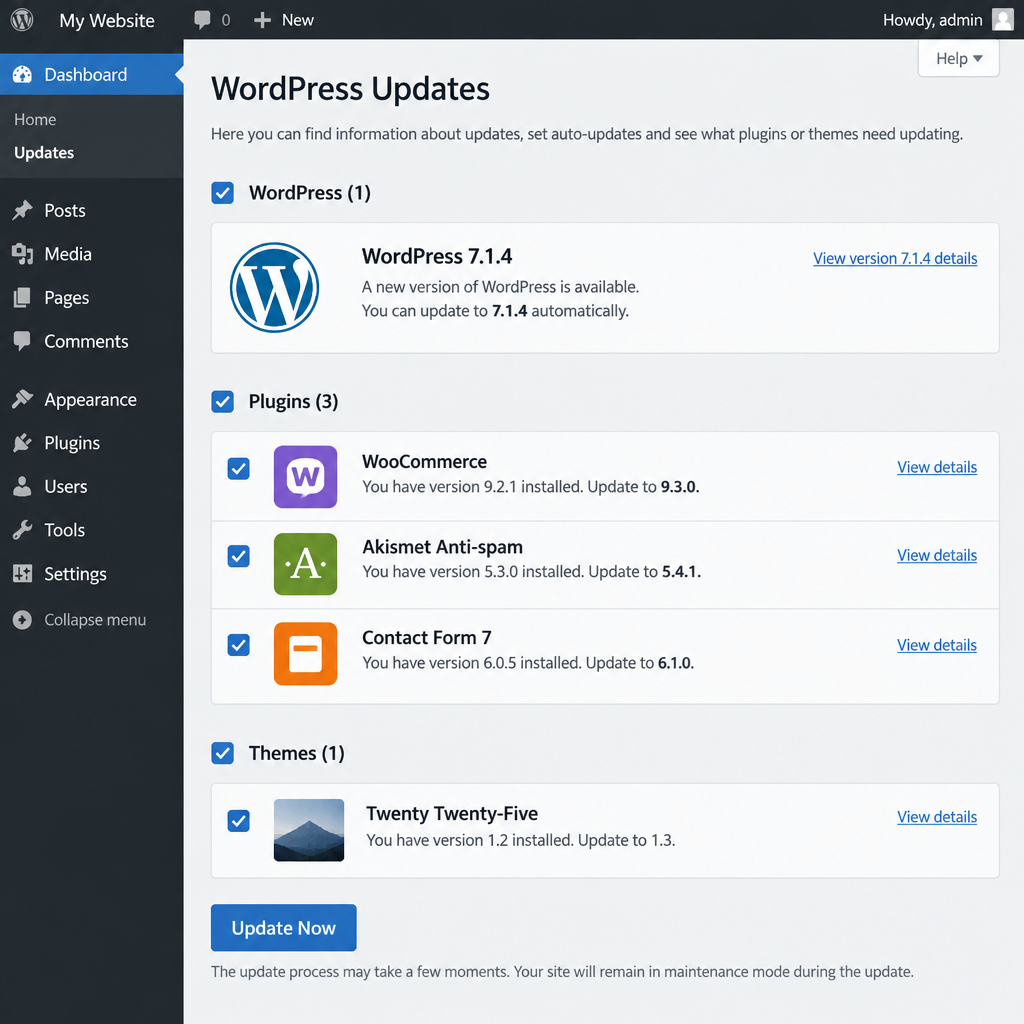
Keeping everything up to date gives you the newest performance improvements and security fixes from each developer. As of early November 2026, the current stable release is WordPress 7.1.4. The 7.1 “Mary Lou” release came out on August 19, 2026, after WordPress 7.0 “Armstrong” on May 20, 2026. WordPress 7.2 is planned for December 2026.
To update, go to Dashboard > Updates in your WordPress admin area. Back up your site first, then update WordPress core, then your plugins and themes.
Check your PHP version too. PHP is the language WordPress runs on, and newer versions are noticeably faster. WordPress.org now recommends PHP 8.3 or greater and MySQL 8.0+ or MariaDB 10.6+, with HTTPS on every site. PHP 7.4 still runs WordPress, but it has reached end of life and no longer gets security fixes. You can see your current version under Tools > Site Health > Info > Server. You usually change it in your hosting control panel (in cPanel, look for Select PHP Version or MultiPHP Manager).
Don’t overload WordPress with plugins either. Keep your setup as simple as you can. Too many plugins can slow down the pages your visitors see and your admin area as well. Go to Plugins > Installed Plugins, then deactivate and delete anything you no longer use.
Install a caching plugin
Caching is the biggest free speed boost most WordPress sites can get. Without it, WordPress rebuilds every page for every visitor by running PHP and querying the database. A caching plugin saves a ready-made copy of each page and sends that copy straight to the next visitor, so the server does far less work. Good caching plugins also tell browsers to keep files such as images, stylesheets and scripts. Returning visitors then load your content much faster because their browser doesn’t download the same files again.
There are thousands of WordPress caching plugins, but you only need one. Running two at once often causes conflicts. Some common choices:
- LiteSpeed Cache (free): the best match if your host runs a LiteSpeed web server
- WP Super Cache (free, from Automattic): simple and dependable on most hosts
- W3 Total Cache (free): more settings, better suited to experienced users
- WP Rocket (paid): easy setup with many speed features built in
You can read here for a closer look at which caching plugins are worth using.
Use a CDN service
CDN stands for “Content Delivery Network.” It is a worldwide network of servers, called edge nodes or points of presence (PoPs), that sits between your site and your visitors. The first time someone near a PoP visits your site, the CDN stores copies of your static files there: images, CSS and JavaScript. The next visitor from that region gets those files from the nearby PoP, not from your server, so the page loads faster for them.
Cloudflare is a great choice because its Free plan includes a CDN and basic caching. Create an account on Cloudflare’s website, add your domain, and switch your domain’s nameservers to the ones Cloudflare gives you.
The free CDN caches your static files but not the HTML pages themselves. For full-page caching at the edge, Cloudflare sells Automatic Platform Optimization (APO) for WordPress. It costs $5 a month on the Free plan and is included in the Pro plan, which costs $20 a month billed yearly.
Pick a hosting provider built for performance
Your hosting provider matters as much as any plugin. Choose one that focuses on speed and reliability, because your host can make or break your online brand. A cheap server that is slow or keeps going down will undo every other fix on this page.
One excellent hosting provider you can consider is HostArmada. The company launched in late 2019 and has offered shared cloud hosting, VPS and dedicated servers ever since. Its shared plans are called Start Dock, Web Warp and Speed Reaper. Here are the key features you get with HostArmada’s shared hosting:
- Free website migration
- Free SSL certificate
- Automatic daily backups
- NGINX web servers on the Start Dock and Web Warp plans, and LiteSpeed on the top Speed Reaper plan
- Data centers in the US, Canada, Europe and Asia-Pacific, chosen when you sign up
- 24/7 support by phone, live chat and ticket
- Low introductory prices, though renewals cost more
- 45-day money-back guarantee on shared plans (not on monthly billing; VPS and dedicated servers get 7 days)
- 99.9% uptime guarantee
If you want a reliable, secure and fast host with good customer support, HostArmada is worth a look. Check the renewal price before you buy, and if you plan to use the LiteSpeed Cache plugin, choose the plan that runs LiteSpeed.
Your next step
These four steps can make your WordPress site much faster without writing or changing a single line of code. Start with the free ones: update everything, switch to PHP 8.3 or newer and install one caching plugin. Then run your homepage through Google PageSpeed Insights so you have a baseline score. Add Cloudflare after that and test again. If your server response time is still slow, that points to your hosting, and moving hosts is the step that will pay off most.
FAQ
Why is my WordPress site so slow?
The most common causes are an outdated PHP version, no caching, too many or badly built plugins, large uncompressed images and slow hosting. Start with Tools > Site Health in your dashboard, which flags outdated software and server problems. Then test the site with Google PageSpeed Insights to see which files slow it down.
Is it safe to update WordPress and plugins?
Yes, as long as you back up first. Updates fix security holes and often speed things up. Problems are rare, but a plugin that hasn’t been updated in a long time can clash with a new WordPress release. That’s why a backup or your host’s staging copy is worth having before major updates.
Do I need both a caching plugin and Cloudflare?
They do different jobs, so most sites benefit from both. The caching plugin cuts the work your server does to build each page. Cloudflare serves your static files from servers close to each visitor. Don’t stack several caching plugins on top of each other, though.
Is Cloudflare’s free plan enough for a small WordPress site?
For most blogs and small business sites, yes. The Free plan includes the CDN, basic caching and free SSL. APO, at $5 a month on the Free plan, adds full-page caching at the edge. It mainly helps sites with visitors in many countries.
Which PHP version should WordPress use in 2026?
WordPress.org recommends PHP 8.3 or greater. Older versions such as PHP 7.4 still run WordPress, but they no longer get security fixes and are slower. Test your site after switching, and switch back in your hosting panel if a plugin breaks.
Will changing hosts really make my site faster?
It can, especially if your current server takes a long time to respond before anything loads. Plugins can’t fix a slow server. Many hosts, HostArmada included, move your site for free, which makes switching less risky.
Sources
- WordPress.org: Requirements
- WordPress.org: Releases
- Cloudflare: Plans
- Cloudflare: Automatic Platform Optimization for WordPress
- HostArmada