

The best free email template builders in November 2026 are Stripo, Beefree, Mailchimp, Brevo (formerly Sendinblue), Unlayer, Topol.io and Postcards. All of them still have a free plan or free editor that lets you design a responsive email without writing code. Moosend and Twilio SendGrid have dropped their permanent free plans and now offer only time-limited trials. If you just need a good-looking template to paste into the email service you already use, start with Stripo or Beefree. If you want to design and send from the same place at no cost, use Brevo or Mailchimp.
Freelancers who need a low-cost but effective email marketing setup still have plenty of free tools to choose from. According to the Radicati Group, there were about 4.48 billion email users worldwide in 2024, and the number is expected to pass 4.85 billion by 2027. That is a bigger audience than any other communication channel, and email marketing is still cheap to run.
Free email template builders let you promote your brand without paying for design work. The tools below are a good place to start if you want to grow a freelance business.
The 12 Best Free Email Template Builders for Freelancers
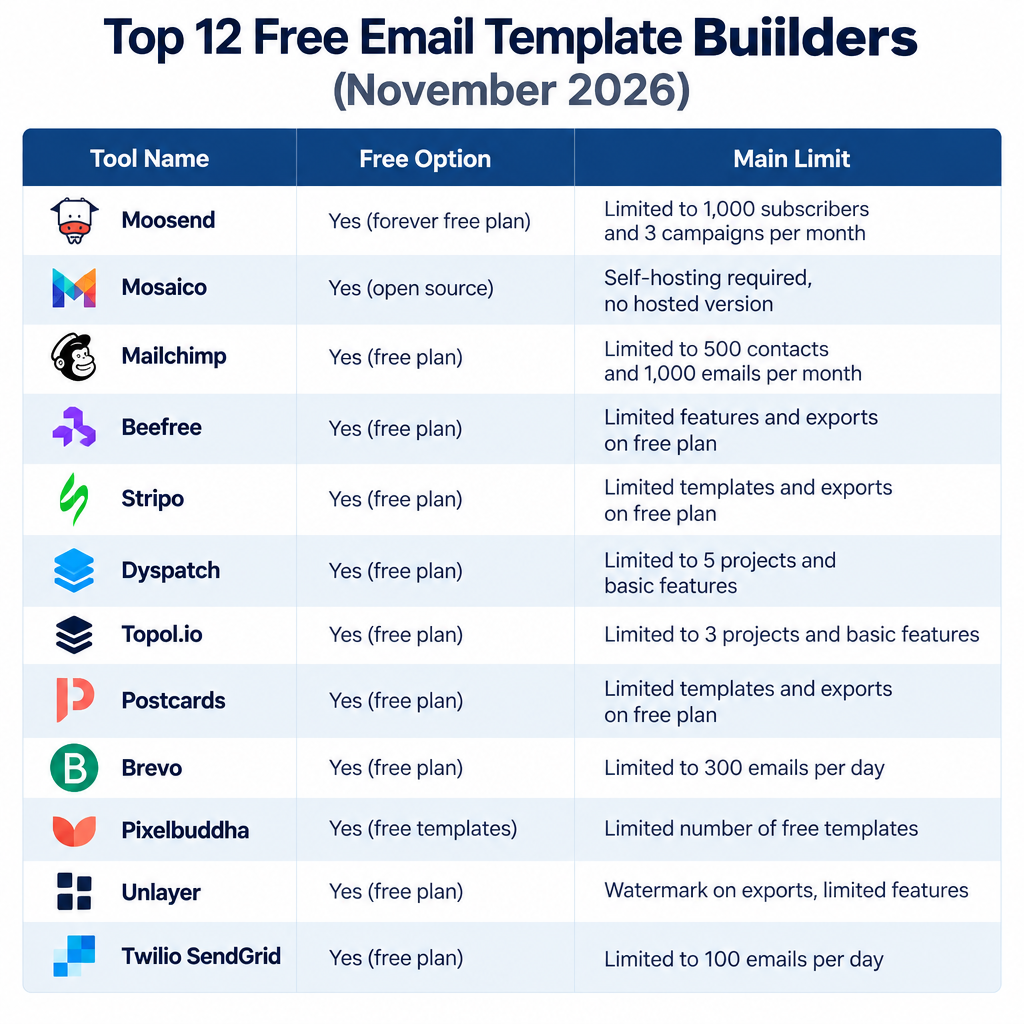
Each tool is covered below, along with what its free option includes today. Several of these tools have changed their free plans since they first became popular, so the table shows where each one stands in November 2026.
| Tool | Free option in November 2026 | Main limit |
|---|---|---|
| Moosend | 30-day free trial only | Paid Pro plan from $9 a month for 500 contacts |
| Mosaico | Free, open source (GPL) | You run and maintain it yourself |
| Mailchimp | Free plan | 250 contacts, 500 sends a month |
| Beefree | Free plan | Monthly export cap, Beefree branding |
| Stripo | Free plan | 4 exports a month |
| Dyspatch | No free plan for solo users | Built for enterprise teams |
| Topol.io | Free editor | Fewer blocks and features than paid plans |
| Postcards | Free plan | Limited templates on the free tier |
| Brevo (formerly Sendinblue) | Free plan | 300 emails a day |
| Pixelbuddha | Free template downloads | Templates only, no editor |
| Unlayer | Free plan | Fewer features than paid plans |
| Twilio SendGrid | 60-day free trial | 100 emails a day during the trial |
1. Moosend
Moosend lets you create and edit professional marketing email templates with a drag-and-drop editor, much like other popular email editors. It no longer has a permanent free plan. The free plan was dropped in 2024, and you now get a 30-day free trial with no credit card required. After that, the Pro plan starts at $9 a month for 500 contacts.
You can add advanced features like videos, animations and countdown timers without knowing any HTML. Its main strengths are:
- Integrations with social media, Google Drive, GIPHY and stock photo sites.
- A library of ready-made layouts, graphics and fonts that you can fully customize.
2. Mosaic
Mosaico, sometimes written as Mosaic, is a free, open-source email template editor. It is released under the GNU General Public License (GPL), which means you can use it for commercial work. Because it is open source, you install and run it yourself, so it suits freelancers who are comfortable with a bit of web hosting. Its standout features are:
- Templates that display properly across popular devices and email service providers (ESPs).
- Customization tools that make it easy to adjust graphics.
- Drag-and-drop resizing and placement of images.
Mosaico also supports custom templates and a global undo and redo system.
3. Mailchimp
Mailchimp is one of the best-known email marketing platforms. The web app is easy for beginners and still has enough depth for experienced email marketers.
You can create a free account to get started and upgrade as your freelance business grows. The free plan is much smaller than it used to be. In early 2026 Mailchimp cut it to 250 contacts and 500 sends a month, with a daily cap of 250 sends. It covers one user and one audience, and it does not include automations. If you go over 250 contacts, Mailchimp holds your sending until you upgrade or remove contacts. The free plan includes:
- The email builder and template editor.
- Basic audience management for your contacts.
- Landing pages and sign-up forms.
4. BEEFree
Try BEEFree, now branded Beefree, if you want free, mobile-responsive marketing email templates. It is a drag-and-drop email editor that needs no coding knowledge.
Beefree also has a large collection of professional marketing templates, with more than 1,700 available. You can customize a template and then export the finished email to the service you send from, such as Mailchimp, Gmail or another ESP. The free plan limits how many emails you can export each month and adds Beefree branding. Paid plans remove those limits.
When browsing templates, you can filter by use, industry and season, along with other categories.
5. Stripo
Stripo lets you build engaging marketing emails with AMP technology. You can add interactive elements such as accordions, carousels, confirmations and buy buttons to get more readers to engage.
The free plan costs nothing, needs no credit card and does not expire. It is a good way to learn modern email design. It includes:
- 4 exports a month to your email service.
- 5 test emails a day.
- Storage for up to 10 emails.
- Access to the drag-and-drop editor and a large template library. Some premium templates require a paid plan.
If you need more exports, the Basic plan costs $20 a month and includes 50 exports a month.
6. Dyspatch
Dyspatch offers a fully visual interface for creating and updating email templates, and no coding is needed to customize them. Today it describes itself as an Email Content Platform for enterprise teams. It focuses on transactional and triggered emails such as receipts, account activations and updates, and it centralizes how templates are built, approved and published.
That makes Dyspatch a better fit for larger companies than for solo freelancers. If you only need a few campaign templates, the free tools in this list are a simpler choice.
7. Topol.io
Topol is an email template builder with drag-and-drop design, responsive HTML emails and very little learning curve. It offers a free online editor alongside paid plans. Its embeddable editor plugin for software companies is a separate, paid product.
The free Topol editor gives you:
- A set of ready-made email marketing templates.
- Image editing inside the builder.
- Basic drag-and-drop content blocks.
- HTML export, so you can take the finished email to your sending platform.
Pre-made blocks and some advanced features are reserved for paid plans.
8. Postcards
Postcards, from Designmodo, is a drag-and-drop builder that lets designers and marketing managers create polished promotional emails.
You can open a free account and start designing straight away. The free plan includes these basics:
- One user can create, open and save emails in the Postcards workspace.
- A limited set of editable templates.
- Editing of links, images and text without any coding.
9. Sendinblue (now Brevo)
Sendinblue renamed itself Brevo in 2023, and it remains one of the most popular free email builders and senders. You can grow a freelance business with it without spending any money. The free plan includes:
- Storage for up to 100,000 contacts.
- 300 email sends a day. The limit resets daily, and unused sends do not roll over.
- A responsive, easy-to-use editor for marketing emails and newsletters.
- A template library and personalization features.
Once you hit the 300-email limit, you cannot schedule a campaign for the next day until your quota resets. Removing the daily limit requires a paid plan.
10. Pixelbuddha
Pixelbuddha is a large library of design resources, including templates for landing pages, websites and UI/UX design. It also offers free HTML email templates.
The free email templates work well for newsletters, blogs and product promotions. You download them and then edit them in a builder or email service such as Mailchimp. Pixelbuddha has no editor of its own, so you need one of the other tools on this list to customize what you download.
11. Unlayer
Unlayer is one of the best-known sources of free HTML email templates, and you can use it to build marketing emails at no cost. Its free plan includes the email builder and lets you design eye-catching emails from scratch or start from a template.
You can filter templates by industry and use case. Freelancers and independent consultants can use the free template library and editor, while the more advanced features sit on paid plans.
12. TWILIO SendGrid
TWILIO SendGrid is a web-based platform for email marketing and email APIs. It used to have a permanent free plan, but Twilio retired the free Email API and Marketing Campaigns plans in 2025. New accounts now get a 60-day free trial. After the trial, you need a paid plan to keep sending, and the Essentials plan starts at $19.95 a month. The trial includes:
- Up to 100 emails a day through the web API or SMTP.
- Up to 100 contacts in Marketing Campaigns.
- Access to SMTP relay, APIs and webhooks.
- Sender authentication tools that help your emails reach the inbox, including Sender Policy Framework (SPF) and DomainKeys Identified Mail (DKIM) records.
SPF and DKIM need a domain you own. If you still send from a free Gmail or Yahoo address, a domain from a registrar or one of the domain marketplaces is a worthwhile first step before any serious email marketing.
Start Email Marketing for Free with These Templates
Now you know which free email template builders are worth using. For most freelancers, the simplest setup is to design in Stripo or Beefree and send from Brevo, since Brevo’s 300 emails a day goes further than Mailchimp’s 500 sends a month. You can also use these builders to promote your blog with a regular newsletter. Social scheduling and Twitter tools can then share each issue with followers who have not subscribed yet.
FAQ
Is there a completely free email template builder?
Yes. Stripo, Beefree, Unlayer, Topol.io and Postcards all have free plans or free editors, and Mosaico is fully free open-source software. The catch is usually a monthly export limit, branding on the free tier or fewer templates. Mosaico has no limits, but you have to host it yourself.
What happened to Sendinblue?
Sendinblue rebranded as Brevo in 2023. It is the same company and the same platform. The free plan still allows 300 emails a day and storage for up to 100,000 contacts.
Does SendGrid still have a free plan?
No. Twilio retired SendGrid’s permanent free plans in 2025 and replaced them with a 60-day free trial that allows 100 emails a day. To keep sending after the trial, you need a paid plan, starting with Essentials at $19.95 a month.
How many emails can you send with Mailchimp for free?
Mailchimp’s free plan now allows 500 sends a month, with no more than 250 in a single day, to a list of up to 250 contacts. That is half of the older limits of 500 contacts and 1,000 sends a month. If you outgrow it, Brevo’s free plan gives you far more room.
Can you use a template from one builder in another email service?
Usually, yes. Stripo, Beefree, Topol.io and Postcards let you export HTML or send directly to popular platforms such as Mailchimp. Free plans often cap how many exports you get each month, so plan your designs before you export.
Do you need your own domain to send marketing emails?
It is strongly recommended. Gmail and Yahoo now expect bulk senders to authenticate their mail with SPF and DKIM, and you can only set those up on a domain you control. Emails sent from a free webmail address through a marketing service are more likely to land in spam.
Sources
- Twilio changelog: changes coming to SendGrid’s free plans
- Twilio SendGrid: Trial account plan
- Twilio SendGrid Email API pricing
- Brevo help center: What are the limits of the Free plan?
- Stripo plans and pricing
- Moosend pricing
- Dyspatch platform













