To send a large file for free in November 2026, upload it to a free file-transfer or cloud service and send the recipient a link, because email attachments are still capped (Gmail allows 25 MB per email). For a quick one-off send, Wormhole handles up to 10 GB with no account, and WeTransfer’s free plan sends up to 3 GB. For private files that need a password and an expiry date, Proton Drive’s free plan does both. Firefox Send, the service this guide used to recommend, has been gone since September 2020.
Before cloud services, sending a big file online was close to impossible. Email was the only real option, and attachments were limited to about 25 MB. That limit still applies. If you attach more than 25 MB in Gmail, it offers to upload the file to Google Drive and puts a link in the email instead.
Free ways to send large files
Pick a service based on how big the file is and how long the link needs to work. The free options differ more on expiry and privacy than on price.
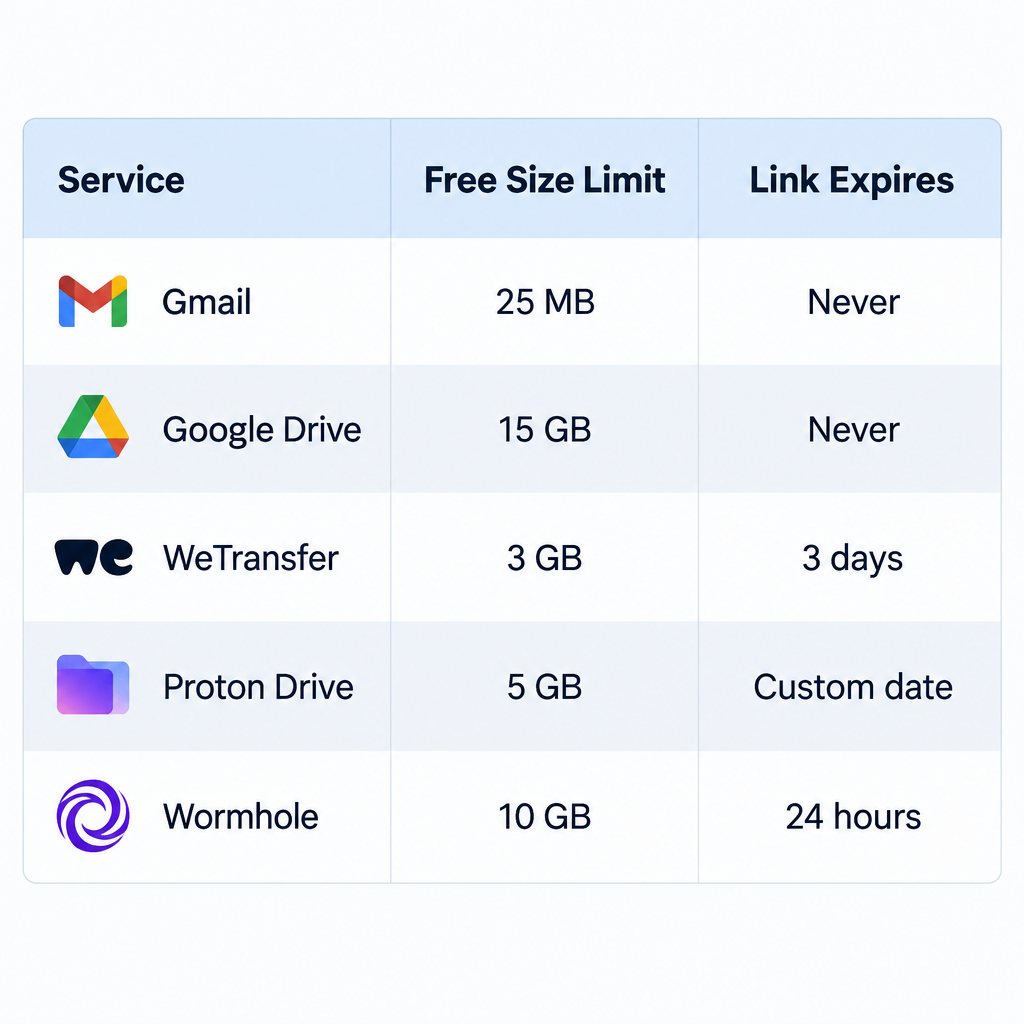
| Service | Free size limit | How long files stay | Best for |
|---|---|---|---|
| Gmail attachment | 25 MB total per email | Stays in the email | Small documents and photos |
| Google Drive | 15 GB of free storage, shared with Gmail and Google Photos | Until you delete the file or stop sharing it | Files you want to keep online |
| WeTransfer (Free) | 3 GB per transfer, and 10 transfers or 3 GB in total per rolling 30 days | 3 days | Occasional sends to people outside your work |
| Proton Drive (Free) | 5 GB of storage (2 GB until you finish the setup tasks) | Until the expiry date you set on the link | Private files that need a password |
| Wormhole | Up to 10 GB; files over 5 GB go directly from your browser to the recipient | 24 hours for files up to 5 GB | Quick, encrypted one-off sends with no account |
What if you want to share a file temporarily?
Use a service that deletes the file or turns off the link for you, so you don’t use up space in your own cloud drive. Files shared from Google Drive, OneDrive or iCloud stay there until you delete them. Many people forget, and then get an email saying their storage is almost full.
Firefox Send used to solve this problem. Mozilla’s free service sent encrypted files of up to 1 GB without an account and up to 2.5 GB with a Firefox account, and it deleted them after a set time. Mozilla paused it in July 2020 after criminals used it to spread malware and phishing files. It shut the service down for good on September 17, 2020, and wiped all stored files. Any old Firefox Send link no longer works.
Today, the closest replacements are:
- Wormhole: works much like Firefox Send. It encrypts files end to end in your browser and deletes files of up to 5 GB from its servers after 24 hours. For files between 5 GB and 10 GB, your browser tab has to stay open until the recipient finishes downloading.
- WeTransfer Free: links expire after 3 days. You can send up to 10 transfers or 3 GB in total in any rolling 30-day window, whichever comes first.
- Proton Drive: encrypted cloud storage from the Swiss company Proton. Links can have a password and an expiry date, so they stop working on the day you choose.
The steps below use Proton Drive, because it offers the same controls Firefox Send had (an expiry date and a password) on a free account.
1. Open Proton Drive
Go to Proton Drive in your web browser and sign in, or create a free Proton account. New free accounts start with 2 GB of Drive storage. That rises to 5 GB once you upload a file, create a shareable link and add a recovery method within 30 days of signing up.
2. Select the files to upload
Click the New button and choose to upload a file, or drag the file straight into the browser window. Find the file or files you want to share. The upload starts and shows its progress on screen.
If you’re sending many files, put them in a ZIP file first. The recipient then gets one download instead of dozens.
3. Choose how long the link works
Open the sharing options for the uploaded file and create a shareable link. In the link settings, set an expiration date. After that date the link stops working, even if someone still has it.
This is how you keep the share temporary. Remember that the file itself stays in your Drive until you delete it. Delete it once the recipient has it, and you get the space back.
4. Protect the files with a password
Proton Drive already encrypts your files. For extra protection, set a password in the same link settings. Anyone who opens the link has to enter it before they can download the file.
Send the password through a different channel from the link. For example, email the link and text the password. That way, one intercepted message isn’t enough to open the file.
5. Save the link settings
Save your expiry date and password, and check the upload shows as complete. If the recipient opens the link while the upload is still running, they won’t get the full file.
6. Share the link
Click Copy link and paste it into an email, chat or text message to the person who needs the file.
You can find all your shared links again in Proton Drive from any device where you’re signed in. A free Proton account gives you:
- Up to 5 GB of encrypted storage once the setup tasks are done.
- Links that stop working on the expiry date you set.
- Optional passwords on shared links.
- One place to manage your shared files from any device.
For one-off sends where you don’t want an account, Wormhole or WeTransfer is quicker. You upload the file, copy the link, and it expires by itself. For anything private or ongoing, Proton Drive gives you more control. And if a file only goes to someone who already uses Google Drive, sharing it from there and removing it afterwards works fine.
FAQ
What is the largest file you can send for free?
Of the services covered here, Wormhole allows the largest single free send, at up to 10 GB. Files over 5 GB go directly from your browser, so you have to keep the tab open until the download finishes. Google Drive can hold bigger files within its 15 GB of free storage, but they stay there until you delete them.
Does Firefox Send still work?
No. Mozilla shut Firefox Send down permanently on September 17, 2020, after pausing it in July 2020 because it was being abused to spread malware. All stored files were deleted, and there is no official replacement from Mozilla.
Why won’t Gmail let me attach my file?
Gmail limits attachments to 25 MB in total per email, not per file. If you go over the limit, Gmail offers to upload the file to Google Drive and adds a link to the email instead. Buying more Google One storage doesn’t raise this limit.
How long do WeTransfer free links last?
On the free plan, transfers expire after 3 days. You can send up to 10 transfers or 3 GB in total in any rolling 30-day window, whichever comes first. Paid plans raise the limits and keep files available longer.
Is it safe to send private files through free transfer sites?
It’s safest with services that encrypt files end to end, such as Proton Drive and Wormhole, because the company itself can’t read the files. Add a password where you can, and send it separately from the link. Avoid unknown transfer sites, which can be used to spread malware.
Sources
- Mozilla Support: What happened to Firefox Send?
- WeTransfer Help Center: Plan limits
- Proton Support: How to create a shareable link in Proton Drive
- Proton Support: How to get more storage in Proton Drive
- Wormhole: Frequently Asked Questions