You can’t sign in at www.optonline.net as a standalone site anymore. Your Optimum email now lives at optimum.net, and webmail.optimum.net is the direct way in. You sign in with your Optimum ID and password, and existing @optonline.net and @optimum.net addresses still work. Voicemail for Optimum Voice is managed in the Optimum Voice portal on optimum.net, or by phone with your 4-digit voicemail PIN.
Optimum Webmail is the email service for Optimum Online internet and Optimum Voice customers. You can use it to read, send and reply to email. It works in a web browser on a computer, laptop, smartphone or tablet. You need an Optimum ID to use it, and the mailbox comes with your Optimum service.
What Optimum Webmail and voicemail let you do
Optimum Webmail lets you send and receive email on any device with a working internet connection. Optimum Voice customers can also listen to and manage voicemail from any phone or online.
Two changes matter most today:
- No new addresses. Optimum stopped creating new @optonline.net and @optimum.net email addresses on May 4, 2021. This applies to new and existing customers. Mailboxes that already existed before that date still work.
- Mail apps use mail.optimum.net. To read Optonline mail in Outlook, Apple Mail, Thunderbird or a phone mail app, set both incoming and outgoing servers to mail.optimum.net. Use IMAP on port 993, or POP on port 995, and SMTP on port 465, all with SSL/TLS.
What you need before you sign in
You need four things:
- A computer, laptop, smartphone or tablet with a working internet connection.
- An up-to-date web browser, such as Chrome, Edge, Safari or Firefox.
- An active Optimum account. For voicemail, that means Optimum Voice service.
- Your Optimum account number, which is printed on your Optimum bill. You only need this if you still have to create an Optimum ID.
How to sign in to Optonline email and voicemail
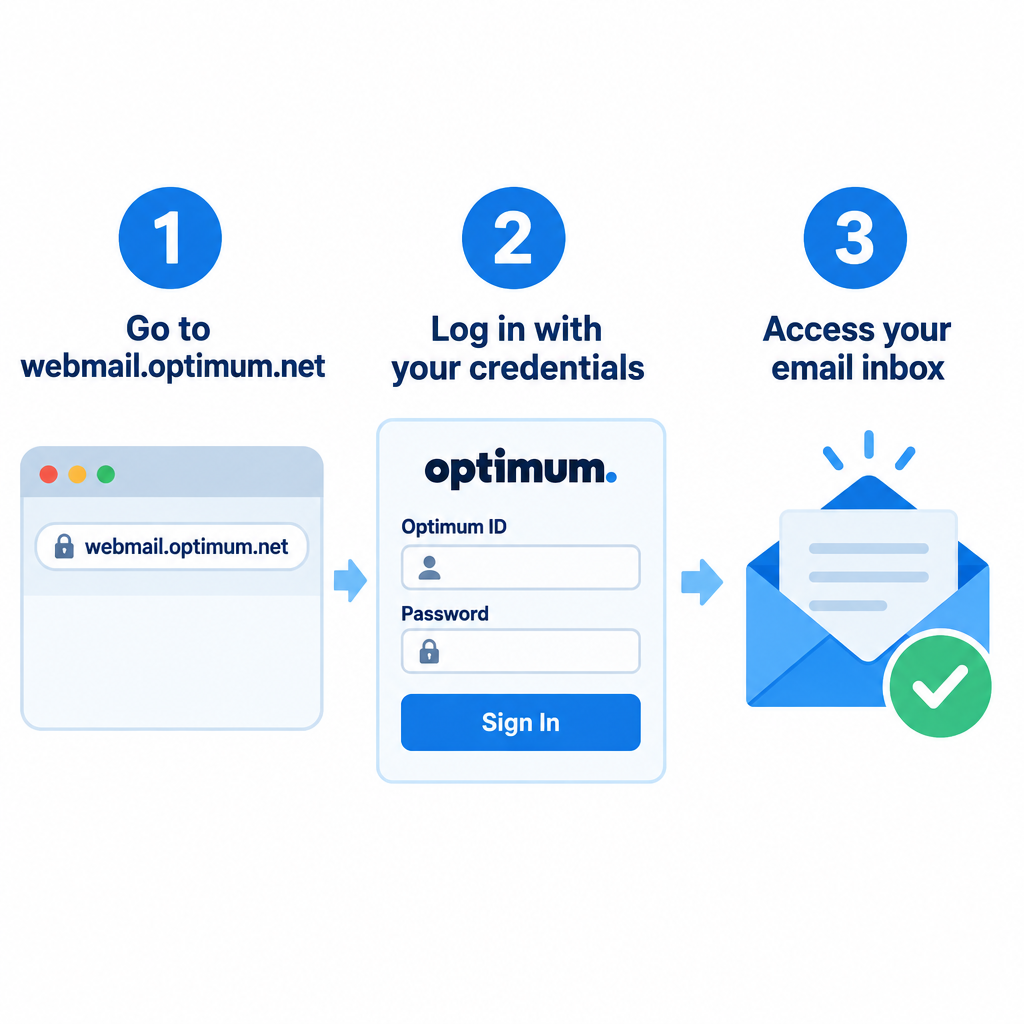
The sign-in takes a minute once you have an Optimum ID. If you don’t have one yet, the steps below include creating it.
- Turn on your computer, laptop, phone or tablet and connect it to the internet.
- Open your web browser and type webmail.optimum.net in the address bar, or go to optimum.net and select the email link. Typing the old www.optonline.net address sends you to Optimum’s current pages.
- If a page says you’re using an older browser version, update your browser before you continue. Older browsers can stop the sign-in page from loading properly.
- On the sign-in page, enter your Optimum ID and password and start using your email. Your Optimum ID is usually the part of your email address before the @. If you’re an Optimum customer without an Optimum ID, select Create an Optimum ID, or go to optimum.net/newid.
- Enter your Optimum account number when asked. You’ll find it on your Optimum bill.
- Next, enter the last name on the account and the phone number linked to it. Then select Continue.
- Follow the prompts on the next few pages to finish setting up your ID and password. Optimum’s ID help page says you have to be at your service location to create your primary Optimum ID.
- Once you’re registered, go back to the sign-in page and sign in to use Optimum email.
Checking voicemail
Optimum Voice voicemail works by phone or online:
- From your Optimum Voice home phone: dial your own Optimum Voice number and enter your 4-digit voicemail PIN.
- From any other phone: dial your voicemail access number, then enter your 10-digit Optimum Voice number and your 4-digit PIN. The access number is shown on the Voicemail page of the Optimum Voice portal.
- Online: sign in at optimum.net with your Optimum ID and open the Voicemail page in the Optimum Voice portal.
- Business customers: sign in to the Optimum Business Account Center at optimum.net/business, open the Phone tab and choose Voicemail. To set up a new voicemail box, dial *86 from your Optimum Voice line and follow the prompts.
If you can’t sign in
Work through these fixes in order:
- Try webmail.optimum.net directly, or open a private (incognito) window. Some customers have signed in at optimum.net and seen no email link at all.
- Clear your browser’s cache and cookies, then try again.
- If you forgot your Optimum ID or password, go to optimum.net/idhelp. Optimum sends you a message with your ID or a link to reset your password.
- If you get a password error in a mail app, check that the server is mail.optimum.net with SSL/TLS turned on. Try your full email address as the username, then just the part before the @.
- If none of that works, contact Optimum support. Only Optimum can unlock an account or fix a mailbox problem on its end.
About Optimum Online
Optimum Online is the internet service from the Optimum brand, which also sells TV, home phone (Optimum Voice) and mobile service. Cablevision built the Optimum brand. Altice bought Cablevision in 2016, and the company ran as Altice USA for years after that.
On November 7, 2025, Altice USA changed its corporate name to Optimum Communications, Inc. Its NYSE ticker changed from ATUS to OPTU on November 19, 2025. The company said the rename did not change its ownership, services or day-to-day operations, so your email address, Optimum ID and voicemail kept working the same way.
Optimum offers email so customers can store, read and reply to messages in one place. The email address is tied to your Optimum service, though, and that matters if you ever plan to leave.
FAQ
Is www.optonline.net still working?
Not as a separate login site. Optonline email is run from optimum.net now, and webmail.optimum.net takes you straight to the mail sign-in. Your @optonline.net address itself still works if you had it before May 4, 2021.
Can I create a new optonline.net email address?
No. Optimum stopped creating new @optonline.net and @optimum.net addresses on May 4, 2021, for new and existing customers. You can still create an Optimum ID to manage your account, but you won’t get a new mailbox with it.
What are the email server settings for optonline.net?
Use mail.optimum.net as both the incoming and outgoing server. For incoming mail, use IMAP on port 993 or POP on port 995. For outgoing mail, use SMTP on port 465. Turn on SSL/TLS for all of them and sign in with your Optimum email password.
What happens to my Optimum email if I cancel service?
Optimum doesn’t publish a clear retention policy. Customer reports say the address stops working after a disconnect period of about 90 days, and that Optimum can’t transfer the address to another provider. Before you cancel, back up your mail and contacts and move important accounts to a new email address.
How do I find my Optimum ID if I forgot it?
Go to optimum.net/idhelp and follow the recovery steps. Optimum sends a message with your ID or a reset link to the contact details on your account. Keep your account number from your bill handy in case you’re asked for it.
How do I check Optimum voicemail away from home?
Dial your voicemail access number, then enter your 10-digit Optimum Voice number and your 4-digit PIN. The access number is listed on the Voicemail page of the Optimum Voice portal on optimum.net, where you can also manage messages online.
Sources
- Optimum, Optimum ID help: optimum.net/idhelp
- Optimum, Residential Voicemail Guide (PDF): optimum.net
- Optimum, Business Voicemail Guide (PDF): optimum.net
- Optimum Online Account Management System: memberservices.optonline.net
- Business Wire, “Altice USA Changes Corporate Name and NYSE Ticker Symbol to Align with Optimum Brand,” November 6, 2025