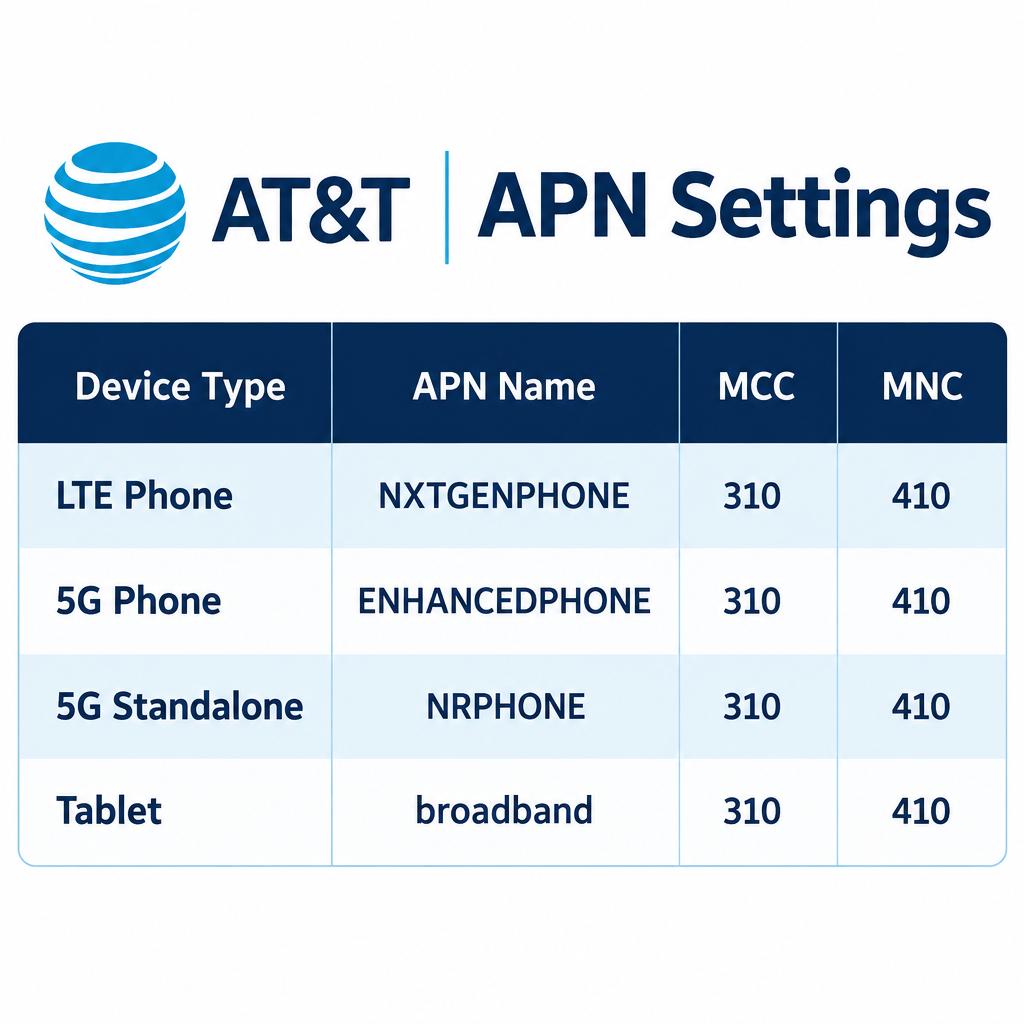
Most AT&T phones get their APN automatically, so start by restarting the phone, checking for a carrier settings update and, on Android, choosing Reset to default in the Access Point Names menu. If you need to type the APN in yourself, LTE phones use NXTGENPHONE, 5G phones use ENHANCEDPHONE, phones that support 5G standalone use NRPHONE, and tablets use broadband. All of them use MCC 310 and MNC 410. On iPhone you can only see these fields if AT&T allows it, and on most AT&T iPhones the menu is hidden because Apple and AT&T push the settings for you.
This guide shows the AT&T APN settings that let your phone or tablet use mobile data and send picture messages (MMS). APN stands for Access Point Name. It is the set of details your device uses to connect to the carrier’s data network.
Why the APN matters
If the APN is missing or wrong, you usually lose mobile data, MMS or both, even with full signal bars. Every carrier uses its own values, and AT&T uses different profiles for LTE phones, 5G phones, tablets and watches.
The usual reasons people end up checking the APN:
- An unlocked phone bought elsewhere and moved to AT&T.
- Data works but picture messages fail, or the other way around.
- A software update or a manual edit changed the APN.
- An older phone still using a profile AT&T has replaced.
Work through the fixes in order: restart the phone, then reset the APN to its default, then enter the values by hand. If none of that works, contact AT&T before you start changing other network settings.
How to change the APN
On Android you can usually see and edit the APN yourself. On iPhone and iPad it depends on whether AT&T allows it. Here is how to reach the menu before you enter the AT&T values listed further down.
For Android
On Samsung Galaxy phones:
- Open Settings.
- Tap Connections (some older models skip this step).
- Tap Mobile networks.
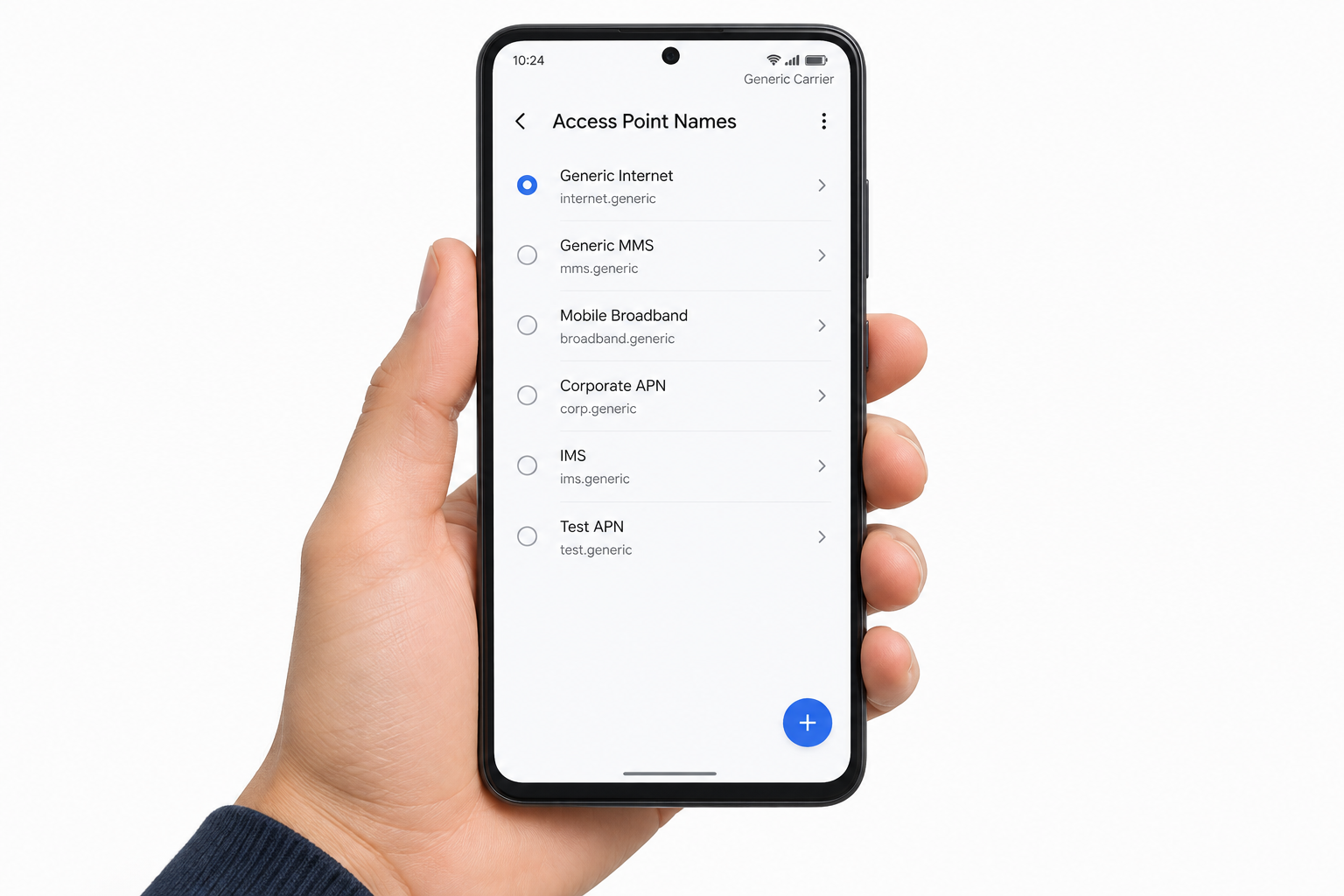
- Tap Access Point Names.
- Tap More (the three dots).
- Tap Reset to default. If data and MMS still don’t work, come back and tap Add to enter the AT&T settings below.
- Save the new APN, then tap the circle next to it to make it the active one.
On Google Pixel and other phones running close-to-stock Android, the path is Settings > Network & internet > SIMs, then tap your AT&T line and tap Access Point Names at the bottom.
For iPhone
- Open Settings.
- Tap Cellular.
- Tap Cellular Data Network and enter the new APN settings.
If Cellular Data Network doesn’t appear, AT&T hasn’t made it editable on your line. That is normal on AT&T, and you can’t add the menu yourself. Install any carrier settings update instead: go to Settings > General > About and accept the prompt if one appears. To undo changes you made by hand, go to Settings > Cellular > Cellular Data Network > Reset Settings.
AT&T APN settings for Apple devices
These are the values for the iPhone, iPad and Apple Watch. Only enter them if your device shows the APN fields and data or MMS isn’t working.
AT&T APN settings for iPhone
The iPhone APN screen is laid out differently from Android. It has no MCC, MNC or APN type fields. Fill in the sections like this:
Cellular Data
- APN: NXTGENPHONE (5G iPhones can use ENHANCEDPHONE if NXTGENPHONE doesn’t give a stable data connection)
- Username: leave blank
- Password: leave blank
MMS
- APN: NXTGENPHONE
- Username: leave blank
- Password: leave blank
- MMSC: http://mmsc.mobile.att.net
- MMS Proxy: proxy.mobile.att.net:80
Personal Hotspot
- APN: NXTGENPHONE
- Username: leave blank
- Password: leave blank
Leave any field not listed here as it is.
AT&T APN settings for iPad
Cellular iPads on AT&T use the tablet profile, not the phone profile. On iPad, the APN fields are under Settings > Cellular Data > APN Settings, and only if AT&T allows changes.
- Name: ATT Broadband
- APN: broadband
- Proxy: not set
- Port: not set
- Username: not set
- Password: not set
- Server: not set
- MMSC: not set
- MMS proxy: not set
- MMS port: not set
- MCC: 310
- MNC: 410
- Authentication type: None
- APN type: default,mms,supl,hipri,fota
- APN protocol: IPv4v6
- Bearer: Unspecified
On an iPad that only shows a single APN field, enter broadband and leave the username and password blank.
AT&T APN settings for Apple Watch
There is no APN to enter on an Apple Watch. Cellular service is set up in the Watch app on the paired iPhone (My Watch > Cellular), and AT&T sends the data settings to the watch when you activate the plan. If a cellular Apple Watch won’t connect, update the iPhone and watchOS, remove the cellular plan and add it again in the Watch app, then call AT&T if it still fails.
AT&T APN settings for Android devices
Below are the AT&T APN settings for Android phones, 5G phones, tablets and smartwatches. Enter each field exactly as shown, including lowercase and commas with no spaces in the APN type.
AT&T APN settings for Android smartphones
This is the standard profile for LTE phones.
- Name: NXTGENPHONE
- APN: NXTGENPHONE
- Proxy: not set
- Port: not set
- Username: not set
- Password: not set
- Server: not set
- MMSC: http://mmsc.mobile.att.net
- MMS proxy: proxy.mobile.att.net
- MMS port: 80
- MCC: 310
- MNC: 410
- Authentication type: None
- APN type: default,mms,supl,hipri
- APN protocol: IPv4v6 (some AT&T tables list IPv4; if data fails with one, try the other)
- Bearer: Unspecified
AT&T APN settings for Android tablets
Android tablets use the same broadband profile as the iPad.
- Name: ATT Broadband
- APN: broadband
- Proxy: not set
- Port: not set
- Username: not set
- Password: not set
- Server: not set
- MMSC: not set
- MMS proxy: not set
- MMS port: not set
- MCC: 310
- MNC: 410
- Authentication type: None
- APN type: default,mms,supl,hipri,fota
- APN protocol: IPv4v6
- Bearer: Unspecified
AT&T APN settings for Android smartwatches
AT&T doesn’t publish a fixed APN to type into cellular Android watches such as the Samsung Galaxy Watch or Google Pixel Watch. The watch gets its settings when you activate the cellular plan in the companion app on your phone (Galaxy Wearable or Pixel Watch). If the watch shows no data, remove the plan and add it again from the companion app, then contact AT&T if that doesn’t fix it.
AT&T APN settings for Android 5G phones
AT&T has two 5G profiles. Most 5G phones use ENHANCEDPHONE. Newer phones that support 5G standalone (SA) can use NRPHONE.
5G phones (ENHANCEDPHONE)
- Name: ENHANCEDPHONE
- APN: ENHANCEDPHONE
- Proxy: not set
- Port: not set
- Username: not set
- Password: not set
- Server: not set
- MMSC: http://mmsc.mobile.att.net
- MMS proxy: proxy.mobile.att.net
- MMS port: 80
- MCC: 310
- MNC: 410
- Authentication type: None
- APN type: default,mms,supl,hipri
- APN protocol: IPv4v6
- Bearer: Unspecified
5G standalone-capable phones (NRPHONE)
- Name: NRPHONE
- APN: NRPHONE
- Proxy: not set
- Port: not set
- Username: not set
- Password: not set
- Server: not set
- MCC: 310
- MNC: 410
- Authentication type: None
- APN type: default,mms,supl,hipri,fota
- APN protocol: IPv4v6
- Bearer: Unspecified
Start with ENHANCEDPHONE. Switch to NRPHONE only if you have a recent standalone-capable phone and data still fails. If picture messages don’t send on NRPHONE, add the MMS values from the ENHANCEDPHONE profile (MMSC http://mmsc.mobile.att.net, MMS proxy proxy.mobile.att.net, MMS port 80).
AT&T APN settings for Windows Phones
Windows Phone is discontinued. Microsoft ended support for Windows 10 Mobile on January 14, 2020, so these settings only matter if you still use one of those phones on AT&T. Older Windows Phone models used separate entries for data and MMS.
Cellular data or internet access
- APN: NXTGENPHONE
- Username: not set
- Password: not set
- Proxy server: not set
- Proxy port: not set
- IP type: IPv4v6
Multimedia Message Service (MMS)
- APN: NXTGENPHONE
- Username: not set
- Password: not set
- Proxy server: not set
- Proxy port: not set
- IP type: IPv4v6
- WAP gateway: proxy.mobile.att.net
- WAP gateway port: 80
- MMSC: http://mmsc.mobile.att.net
- Maximum message size: 600K
FAQ
Why can’t I see Cellular Data Network on my AT&T iPhone?
AT&T, like most major US carriers, locks the APN on iPhone and sends the settings through carrier settings updates. When the menu is hidden, you can’t add it. Install any carrier settings update from Settings > General > About, restart the phone, and contact AT&T if data still doesn’t work.
What is the AT&T 5G APN?
Most AT&T 5G phones use ENHANCEDPHONE as both the name and the APN. Phones that support 5G standalone can use NRPHONE. Both use MCC 310 and MNC 410. LTE-only phones stay on NXTGENPHONE.
Will resetting the APN delete anything on my phone?
No. Reset to default on Android, or Reset Settings under Cellular Data Network on iPhone, only puts the APN fields back to what the carrier supplied. Your apps, photos and messages stay as they are. Any APNs you added yourself will be removed, so write them down first if you need them.
Why does mobile data work but picture messages don’t send?
The data part of the APN is fine, but the MMS fields are missing or wrong. Check that MMSC is http://mmsc.mobile.att.net, MMS proxy is proxy.mobile.att.net and MMS port is 80, and that the APN type includes mms. Mobile data also needs to be switched on, because MMS goes over the data connection even on Wi-Fi.
Do I need to change the APN after switching to an AT&T eSIM?
Usually not. When you activate an AT&T eSIM, the carrier profile normally brings the correct APN with it. Only check the APN if data or MMS fails after activation. On Android, try Reset to default before typing anything in.
When should I contact AT&T instead?
Call AT&T or visit a store if the right APN is in place and you still have no data, if your line shows “SIM not provisioned”, or if the phone is locked to another carrier. These are account or network problems, and changing APN settings won’t fix them.
Sources
- AT&T: Program data settings for your device
- AT&T: Apple device data settings
- Apple Support: View and edit your APN on your iPhone and iPad
- Samsung Support: How to set up Access Point Name (APN) on Samsung mobile devices