To update an old blog post for more traffic, start in Google Search Console: find the post’s query data, check the post still matches what searchers want, then rewrite the outdated parts and add the topics people are actually searching for. Make sure the facts, screenshots and author details are current. Only change the date when the update is substantial. After that, audit the rest of the site and decide which posts to improve, merge or remove.
Updating old posts with new keywords and current information can look like a lot of work. If the post didn’t perform the first time, it’s fair to ask why it would now. The answer is that you already have the page, its links and its history with Google. A careful refresh builds on all of that, so it often pays off faster than starting from scratch.
Why updating old posts pays off
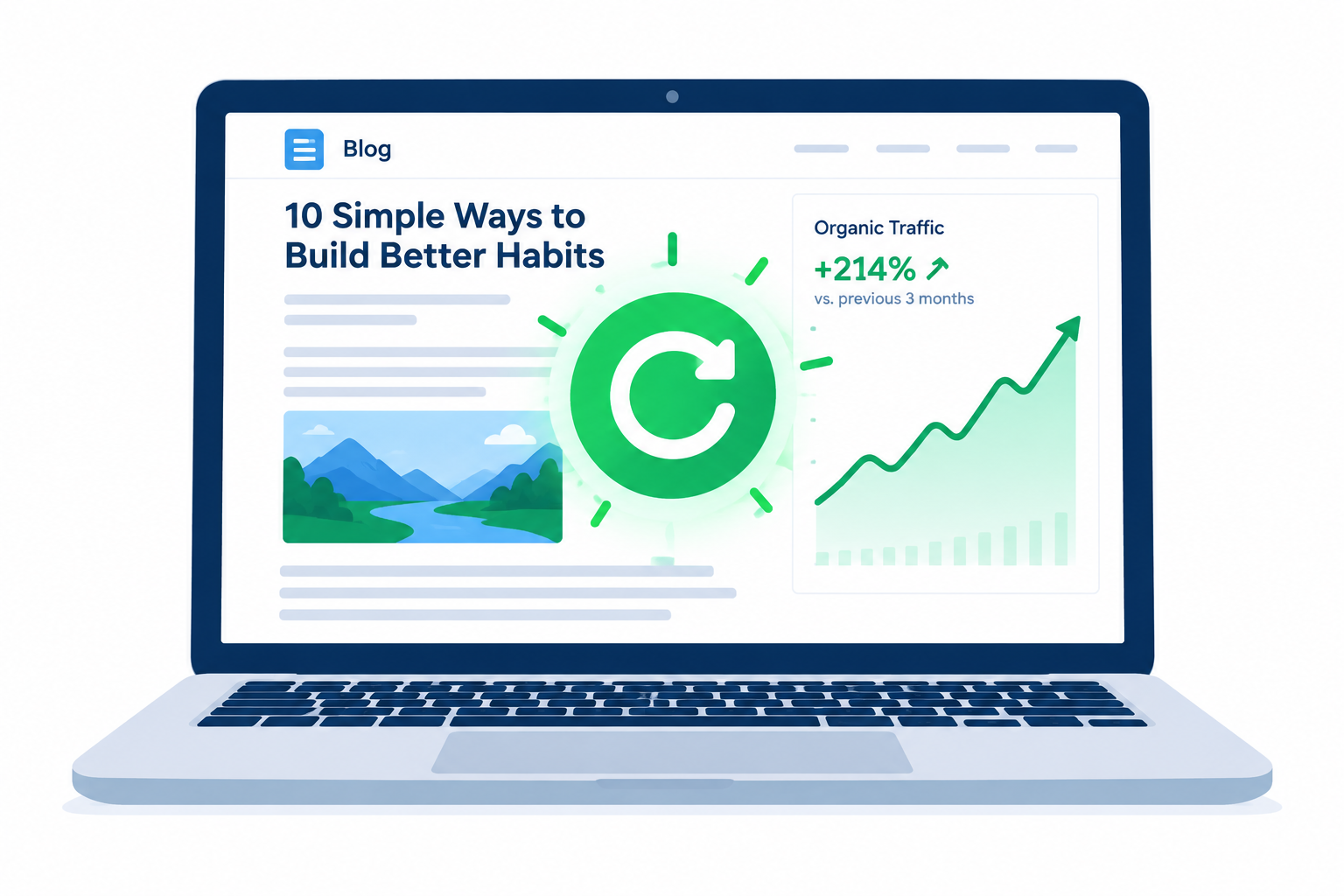
Updating old content is now standard practice for one simple reason: it works, and it costs less than writing new posts. The best-known example is Brian Dean’s “content relaunch” case study on Backlinko. He reported a 260.7% rise in organic traffic to one older post within 14 days of updating and republishing it. He had swapped outdated screenshots for new ones and restructured the post.
The traffic at stake is large. BrightEdge’s 2019 channel report found that organic search drove 53.3% of trackable website traffic, with paid search at about 15%. For B2B sites, organic and paid search together made up more than 76% of trackable traffic. If a better keyword is within reach, leaving an old post as it is wastes that traffic.
A few rules before you start:
- Only re-target a post if the new keyword has solid search volume or stronger buying intent.
- Look back at what the post was meant to achieve, and work out why it fell short.
- Check that the new keyword actually fits the audience you want to reach.
- Look for weak trust signals. Is your About page complete? Is the writing strong? Do you use helpful media such as video, slideshows or infographics? Does the author have real experience with the subject? Google’s quality guidelines call this E-E-A-T, covered in Step 4.
The steps below show how to add new keywords to an old post, plus a keyword research method that works especially well when you re-optimize.
Five ways to upgrade outdated content for better search results

This is mostly on-page SEO work, and you don’t need expensive tools for it.
Free Google tools cover nearly everything: Google Search itself, Google Trends, Google Analytics 4, Google Search Console and the Keyword Planner in Google Ads. Google Analytics 4 is now the only version. Standard Universal Analytics properties stopped processing new data on 1 July 2023, and UA 360 properties stopped on 1 July 2024, so any instructions that rely on UA reports no longer apply.
Step 1: Evaluate your original keyword’s user intent

Before you change anything, search your main keyword and look at the pages Google ranks today. If they answer a different question from your post, the post needs a new angle, not just new keywords. SEO keeps changing, and tactics that worked a few years ago often fail now.
Google rolled out the BERT language model in October 2019 to understand intent better, especially small words like “for” and “to”. Google’s own example was the search “2019 brazil traveler to usa need a visa”. Before BERT, results ignored the word “to” and showed pages about US citizens going to Brazil. After BERT, Google understood the searcher was a Brazilian travelling to the US. Google’s systems have kept moving in this direction since then. In March 2024, Google folded its “helpful content” signals into its core ranking systems, and AI Overviews now answer many simple questions right on the results page.
What this means for your post:
- Check that your target keyword doesn’t contain a modifier that changes its meaning away from your topic. A post that answers the wrong intent ends up far down the results, however well written it is.
- Look for keyword variations with modifiers that do fit your topic (“for beginners”, “on iPhone”, “without Wi-Fi”). Step 3 shows how to find them.
- Rework outdated material so it solves the problem the searcher actually has right now.
Step 2: Check the strength of your original keyword

Many first drafts aim at the wrong keyword. It might have almost no searches, be too broad to rank for, or be far too competitive for your site.
Low search volume isn’t always bad. A specific long-tail phrase, usually three words or more, often has few searches but clear intent and less competition. That makes it much easier to climb the results page quickly.
Long-tail keywords work well because they match exactly what someone typed. “Update old blog posts” is broad. “How to update old blog posts without losing rankings” is a long-tail phrase with an obvious intent.
To check a keyword’s strength:
- Open the Keyword Planner in Google Ads (Tools > Planning > Keyword Planner) and choose “Get search volume and forecasts” to see historical volume. Accounts without an active ad campaign usually see ranges, such as 1K to 10K, rather than exact numbers. That is still enough to compare options.
- Open Google Trends and enter the keyword to see whether interest is growing, flat or falling. You can compare up to five terms at once.
- Search the keyword on Google and see who ranks. If the whole first page is big brands with deep coverage, a long-tail variation is the smarter target.
Step 3: Find new focus keywords and related keywords
This step usually gives you the most for the least effort.
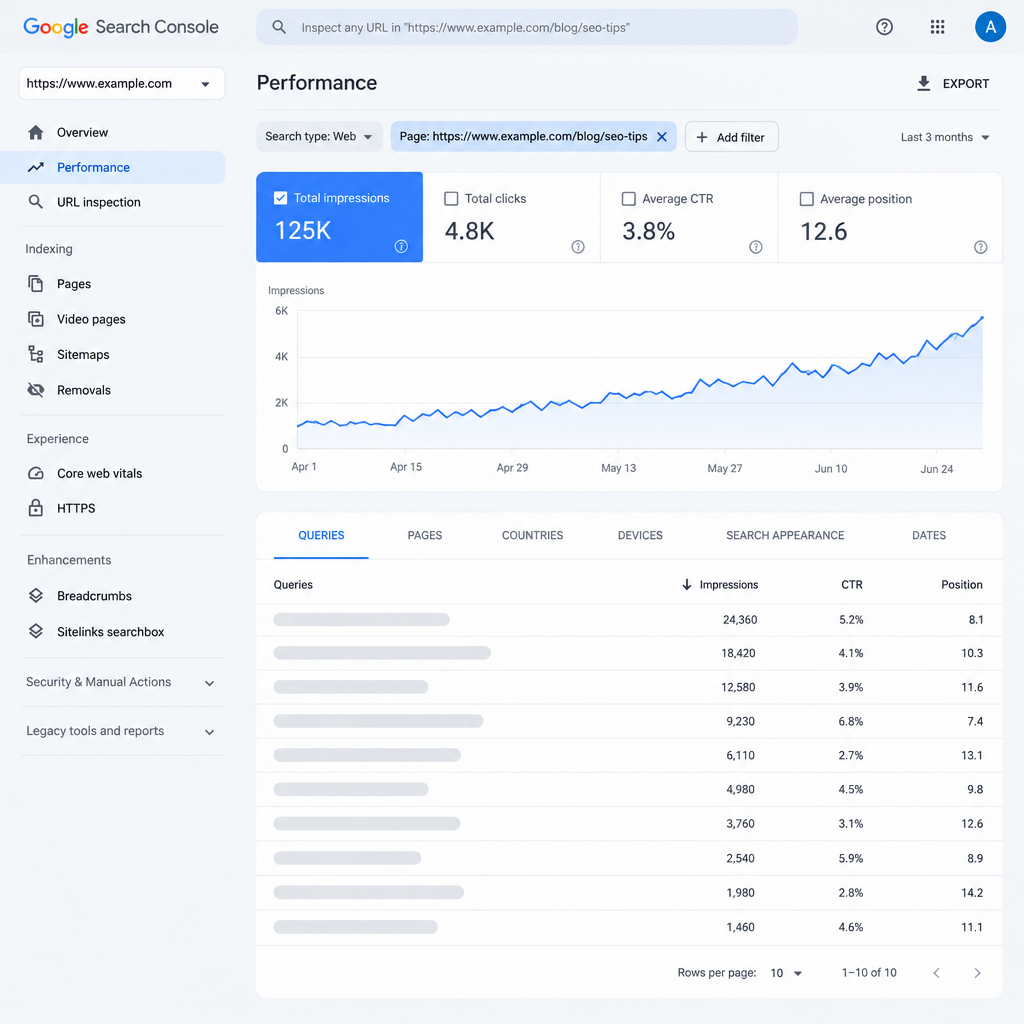
Once a post has been live for a while, Google often shows it for searches you never targeted. Search Console lists those searches, which gives you a ready-made keyword list.
To find them:
- Open Google Search Console and select your property.
- In the sidebar, choose Performance > Search results.
- Click “+ Add filter”, choose Page, and enter the URL of the old post.
- Make sure Total impressions, Average CTR and Average position are switched on, then open the Queries tab below the chart.
Your new focus keyword is often already somewhere in that list.
What are LSI keywords
“LSI keywords” is an old SEO term for related words that support a topic. If a business sells skiing trips, for example, words like “mountain”, “snow” and “lift pass” would naturally appear on its pages. The name comes from latent semantic indexing, an information retrieval method from the 1980s. Google’s John Mueller has said several times, starting in 2019, that Google has no concept of LSI keywords.
The useful idea behind the term still stands. Cover the related subtopics and questions a reader expects, and use the words people naturally use for them. Think of these as related keywords, not a special ranking trick.
How to choose the right keywords
Sorting the Queries table in Search Console gives you two quick ways to generate ideas:
- Sort by Impressions, highest first. These queries get the most attention. Your new focus keyword is probably among them.
- Sort by Impressions, lowest first. Here you’ll find long-tail queries, synonyms and related keywords to work into the text.
Don’t cram everything in. Write sentences, headings or a short FAQ that genuinely answer each query, and skip any that don’t fit the topic.
To get even more out of intent matching, look for queries that include prepositions or question words. Use the filter Query > “Custom (regex)” with a pattern such as \b(for|to|without|how)\b, or click Export to analyze the full report in a spreadsheet. On a B2B Business site, queries with “for” (“CRM for small teams”, “software for accountants”) often show buying intent worth targeting.
Google related searches
Google itself can add more terms to your list. Popular and long-tail searches show up in “People also ask” and in the related searches near the bottom of most results pages. This is a quick way to find related keywords and real questions.
For comparison posts and reviews, these phrases are often good focus keywords too. A comparison post such as Outpost Alternatives, for example, usually picks up related searches like “best free alternative” and “is it still supported”, and each one can become a section of the post.
Working several related keywords into one well-organized post makes it more relevant and helps it bring in traffic from many searches at once.
Step 4: Perform on-page re-optimization
This is where the actual rewriting happens. Fix the facts, strengthen the trust signals, and tighten the title, headings and body so they match the keywords you chose.
What is E-E-A-T
E-E-A-T stands for Experience, Expertise, Authoritativeness and Trustworthiness. It comes from Google’s Search Quality Rater Guidelines, a document that helps human quality raters, and site owners, understand what Google considers a high-quality page. Google added the extra “E” for Experience in December 2022. The guidelines have been revised since, including an update on September 11, 2025. Trust is the most important of the four. E-E-A-T is not a single ranking score, but it describes what Google’s systems aim to reward.
How to re-optimize a page with E-E-A-T in mind:
- Update content regularly, and fact-check every figure, version number and screenshot while you’re at it.
- Complete your About page. Show the real credentials and experience behind the site.
- Give readers several ways to contact you.
- Add a clear author byline and short bio on each post.
- Optional but useful: bring in subject experts as writers or guest contributors. Writers looking for guest spots often search phrases like Write for us Technology, so a clear contributor page helps the right people find you.
- Consider a redesign if the site looks dated. A cleaner design makes the site look more professional.
Optimizing titles, headings and content
The title is often the first thing a searcher sees, and it has a big effect on whether they click. Write a clear, specific title that promises what the post delivers. Search Console’s CTR column shows whether your current title is earning clicks.
Exact-match keywords in subheadings (H2, H3 and so on) still help, but don’t overdo it. Google’s language systems understand synonyms and context, so keyword stuffing no longer works. Use the target phrase where it reads naturally and otherwise write normally.
Everyone agrees that high-value content matters. In practice, a strong blog post has:
- Clear, accurate writing by someone who knows the subject
- Useful, up-to-date advice
- A length set by the topic, not by a word count. Google has said word count is not a ranking factor.
- A clear meta description that sums up the answer
- A clean, readable layout, with images or video where they help
- Useful internal links with natural anchor text
Yaniv Masjedi, then CMO of Nextiva, recommended connecting calls to action to relevant lead magnets, such as case studies, ebooks and testimonials, to raise conversions from each article.
Setting the date after an update
When you’ve finished a substantial revision, update the “last updated” date. In WordPress, you can do this in the post’s settings panel. Google’s own guidance warns against making a page look fresher than it is. Change the date only when you’ve added significant new information, not just fixed a typo or changed the year in the title. Showing both the original publication date and the last-updated date is fine, and it helps readers too.
Landing pages follow the same rules
Landing pages and sales pages work the same way: valuable content, presented in a way that’s easy to use. Salesflare, for example, added an interactive product tour to its trial page so visitors could explore the product before signing up.
Each landing page should fit its users, the user experience and the stage of the sales funnel it serves. DJ Francis, then VP of Content Strategy at Imagination, advised planning content and the site experience around the user journey, because one page often has to serve visitors at different buying stages.
A heatmap tool takes landing page optimization further. It shows where real visitors click, scroll and stop, so your changes are based on actual behaviour instead of guesses.
Step 5: Run a quick content audit for your website
After the first post, keep going. Unless your site is brand new, it has weak posts: thin articles, outdated guides, pages that compete with each other. A content audit finds them so you can fix, merge or remove each one.
Removing content can work, but it’s risky. Animalz reported that QuickBooks nearly doubled its traffic after deleting about half of its content. Even so, deleting pages that still earn links or traffic can hurt more than it helps. Decide page by page, and keep watching your traffic afterwards.
| What the data shows | Best action |
|---|---|
| Gets impressions but few clicks or poor rankings | Update and re-optimize (Steps 1 to 4) |
| Covers the same topic as a stronger post | Merge into the stronger post and add a 301 redirect |
| Outdated, no traffic, no links, no future value | Remove, and redirect if a related page exists |
| Performing well | Leave it, and check the facts once a year |
Here’s how to run a content audit with Screaming Frog SEO Spider (API integrations need a paid licence):
- Connect Google Analytics 4, Google Search Console and Ahrefs to get the key metrics into your audit.
- Set up all three under Configuration > API Access, and sign in to each account.
- Crawl the website.
- Export the results to Excel.
- Press Ctrl+A to select the whole table.
- Choose Home > Format as Table and pick any style.
- Sort the table from low to high to spot weak pages, using metrics such as:
– Google Analytics 4: sessions, engaged sessions and key events (conversions)
– Google Search Console: clicks, impressions, CTR and position
– Ahrefs: referring domains - List every page that performs poorly and decide whether it’s worth updating, using the table above.
BuzzSumo is another useful audit tool, mainly for its data on backlinks and social shares. If your budget is tight, a cheaper alternative can do a similar job.
Resharing updated posts on social media can give them a real boost. Plan several future social posts for each refreshed article. Plenty of social media scheduling tools can automate this, including ones built just for Instagram.
Recycle a lot, create a lot
Updating old posts is a strong SEO tactic, but keep publishing new content too. There’s always new information to cover or a fresh angle to take. Updates should be one part of your content plan, not the whole thing.
The Search Console query list helps here as well. Queries that don’t fit any existing post are ready-made ideas for new articles, taken straight from what people are already searching for. Check that report every month or two and you’ll always have a list of updates to make and new posts to write.
FAQ
How often should you update old blog posts?
Check your most important posts at least once a year, and sooner for topics that change quickly, such as software, prices or rules. Use Search Console to spot posts losing clicks or position, and update those first. Posts that are performing well and still accurate can usually be left alone.
Does changing the date on a post improve rankings?
No, not by itself. Google says to update the date only after a substantial change, and warns against making a page look fresher than it really is. A new date after a real update is fine and helps readers see the content is current.
Should you change the URL when updating a post?
Usually not. The existing URL carries the post’s links and ranking history, so keep it even if the title changes. If you must change it, set up a 301 redirect from the old URL to the new one.
How long does it take to see results after updating a post?
It varies. Google needs to recrawl the page first, which you can request with the URL Inspection tool in Search Console. Some updated posts move within a couple of weeks, as in Backlinko’s case study. Others take a few months, so compare performance over at least four to eight weeks.
Is it better to update an old post or write a new one?
Update when the old post targets the same topic and intent, because it already has links and history. Write a new post when the topic or search intent is clearly different. Publishing a second post on the same topic can leave two pages competing for the same keyword.
Should you delete old blog posts that get no traffic?
Only after checking them. If a post has no traffic, no links and no future value, removing it is reasonable, and you should redirect it if a related page exists. If it covers a topic worth ranking for, updating or merging it is usually the better choice.
Sources
- Google Search Central: Influence your byline dates in Google Search
- Google Search Central Blog: Help Google Search know the best date for your web page
- Google Ads Help: Understanding your Keyword Planner statistics and traffic estimates
- Screaming Frog: Google Analytics integration
- Screaming Frog: Google Search Console integration
- Backlinko: How to Get 260.7% More Organic Traffic In 14 Days
- BrightEdge: Organic Channel Share Expands to 53.3% of Traffic