

Choose a telemedicine platform that will sign a HIPAA business associate agreement (BAA), connects to your EHR or includes one, and covers the visit types you bill for. HHS ended its enforcement discretion period on August 9, 2023, so a video app qualifies only if the vendor complies with HIPAA and signs a BAA, and public-facing apps are not permitted for telehealth. For a small practice that needs everything in one system, all-in-one suites such as RXNT or ChARM EHR are the simplest choice. Practices that already have an EHR usually do better adding a dedicated video or patient engagement tool such as Doxy.me, Updox or Luma Health.
Telehealth use rose sharply during COVID-19, and the rules that shaped it are still changing. Congress restored Medicare’s telehealth flexibilities in the Consolidated Appropriations Act, 2026, signed on February 3, 2026, and extended them through December 31, 2027. The DEA’s separate rules on prescribing controlled substances by telemedicine run only until December 31, 2026, unless they are extended again. Telemedicine has moved well past simple video calls. It now links physicians, clinicians and patients in one connected workflow.
When telemedicine software includes electronic health record (EHR) features, you can treat patients remotely and still manage the whole process in one place, from scheduling to filing insurance claims. Running video visits and records together cuts down on retyping and missed details.
The ten tools below come from Software Advice’s telemedicine listings for products with EHR features. They are listed alphabetically, not ranked. The method is explained near the end of the page.
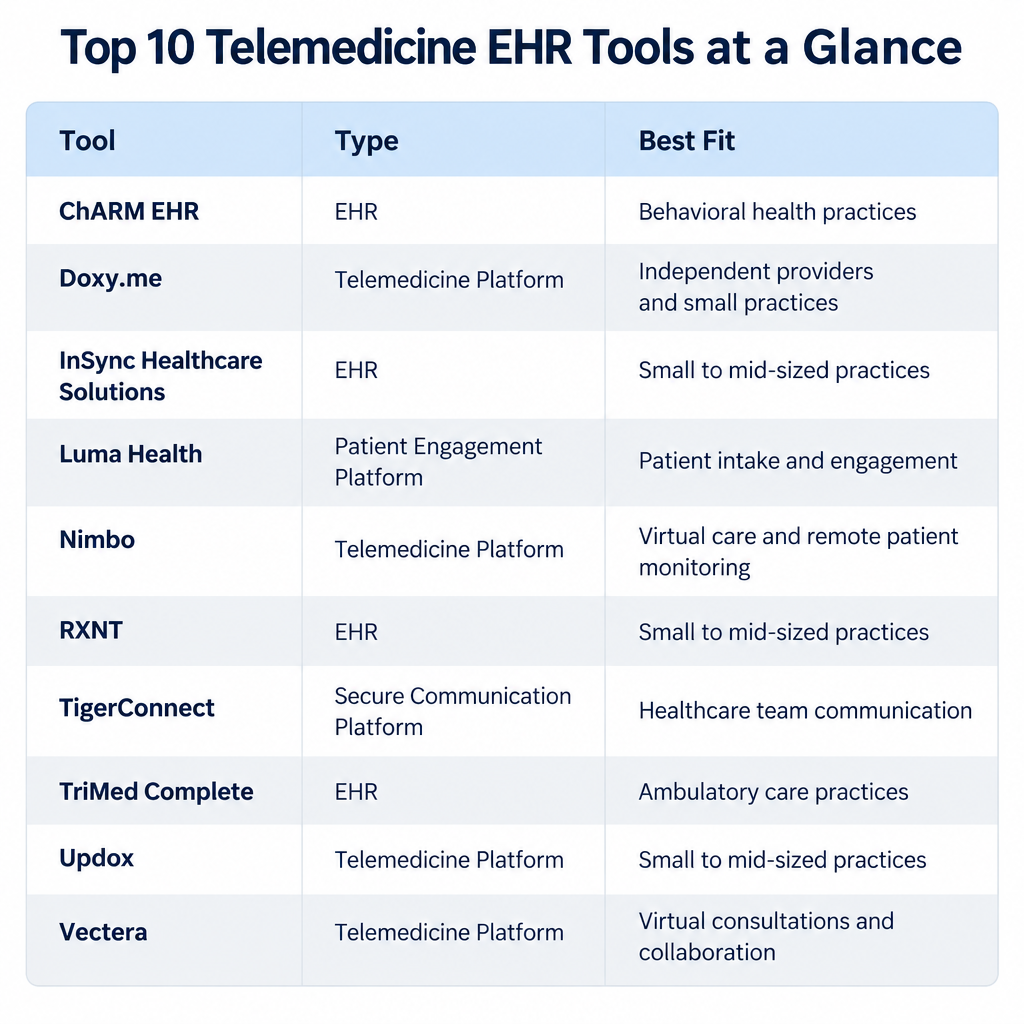
The 10 telemedicine EHR tools at a glance
These ten tools fall into three groups: full EHR suites with built-in telehealth, communication platforms that connect to an EHR you already use, and one general meeting tool. Use the table to see which group fits your practice before you read each profile.
| Tool | Type | Best fit | Pricing as of 2026 |
|---|---|---|---|
| ChARM EHR (CharmHealth) | Full EHR suite with telehealth | Small and mid-size ambulatory practices | Free plan up to 50 encounters a month; $0.50 per encounter ($25 minimum); $200 per provider a month |
| Doxy.me | Browser-based video visits | Solo clinicians and therapists | Free; Premium $35 per user a month ($29 a month billed annually) |
| InSync Healthcare Solutions | EHR, practice management and billing | Behavioral health and specialty practices | Quote on request |
| Luma Health | Patient engagement layer on top of an EHR | Health systems and multi-site groups | Quote on request |
| Nimbo | Cloud patient management with teleconsultation | Small clinics, mainly in Europe | Quote on request |
| RXNT | Full EHR suite with telehealth | Independent practices that want one bill | EHR Bundle from $118 per provider a month |
| TigerConnect | Clinical communication and collaboration | Hospitals and large care teams | Quote on request |
| TriMed Complete | EHR, practice management and telemedicine | Practices that want custom reporting | Quote on request |
| Updox | Secure texting, video and forms | Practices that keep their current EHR | Quote on request |
| Vectera | General client meeting software | Non-clinical consultations only | Quote on request |
1. ChARM EHR
ChARM EHR, now usually sold under the CharmHealth name by MedicalMine Inc. of Pleasanton, California, is a cloud-based suite for daily practice work. It covers EHR, practice management, telemedicine and medical billing.
Live consultations combine audio and video and work on desktop and mobile devices. Before each session, clinicians can prepare their own consent documents and get the patient’s approval. Multiuser telehealth sessions let more than one patient representative, such as a parent or caregiver, join the same video visit.
The EHR side lets you document, sort and manage patient records and build custom reports. It flags possible allergies, drug interactions and other health concerns so doctors can monitor patients closely. A check-in feature uploads patient information in real time for further diagnosis.
Each patient gets a personal health portal to track records, reports, treatments and medications. Electronic claims and remits let you file claims and receive remittances electronically, which lowers submission costs and speeds up payment.
Pricing is based on usage. A free plan covers up to 50 encounters a month, an encounter plan costs $0.50 per encounter with a $25 monthly minimum, and the provider plan costs $200 per provider a month. Check which plan includes how many telehealth hours before you sign.
2. Doxy.me
Doxy.me is telemedicine software that clinicians run on its own or next to their EHR. It is built for HIPAA compliance and gives you a secure place for live consultations.
The Clinician Dashboard shows a list of booked patient visits so you can move from one session to the next. Patients join through an online check-in. Check-in updates the patient queue automatically and tells the clinician who is waiting.
You can customize the virtual waiting room with text, photos and videos to keep patients engaged. Doxy.me also keeps a record of past sessions, including patient details, appointment dates and call length.
Doxy.me has two plans: Free at $0 and Premium at $35 per user a month, or $29 a month when billed annually ($348 a year). The free plan covers encrypted video and email support. Premium adds audio calls, waiting room editing, file transfer, group calls and screen sharing.
3. InSync Healthcare Solutions
InSync Healthcare Solutions sells EHR software that is fully integrated with medical billing, practice management and interoperability tools. Providers can track patient progress and reach every patient record easily. You can create and update records, review medical history, pull lab data, check demographics and evaluate results.
Lab reports, patient forms and e-prescription data all sit in a single environment. Automated billing features help billers process claims faster and with fewer denials.
InSync connects e-prescribing with the EMR, so clinicians and patients can see past prescriptions and follow the treatment plan visually.
Pricing is by quote. Ask which telehealth features are included in the base package and which cost extra.
4. Luma Health
Luma Health sells a patient engagement platform, the Patient Success Platform, to hospitals, health systems, specialty groups and primary care practices. It covers appointment scheduling, patient self-scheduling, interactive reminders, intake and telehealth. Luma is not an EHR. It sits on top of the one you use and writes data back into it.
Its intake forms simplify clinical, financial and operational work by uploading patient data automatically through open standards and Clinical Document Architecture (CDA) tools. You can collect insurance cards, patient details and authorizations without retyping them.
Dashboards track key patient engagement measures. They also measure how well your messages work and what return they bring, using Net Promoter Scores.
Luma Health prices by quote and mostly sells to larger organizations. A solo practice will usually find Doxy.me or an all-in-one suite cheaper.
5. Nimbo
Nimbo is a cloud-based patient management service that combines telemedicine, telehealth and EHR features. It helps clinicians and clinics chart patients, create medical records and organize teleconsultation schedules. Ready-made templates, online booking, inventory control, surveys and a medical directory make communication and admin work easier.
Doctors can write and send e-prescriptions, build custom forms and get alerts about unusual interactions with prescribed medication. The telehealth suite lets physicians talk with patients and bill them automatically once an appointment is confirmed.
The Agenda module sends email reminders, follows up on missed appointments and builds calendars. Doctors can chat live with patients and share notes, photos and videos.
Nimbo connects with third-party tools such as Google Calendar, Zoom and Mailchimp. Nimbo is aimed mainly at clinics outside the US. If you practice in the US, confirm it will sign a BAA before you store any patient data in it.
6. RXNT
RXNT is a cloud-based suite covering telemedicine, EHR, scheduling, practice management and e-prescribing. Clinicians can connect with patients online, open their records and prescription history, schedule visits, and order and review test results. Its VideoBridge telehealth feature runs live consultations inside the same system.
The EHR keeps patient records in one place and makes it easier for patients and clinicians to communicate. Because it runs in the cloud, you can open records from anywhere you are allowed to work. Custom templates, Smart Forms and keyboard shortcuts cut documentation time.
On the Patient Portal, patients can book appointments and sign consent forms. Built-in medical billing automates routine tasks and speeds up payment.
RXNT publishes its prices, which is uncommon in this market. In 2026 the EHR Bundle (EHR, e-prescribing and scheduling, with VideoBridge telehealth) was listed at $118 per provider a month. The Full Suite, which adds practice management and billing, was listed at $319 per provider a month, and paying yearly saves 10%. Some third-party sites still show older prices of $126 and $335, so get a written quote.
7. TigerConnect
TigerConnect is a clinical communication and collaboration platform, mainly for hospitals. It is not an EHR. It connects to EHRs such as Epic, and its alarm management product was listed in Epic’s Toolbox in December 2025. The platform is built to HIPAA and HITRUST standards to protect clinician and patient privacy.
Clinicians can hold live consultations with patients, colleagues, specialists and care teams by video, voice or text. One-on-one or group video visits and remote check-ins keep specialists and patients in contact.
Care teams can also post real-time updates on patient transfers, medication reconciliation and consults with other departments.
TigerConnect bought Evideon in August 2025 and also acquired Twiage, which handles EMS-to-hospital communication. In August 2026 the company said more than one million care-team members at nearly 6,000 organizations used its products. Pricing is by quote.
8. TriMed Complete
TriMed Complete is a suite of EHR, practice management and telemedicine tools. Doctors, clinicians and consultants can hold private video consultations with patients inside the same system that stores their records.
Doctors and patients can book appointments remotely at times that suit both. Through TriMed Telemedicine, providers can diagnose patients, discuss treatment options and write prescriptions. TriMed is built for HIPAA compliance to keep patient data private.
The practice management tool lets you set appointment schedules, visit types, visit lengths and provider types for more flexible booking. You can schedule your own reports to run regularly and export the results to Excel for deeper analysis. Pre-built report templates can be adjusted to your needs, and records can be combined from several sources into one document.
If you record sessions, keep the recordings inside the platform. Running them through video converter software or other desktop tools creates unprotected copies of patient health information outside your BAA.
9. Vectera
Vectera is meeting software that helps businesses handle appointment scheduling, video calls and client communication. Teamleader, a Belgian CRM company, acquired it. Each client gets a permanent meeting room at a fixed URL. The room keeps papers, documents, notes and recordings so the next meeting can pick up where the last one ended.
Businesses can brand the interface with their own logo, colors and themes. Annotations, notes, contact sync, co-browsing, whiteboards and video recording help teams work together.
Vectera is built for client meetings in general, not for healthcare. It does not include EHR features. Treat it as an option for non-clinical consultations such as coaching or wellness sessions, and do not use it for patient care unless the vendor signs a BAA.
10. Updox
Updox is a communication platform that lets physicians, pharmacists and other clinicians reach patients by video chat, secure texting, electronic forms, broadcasts and a patient portal. EverCommerce (NASDAQ: EVCM) has owned it since December 2020.
Through the patient portal, patients can see upcoming appointments, records, medications and bills. Patient charts gather medications, current doses, allergies and vital signs in one place. Updox connects with more than 100 EHRs, so your patient directory is shared and you do not have to replace the system you already use.
Updox collects patient information through secure electronic forms in a HIPAA-compliant environment, which cuts down on paper. Secure texts are sent inside that same protected environment.
To add telehealth, you contact the Updox account support team. Pricing is by quote.
How to choose the right telemedicine EHR software
The best tool is the one that fits how your practice already works, protects patient data under a signed BAA, and bills the visit types you actually perform. The tools above are a starting point. Use these checks to narrow the list.
- Match your practice’s needs. The software should fit your specialty, your visit volume and your plans to grow. It should scale as you add providers or locations, and you should be able to reach it from anywhere you are allowed to work.
- Track billable time and visit codes. During live consultations you need accurate time and visit records. Good tools capture session length and link it to the right patient automatically, so less data has to be typed in by hand when bills are prepared.
- Work with your existing software. You probably already use other tools, such as a separate video platform, an intake system or a patient portal. Telehealth will run more smoothly if the software you shortlist connects cleanly to them, ideally through standards such as HL7 FHIR or CDA.
- Follow security rules. Since August 9, 2023, US providers need a signed BAA with any video or scheduling vendor that handles patient data. The software should limit access to authorized users, encrypt communications, verify identities and guard against breaches. Practices that use single sign-on often connect the EHR to Identity Management Software so staff access can be granted or revoked in one place. Note that HIPAA governs privacy, while the FDA regulates certain medical devices and software, not telehealth video tools in general.
- Work across devices. If you see patients remotely, you need to book appointments, check charges and review results from a laptop, tablet or phone. Patients should be able to join from a browser without installing an app, which reduces no-shows among older patients.
Common questions to ask telemedicine EHR vendors
Ask these questions before you sign a contract. The answers show what the software will really cost you and how well it will hold up in daily use.
- What deployment and access options do you offer? Cloud-based systems are now standard. Your records are reachable from any approved device, and the vendor handles security patches and backups. Ask where the data is hosted and whether the vendor will sign a BAA.
- Do you provide automated coding help? Computer-assisted coding reduces data errors, raises productivity and cuts coding time. It pays off quickly in billing and practice administration. Ask whether it supports the current CPT telehealth codes and the place-of-service and modifier rules that apply to your payers.
- What technical support do you offer? Look at support for both staff and patients. Check which channels are included in your plan, such as live chat, phone or video, and the hours they cover. A patient stuck at a frozen video screen needs help in minutes, not the next business day.
- What happens to our data if we leave? Ask how you can export records, in which formats, and whether it costs extra. Lock-in is one of the most expensive surprises in EHR contracts.
How these products were selected
The ten tools come from Software Advice’s telemedicine listings for products with EHR features. They are listed alphabetically, and the order does not mean one tool is better than another. Software Advice checks user reviews before publishing them, and its listings are based on feedback from many users, not on one person’s opinion or on paid placement. Ownership, pricing and feature details on this page come from vendor pages and announcements current in 2026.
FAQ
Is Zoom or FaceTime allowed for telehealth visits now?
Standard consumer versions are not a safe choice for US providers. The HHS Office for Civil Rights stopped waiving HIPAA penalties for non-compliant video apps on August 9, 2023. You now need a vendor that will sign a business associate agreement, such as Zoom’s healthcare plan or a dedicated platform like Doxy.me.
Does Medicare still pay for telehealth in 2026?
Yes. Medicare’s telehealth flexibilities briefly lapsed on January 30, 2026, then were restored retroactively by the Consolidated Appropriations Act, 2026. They now run through December 31, 2027. The in-person visit requirement for telemental health has also been pushed back to that date.
Can clinicians still prescribe controlled substances by telemedicine?
Yes, for now. The DEA and HHS extended the telemedicine prescribing flexibilities for Schedule II to V medications through December 31, 2026. Under them, no in-person exam is needed first, as long as the rule’s conditions are met. Watch for an announcement before year end, because a permanent rule has not been finalized.
What is the cheapest HIPAA-compliant telemedicine option?
Doxy.me’s free plan includes encrypted video, email support and breach insurance at no cost. ChARM EHR also has a free plan for up to 50 encounters a month. Both are fine for low volume, but busy practices soon need paid features such as audio-only calls, file transfer and billing.
Do I need a separate EHR if I use a telemedicine app?
Only if the app does not include one. Doxy.me, Luma Health, TigerConnect and Updox handle communication and connect to an EHR you already have. RXNT, ChARM EHR, InSync and TriMed Complete include the EHR itself. A new practice without an EHR saves money and setup time by choosing an all-in-one suite.
Is Vectera suitable for medical practices?
Not for clinical visits by default. Vectera is a general client meeting platform owned by Teamleader, and it has no EHR features. Use it only for non-clinical sessions unless the vendor signs a BAA covering patient data.
Sources
- HHS: DEA telemedicine prescribing extension for 2026
- KFF: What to know about Medicare coverage of telehealth
- HIPAA Journal: OCR’s COVID-19 telehealth enforcement discretion transition period ends
- RXNT: EHR software cost guide 2026
- Updox help center: Telehealth overview
- TigerConnect newsroom
- Teamleader: Acquisition of Vectera
- Luma Health: The Patient Success Platform













