
As of November 2026, the cheapest cloud backup is usually not the lowest per-terabyte price. It is the plan whose minimums, restore fees and billing terms fit how you really back up and restore. Before you sign, compare four things: the storage rate, the egress or restore charges, the minimum storage duration and the billing model (monthly or yearly upfront). Then check the features you need and read reviews about restores, not just about the sign-up process.
When you pay for any service for your business, you want one that works well at a price you can afford. You have to watch spending and keep up cost control, but you also need backups that are reliable and help the business run smoothly. Getting that balance right takes some work.
If you are looking at cloud options for your business, such as Veeam backup solutions, a few steps can get you a much better deal. They help you avoid surprise charges that put pressure on your business budget, and they help you end up with a service that suits how your business works.
What you can do
You can get a good deal on cloud backup without giving up quality, speed or reliability. The steps below cover the three checks that matter most:
- Look at the full pricing, not just the headline rate.
- Check that the features match what your business needs.
- Read reviews from people who have actually restored data.
Look at pricing
Start with what you can afford, then compare the total cost of each service. The total includes storage, restores, minimum charges and how the bill is paid. Check your budget first to work out what you can spend each month and each year. Then shortlist services that fit.
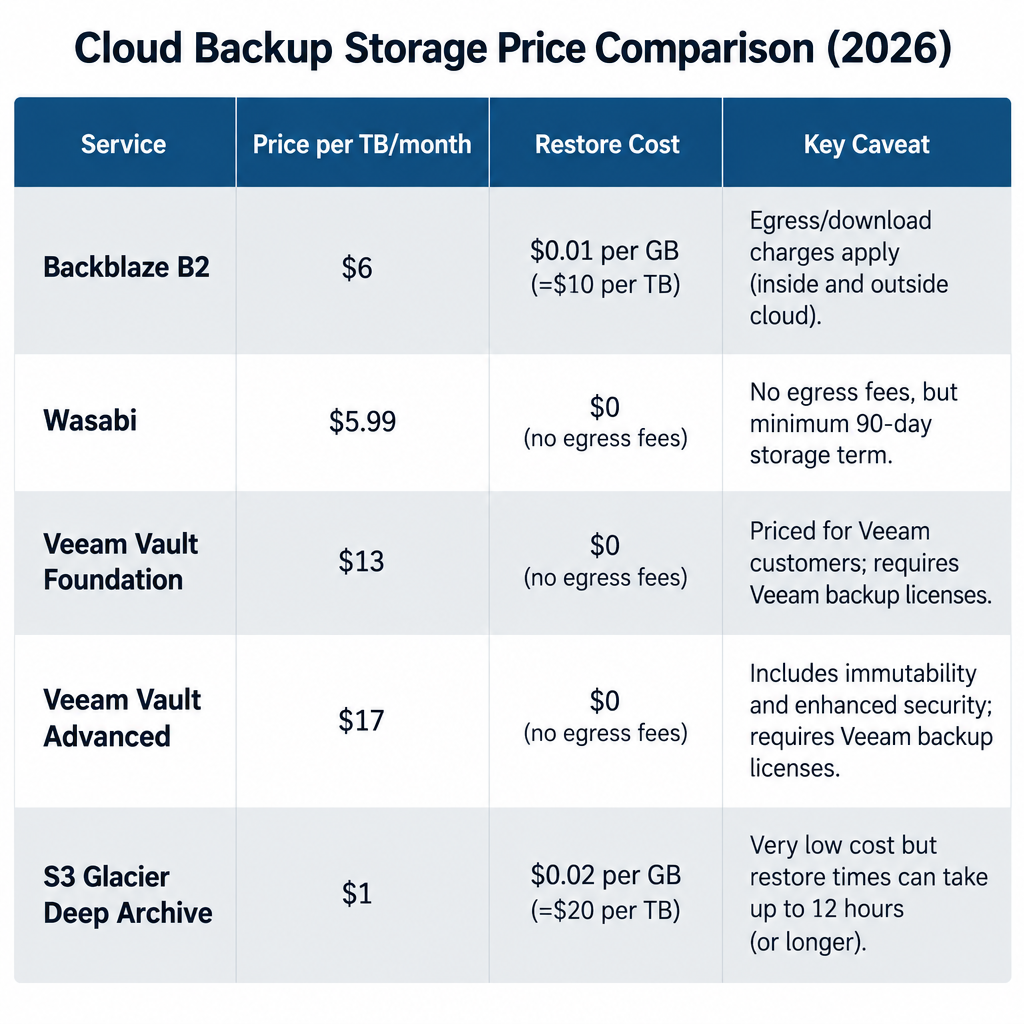
Here are current list prices for some well-known backup storage options:
| Service | List price | Restores and egress | Minimums and billing |
|---|---|---|---|
| Backblaze B2 (pay as you go) | $6.95 per TB per month, since May 1, 2026 | Free up to 3x your average monthly storage, then $0.01 per GB | First 10 GB free; standard API calls free |
| Wasabi (Pay-Go) | $7.99 per TB per month, since July 1, 2026 | Covered by Wasabi’s fair-use egress policy | 1 TB monthly minimum; 90-day minimum storage duration |
| Veeam Data Cloud Vault Foundation | $14 per TB per month | Restores included under a fair-use policy | Billed annually upfront |
| Veeam Data Cloud Vault Advanced | $24 per TB per month | Unlimited restores; API calls and egress included | Billed annually upfront |
| Amazon S3 Glacier Deep Archive | About $0.00099 per GB per month (around $1 per TB) | About $0.02 per GB standard (up to 12 hours), $0.0025 per GB bulk (up to 48 hours) | 180-day minimum storage duration |
A worked example with 5 TB of backups
Say your business keeps 5 TB of backups in the cloud:
- Backblaze B2: 5 × $6.95 = $34.75 a month. A full 5 TB restore stays within the free egress allowance.
- Wasabi: 5 × $7.99 = $39.95 a month. If your backup jobs delete data after 30 days, you still pay for each deleted object up to the 90-day minimum. Short retention settings can quietly raise your bill.
- Veeam Data Cloud Vault Foundation: 5 × $14 = $70 a month, paid as $840 upfront for the year. You pay more, but storage, API calls and restores come in one predictable bill that is managed from inside Veeam.
- S3 Glacier Deep Archive: roughly $5 a month to store the data. A full standard restore of 5 TB (about 5,120 GB) costs about $102 in retrieval fees, and you wait up to 12 hours before the data is ready.
The lesson: archive tiers work well for copies you hope never to touch. They are a poor fit for your main backup, where you need restores to be fast and cheap.
Software licences are a separate cost
The backup software usually costs extra, on top of the storage. Veeam’s self-managed Veeam Data Platform is licensed per workload through the Veeam Universal License. Pricing comes as a quote from Veeam or a partner, and cloud storage is billed separately. If you have 10 workloads or fewer, the free Veeam Backup & Replication Community Edition covers up to 10 workloads (VMs, Windows and Linux machines, laptops and NAS), which can be enough for a very small office. Veeam’s software-as-a-service backup for Microsoft 365 is priced per user instead. Foundation is $2.63, Advanced is $3.33 and Premium is $7.00 per user per month, billed annually.
Prices change. Backblaze and Wasabi both raised their pay-as-you-go rates in 2026, so check each vendor’s pricing page on the day you buy. Committed or contract pricing can lock in a rate until renewal.
Check features and benefits
The cheapest service is a bad deal if it cannot protect your data the way you need. Work out what your business needs first, then check what each service actually offers. Things to check:
- Immutability: Look for support for S3 Object Lock or immutable backups, so ransomware or a compromised admin account cannot delete or encrypt your backup copies.
- Compatibility: Confirm the storage works as a target for your backup software. Veeam, for example, supports S3-compatible object storage as well as its own Vault.
- Restore speed and cost: Find out how quickly you can get data back and what a full restore costs. The example above shows how much this varies.
- Data location: Pick a region that meets your legal or customer requirements, such as keeping data in the US or the EU.
- Redundancy: Veeam’s Vault Foundation tier uses locally redundant storage. Advanced uses zone-redundant storage, which helps if one data centre has an outage.
- The 3-2-1 rule: Keep three copies of your data, on two different types of media, with one copy offsite. Cloud backup is usually the offsite copy, not the only copy.
Once you know which features you need, you can compare services on equal terms and make a more informed choice.
Look at reviews
Reviews from other businesses show what the pricing page leaves out. Sites such as G2, TrustRadius and Gartner Peer Insights collect reviews of backup software and storage from verified users. The most useful reviews mention:
- How fast a real restore was, and whether it worked first time
- Unexpected charges, such as minimum durations or egress fees
- How quickly and how well support responded during an incident
- Price rises at renewal
Look at the most recent reviews first. A complaint from three years ago may describe pricing or a product version that no longer exists.
Use all three checks together. Price tells you what you will pay, features tell you whether the service fits, and reviews tell you whether it works when you need it. A service that passes all three is the right deal for your business.
FAQ
What is the cheapest cloud backup storage for a small business?
On list price, archive tiers such as Amazon S3 Glacier Deep Archive are cheapest, at around $1 per TB per month. Restores are slow and cost extra, and data must stay stored for at least 180 days. For a main backup that you may need to restore quickly, pay-as-you-go storage such as Backblaze B2 at $6.95 per TB per month is usually better value.
Do cloud backup services charge you to restore your data?
Some do. Backblaze B2 includes free egress up to three times your average monthly storage, and Veeam Data Cloud Vault includes restores in its per-TB price. Archive tiers such as S3 Glacier Deep Archive charge for every gigabyte you retrieve, so check restore costs before you choose.
Is Veeam Backup & Replication free?
Veeam offers a free Community Edition of Veeam Backup & Replication that protects up to 10 workloads. Beyond that, you need a paid Veeam Data Platform licence, which is quote-based and licensed per workload. Cloud storage is a separate cost unless you use Veeam’s own Vault.
What is a minimum storage duration?
It is the shortest time a provider charges you to keep each file. Wasabi’s Pay-Go plan has a 90-day minimum and S3 Glacier Deep Archive has a 180-day minimum. Delete data sooner and you still pay for the full period, so match your backup retention settings to the provider’s rules.
Is paying yearly upfront worth it?
Paying yearly can lock in a rate and make your budget predictable, which helps if prices go up mid-year, as Backblaze’s and Wasabi’s pay-as-you-go rates did in 2026. The downside is that you pay for capacity before you use it. Pay monthly if your data size is still changing a lot.
Sources
- Backblaze B2 Cloud Storage pricing
- Backblaze pricing and product updates
- Wasabi: May 2026 pricing
- Wasabi: May 2026 pricing FAQs
- Veeam Data Cloud pricing and purchasing options
- Veeam Vault cloud storage
- Veeam Backup & Replication Community Edition
- Veeam Backup & Replication 13 release notes
- AWS: S3 Glacier Deep Archive announcement













